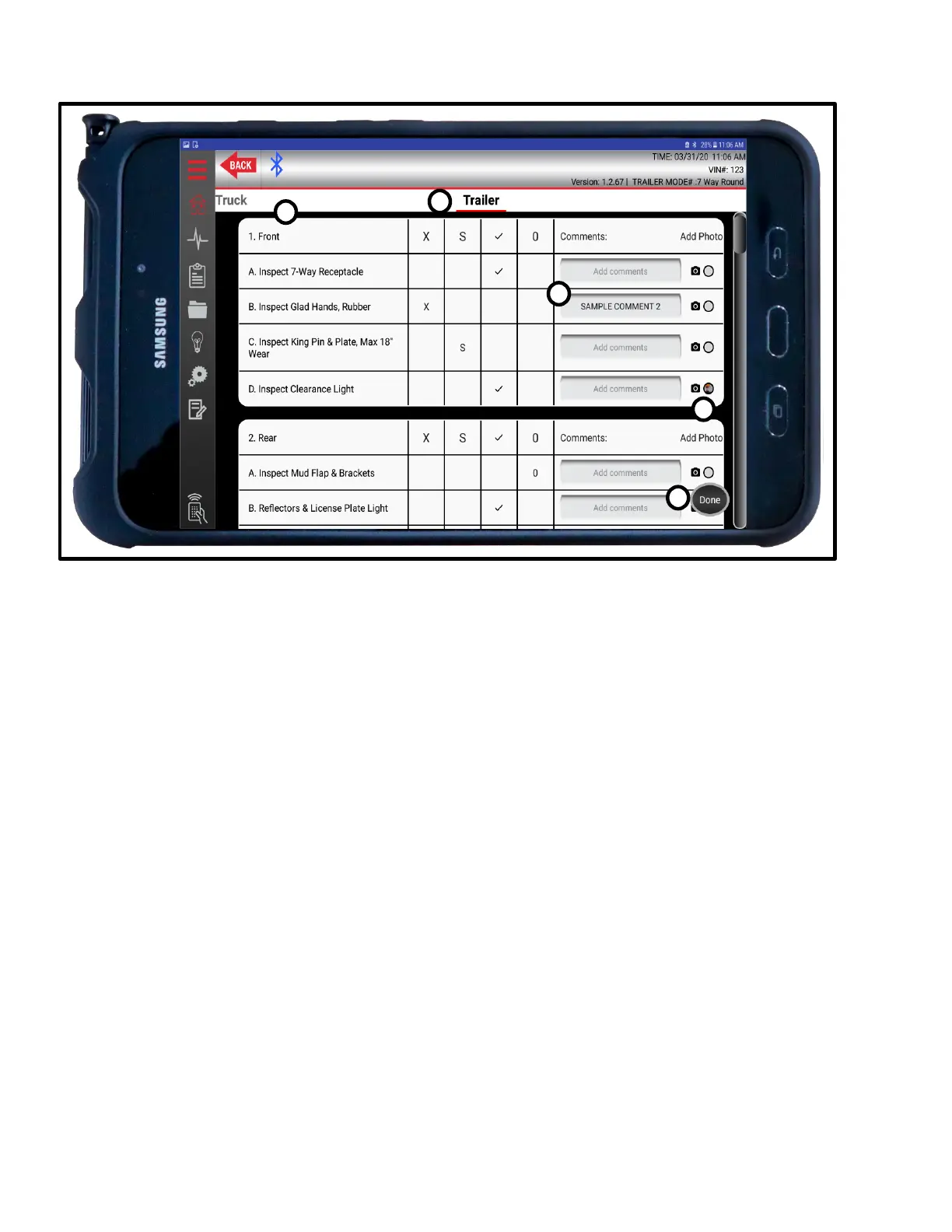
Trailer Inspections Controls
A. Inspection Categories
Standard DOT/PM Inspection categories. Editable in Inspection Creation Tab.
B. Inspection Results
Standard DOT/PM Inspection-result categories. Press anywhere in box to toggle on/off.
C. Comments
Comments can be added per line by pressing ADD COMMENT and entering desired text in the
pop-up window. Comments are saved to the report as CATEGORY-LINE-COMMENT.
D. Images
Images can be taken with the tablet’s camera during inspection or assigned from the tablet’s
gallery. To take an image, press the CAMERA icon. Once an image is saved to Inspection, a
snapshot can be seen next to the CAMERA icon. Press snapshot to enlarge for verification. To
replace, press the CAMERA icon again and take a new picture. This will override the old image.
E. Done
Saves changes and ends Inspection.



 To Next Page