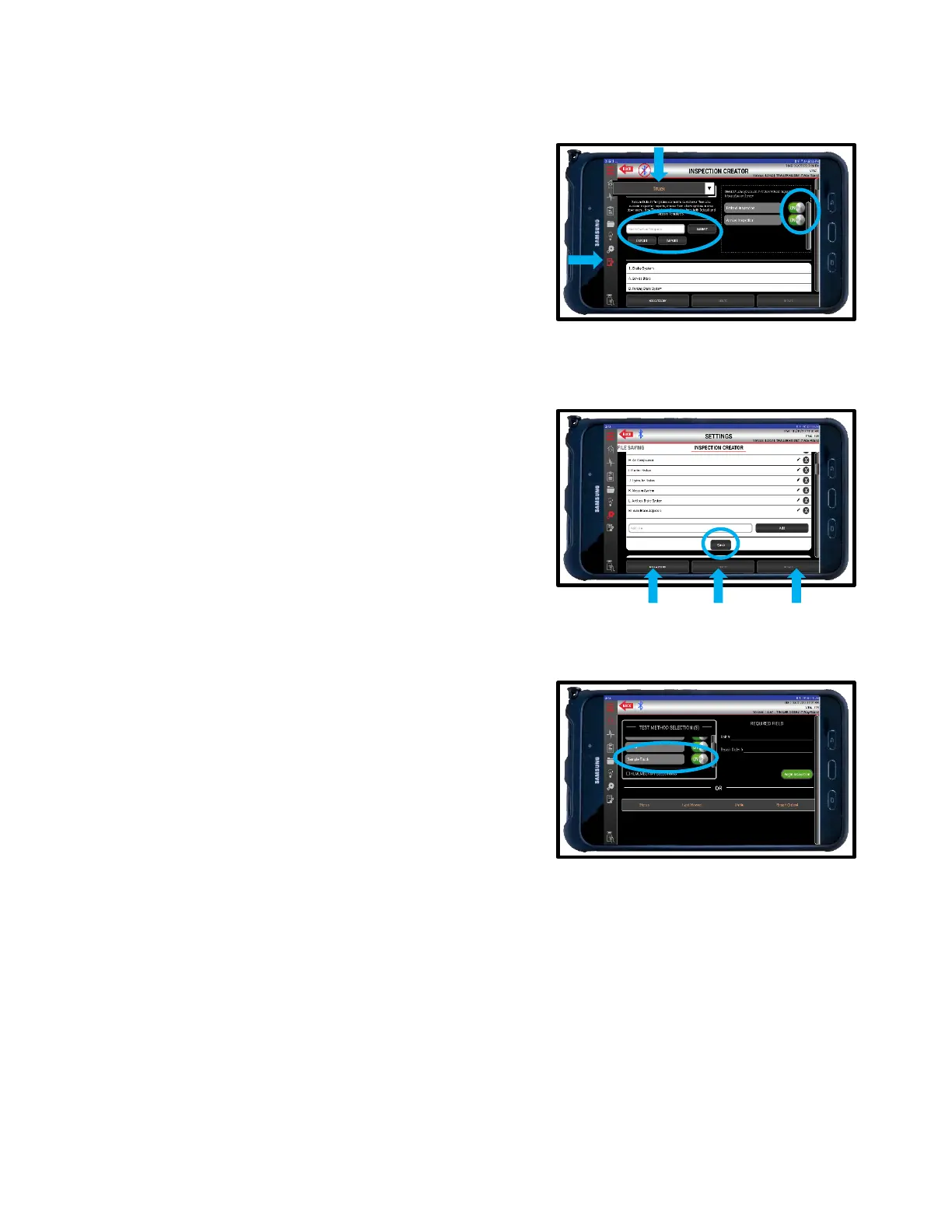
11.4 Inspection Creator Tab
The Alpha MUTT
®
app allows users to create custom inspections using default templates and select
which inspections will appear when initializing an inspection.
1. To begin, select the INSPECTION CREATOR tab
from the left side menu.
2. Choose which TEMPLATE to start with.
3. Enter the NEW TEMPLATE’S name. Alternatively,
you can import a template from saved files.
4. Press SUBMIT.
5. The NEW TEMPLATE will appear in the Defaults
Section. Remember to toggle on your NEW
TEMPLATE if you wish to use it during inspections.
6. Add or delete lines by entering the Edit Mode for
each category. Press the EDIT button to begin.
7. Press the PENCIL icon to edit a line.
8. Press the X to delete a line.
9. Use the ADD LINE box to enter new line items.
10. Save each category before moving on to the next.
11. Press ADD CATEGORY at the bottom of the page
to create a new category.
12. Press DELETE to delete Template
13. Press UPDATE to save changes to NEW
TEMPLATE.
14. The NEW TEMPLATE will now appear as an
option in the Test Method when performing
DOT/PM Inspections.



 To Next Page