25
3.7. PARAMETER PROGRAMMING
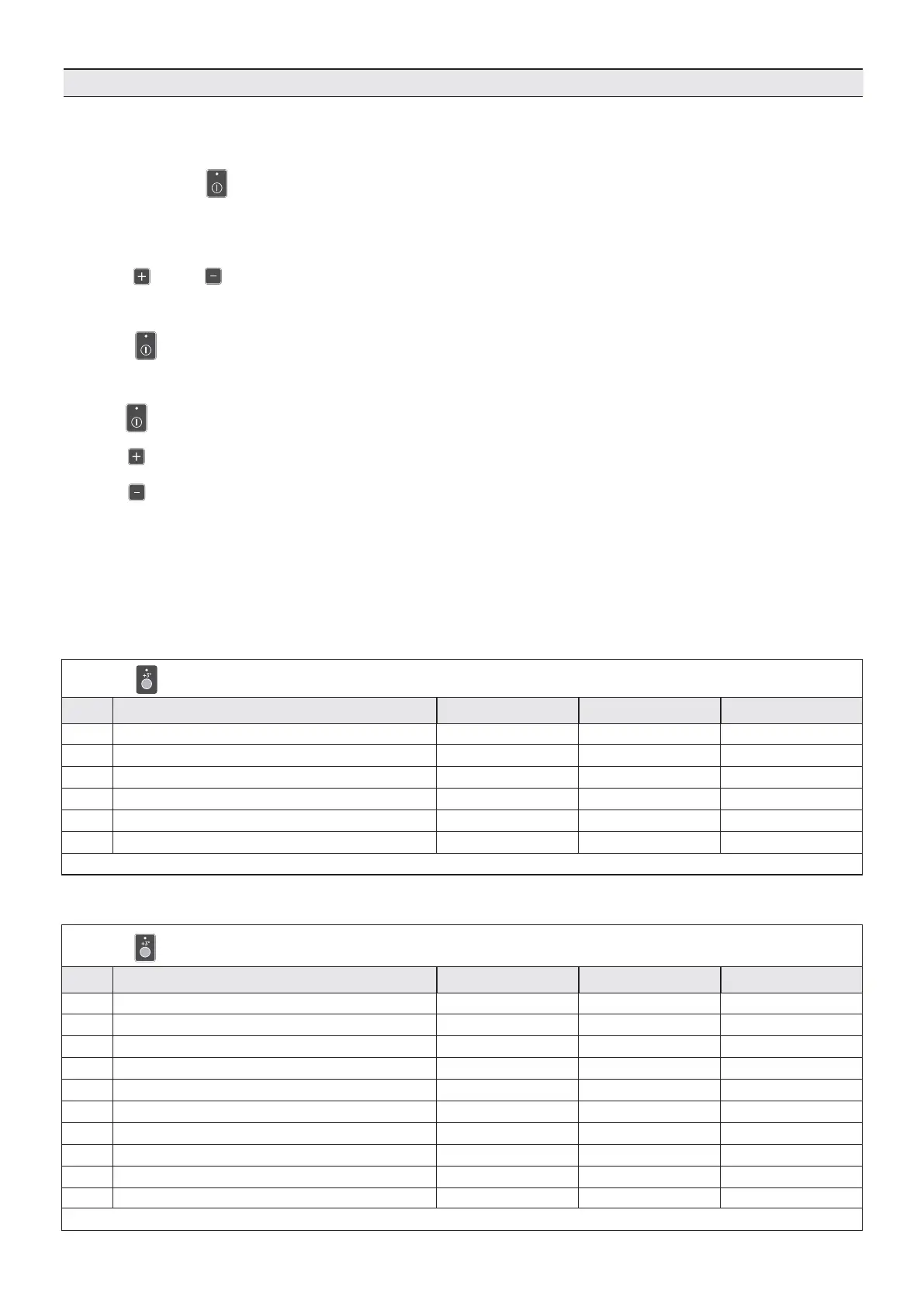
Parameter programming is accessed with the blast chiller “OFF”.
Press the P5 button for 5s.
• The DL5 LED will flash
• The DS1 display shows “PrC”
• The DS2 display shows “----”
Press P6 or P7 to select:
1. “PrC”: Cycle parameters
2. “PrC”: Operator parameters
Press P5 to confirm the selection.
Key use for parameter navigation:
- P5 key : confirms the value selected and passage to the successive value
- P6 key : increases the value of the selected parameter
- P7 key : decreases the value of the selected parameter
After the final parameter, programming is exited automatically
60s after the last key was pressed, the programming phase is exited automatically
Parameter programming
PrC - CYCLE parameters:
STRONG CHILLING cycle
1-A
2-A
3-A
4-A
5-A
1-M
2-M
3-M
4-M
5-M
Press P1 The DS1 displays shows the set N. The DS2 display shows the parameter value
A = AUTOMATIC mode M= MANUAL mode
Blast chilling air temp. PHASE 1 - S1
Blast chilling air temp. PHASE 2 - S1
Cycle end core temp.- S2
Cycle end core temp.- S2
Preservation air temp. - S1
Blast chilling air temp. PHASE 1 - S1
Blast chilling air temp. PHASE 2 - S1
Preservation air temp. - S1
Blast chilling duration PHASE 1
Blast chilling duration PHASE 2
1°C
1°C
1°C
1°C
1°C
1°C
1°C
1°C
1min / 1h
1min / 1h
-20°C
-1°C
+20°C
+3°C
+2°C
-20°C
-1°C
+2°C
30 min
60 min
set n. Description
Resolution Default values
-50 ÷ +40°C
-50 ÷ +40°C
-50 ÷ +40°C
-50 ÷ +40°C
-50 ÷ +40°C
-50 ÷ +40°C
-50 ÷ +40°C
-50 ÷ +40°C
1min ÷ 3h
1min ÷ 3h
Range
DELICATE CHILLING cycle
1-A
2-A
3-A
1-M
2-M
3-M
Press P1 The DS1 displays shows the set N. The DS2 display shows the parameter value
A = AUTOMATIC mode M= MANUAL mode
Blast chilling air temp. - S1
Preservation air temp. - S1
Cycle end core temp. - S2
Blast chilling air temp. - S1
Blast chilling air temp. - S1
Blast chilling phase duration
1°C
1°C
1°C
1°C
1°C
1min / 1h
-1°C
+2°C
+3°C
-1°C
+2°C
1:30 min
set n. Description
Resolution Default values
-50 ÷ +40°C
-50 ÷ +40°C
-50 ÷ +40°C
-50 ÷ +40°C
-50 ÷ +40°C
1min ÷ 3h
Range


 To Next Page