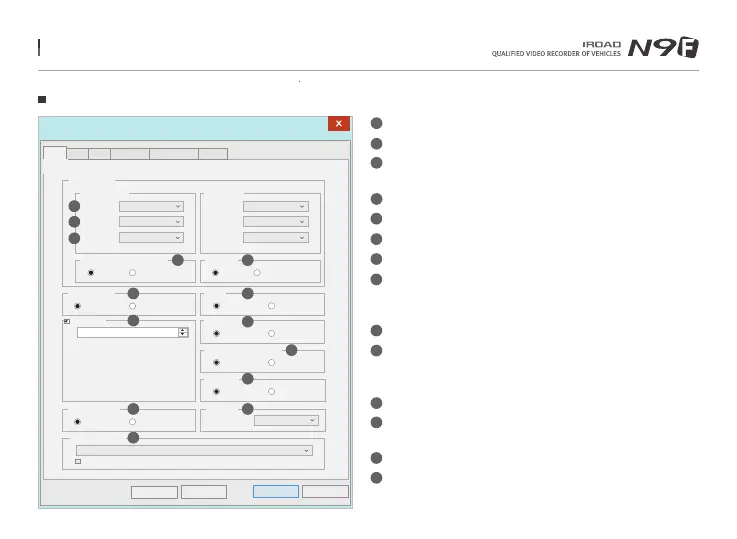
45. DEDICATED PC VIEWER SETTING
Setup(H:/config/system.cfg)
Cancel
OK
Camera Settings
Forward-camera
Normal(fps)
Event(fps)
Brightness
Rear-camera
30
30
Default
Normal(fps)
Event(fps)
Brightness
30
30
Default
Audio Recording
On
Off
Use auto-off timer
On
Off
Timer setup
Time :
48 Hour
Rear camera reverse recording
On
Off
Night vision
On
Off
Security Led
On
Off
High temperature shutdown
On
Off
Standard time zone
(GMT +09:00) Seoul,Osaka,Sapporo,Tokyo
Automatically adjust dock for daylight saving changes
Auto Reboot
AM 03:00
SYSTEM will be rebooted every day for
stablity of operation.
Km
/
h / Mph
Km/h
Mph
Default
Load Config
시스템 Event ADAS User Settings Removable Disk Version
System
1
2
3
6
4 5
9
14
8
Buzzer
On
Off
7
11
12 13
10
System Settings
Normal(FPS) ‒ Setting for Frame Per Second for normal recording.
Event(FPS) - Setting for Frame Per Second during event recording.
Brightness - Adjust the brightness of recording
There are 3 setting for brightness, Darkness / Default / Bright
Reverse (Rear) ‒ Save with reversed image
Night Vision ‒ ON / OFF is available
Audio Recording - Enable/Disable audio when recording
Buzzer - Alarm will sound when event have occur (Available to ON/OFF)
Auto Reboot - Auto Reboot - Reboot the device at the pre-set time
so that the system will do a check on the memory card
and also the device system.
Security LED - Select on/off (Only for front camera)
High Temperature Shutdown
- When the temperature limit is reached(75 °C) in parking mode,
the power is cut off to protect the product.
Speed Meter Display - Change distance notation, KM or Miles
Use Auto-Off Timer ‒ After entering the parking mode,
the power is cut off by setting timer.
Timer Setup ‒ Auto-Off timer setting
Standard Time Zone - Select exact time zone
1
2
3
4
5
6
7
8
9
10
11
12
13
14
Menu and function can be changed without prior notice by sudden firmware upgrade or product enhancement.



 To Next Page