19 of 48IPC/IPC-N, 14-013, REV. D
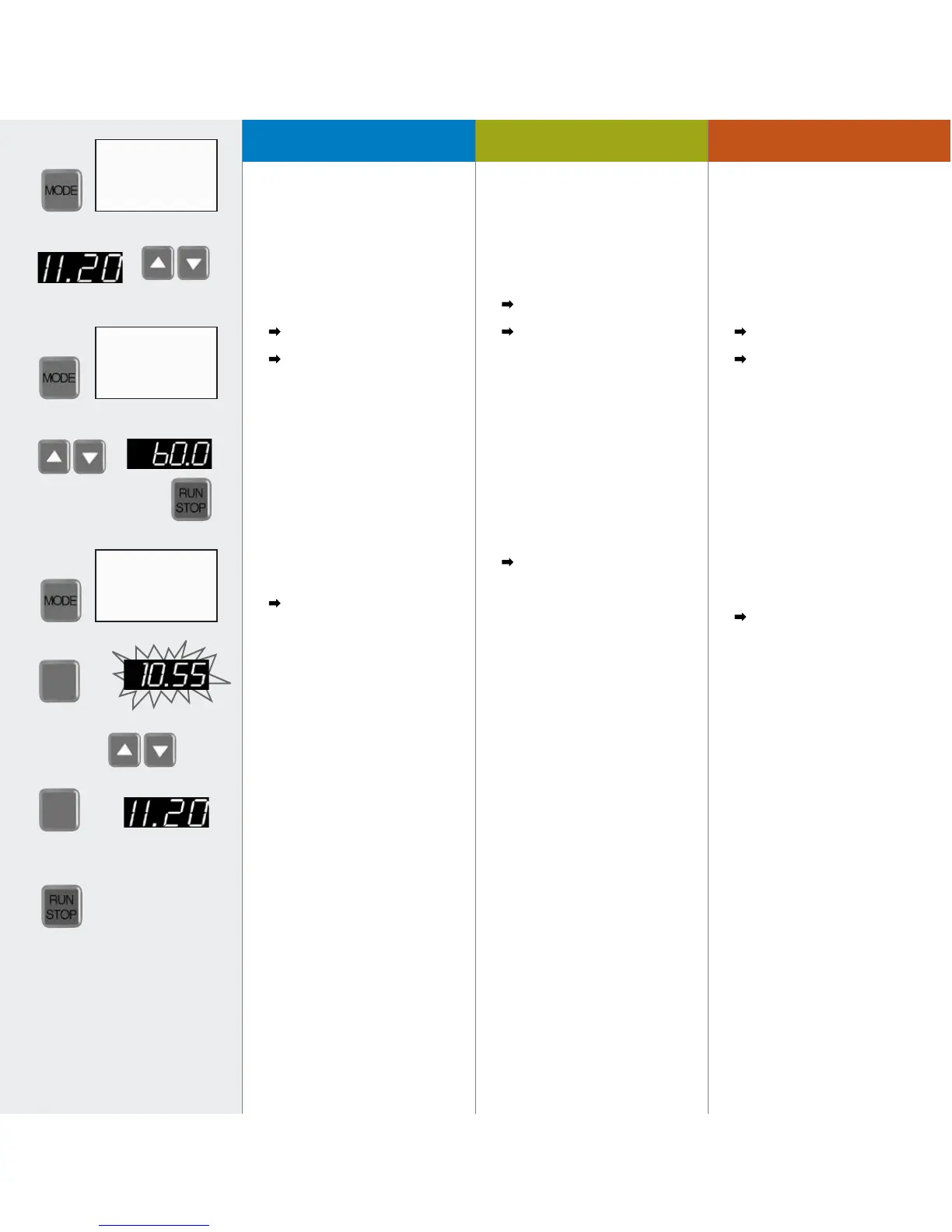
1. Mit der MODE-Taste auf
PUMP% Flow rate (siehe Pumpen
nach Fließrate, Seite 18)
Mit den
5
6
Tasten gewünschte
Fließrate eingeben
2. Mit der MODE-Taste auf
DISP Time
– Mit den
5
6
Tasten
60 Sekunden eingeben
– Mit RUN/STOP starten
Pumpe stoppt autom.
nach 60 Sekunden
Dosierte Flüssigkeit nach
Volumen oder Gewicht bestimmen
und erhaltenen Wert wie folgt
kalibrieren:
3. Mit der MODE-Taste auf
PUMP% Flow rate
4. MAX/CAL-Taste drücken
(Anzeige blinkt)
Mit
5
6
Taste gewogenen oder
gemessenen Wert eingeben.
5. Mit MAX/CAL-Taste speichern (die
Fließrate kehrt nun automatisch auf
den vor-gegebenen Soll-Wert zurück)
6. Mit RUN/STOP starten
Je nach Anwendungs-
bedingungen kann mehrmaliges
Kalibrieren nötig sein.
1. Change mode to PUMP% Flow rate
(see pumping by flow rate, Page 18)
Enter the required flow rate with the
5
6
keys
2. Change mode to DISP Time
– Enter 60 seconds by using
the
5
6
keys
– Start pump with RUN/STOP
Pump stops automatically after 60
seconds
Measure the dispensed liquid by
volume or weight and calibrate the
ascertained value as follows:
3. Return to mode
PUMP% Flow rate
4. Press the MAX/CAL button
(displayed value blinks)
Enter the weighed or measured value
with the
5
6
keys
5. Confirm with the MAX/CAL-key (the
flow rate setting returns automatically
to the initially entered set point)
6. Start with the RUN/STOP-key
Depending on the application
conditions repeated calibration may
be necessary.
1. Passer avec la touche MODE sur
PUMP% Flow rate (voir pompage
selon le débit Page 18) Introduire
le débit souhaité au moyen des
touches
5
6
2. Passer avec la touche MODE
sur DISP Time
– Introduire 60 secondes avec
les touches
5
6
– Mettre en route avec RUN/STOP
La pompe s’arrête auto-
matiquement après 60 secondes
Déterminer le liquide dosé selon le
volume ou le poids et calibrer la valeur
ainsi obtenue comme suit:
3. Passer avec la touche MODE sur
PUMP% Flow rate
4. Presser la touche MAX/CAL
(l’affichage clignote)
Saisir la valeur pesée ou
mesurée avec les touches
5
6
5. Mémoriser avec la touche MAX/
CAL (le débit retourne maintenant
automatiquement à la valeur
préréglée initialement)
6. Mettre en route
avec RUN/STOP
En fonction des conditions
d’application, il peut être nécessaire
de calibrer plusieurs fois.
Calibration du débitCalibrating the flow rateFließrate kalibrieren
MAX
CAL
MAX
CAL
4
5
1
2
3
6
settings
settings
settings
PUMP %. ● Flow rate
DISP
○ Volume
DISP
○ Time
PAUSE
○ Time
PUMP %. ○ Flow rate
DISP
○ Volume
DISP
● Time
PAUSE
○ Time
PUMP %. ● Flow rate
DISP
○ Volume
DISP
○ Time
PAUSE
○ Time



 To Next Page