22
x2
ENT ENT
ENT
%
l / h
0 0 0
0 0 0
MODE
0240
CONFIGURATION
SET UP
IN / OUT
PUMP CALIBRATION
DOSING MODE
SET UP
DOSING PUMP
UNITS
LOCK CODE
FLOWMETER
MODBUS
FLOWMETER
FREQUENCY LOW
x2
ENT
ENT
ENT
%
l / h
0 0 0
0 0 0
MODE
0240
CONFIGURATION
SET UP
IN / OUT
PUMP CALIBRATION
DOSING MODE
SET UP
DOSING PUMP
FLOWMETER
LOCK CODE
UNITS
MODBUS
UNITS
Flow
Pressure BAR
Proportional %
LITERS
UNITS
Flow
Pressure
Proportional %
LITERS
BAR
UNITS
Flow GALONS
Pressure PSI
Proportional ppm
Conguration
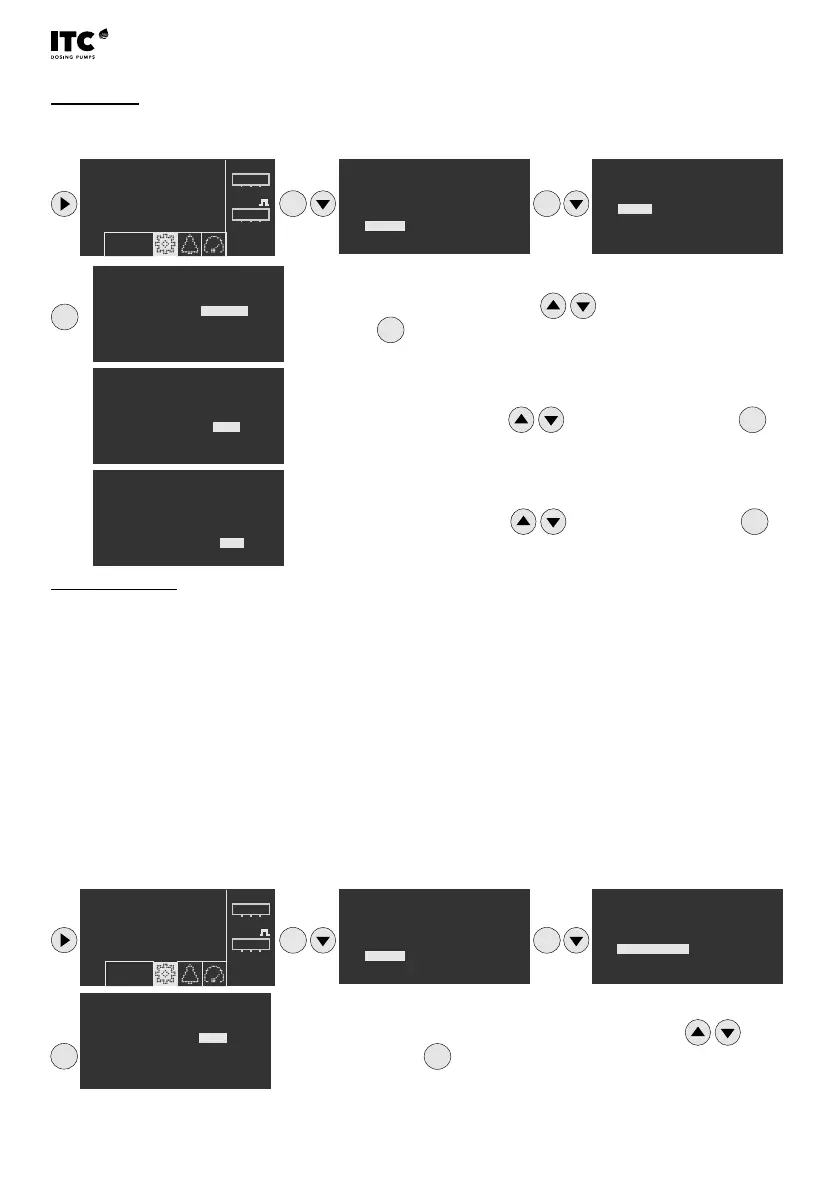
4.2.3.2 Units
Select ow, pressure and proportionality units
4.2.3.3 Flowmeter
For a correct water ow reading, the owmeter constant (volume/pulse or pulses/volume) must be
entered. First select the type of owmeter for low or high frequency.
Low frequency: for water meters with low frequency outputs (0.005 Hz to 30 Hz). The constant
corresponds to volume/pulse (litres/pulse ; gallons/pulse).
High frequency: for owmeters with high frequency output (1 Hz to 300 Hz). The K-factor corresponds to
pulses/volume (pulses/litre ; pulses/gallon).
Change litre/gallons by pressing
and conrm by
pressing
ENT
Change bar/psi by pressing and conrm by pressing
ENT
Change %/ppm by pressing and conrm by pressing
ENT
Change low (LOW) or high (HIGH) frequency by pressing and
conrm by pressing
ENT


 To Next Page