4/8
Installation Guide - Bluetooth Connectivity
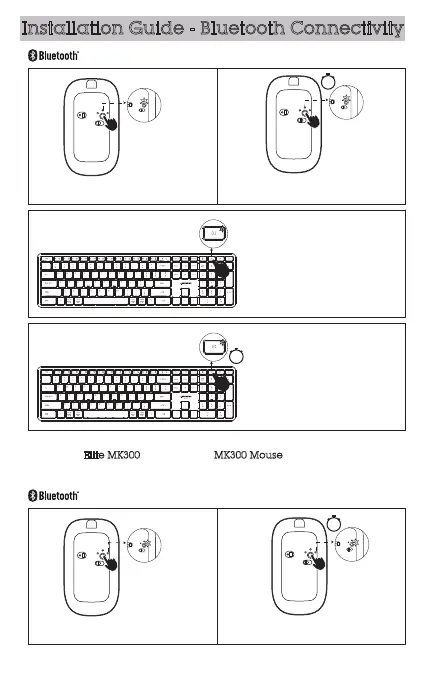
Connecting to bluetooth device 1.
Press the round button,the white light
flashes once.
Press the BT2 key, the white light flashes
once.
Now it is in Bluetooth pairing mode. Go to Bluetooth setting on your device
and select Elite MK300 for keyboard, MK300 Mouse for mouse. Follow the
onscreen instructions to complete the pairing. The light will turn off once
Bluetooth pairing is successful.
Connecting to bluetooth device 2.
Press the round button,the white light
flashes once.
3s
Hold the BT2 key for more than 3 seconds
until the white light flashes quickly.
Hold round button more than 3 seconds until
the white light flashes quickly.
3s
Hold round button more than 3 seconds
until the white light flashes quickly.
3s



 To Next Page