18
Fill CYCLE TIMERS:
Fill Timer: s
Det Timer:
R/A Timer: 0012.0s
s
Millenium 3
Crouzet
0010.0
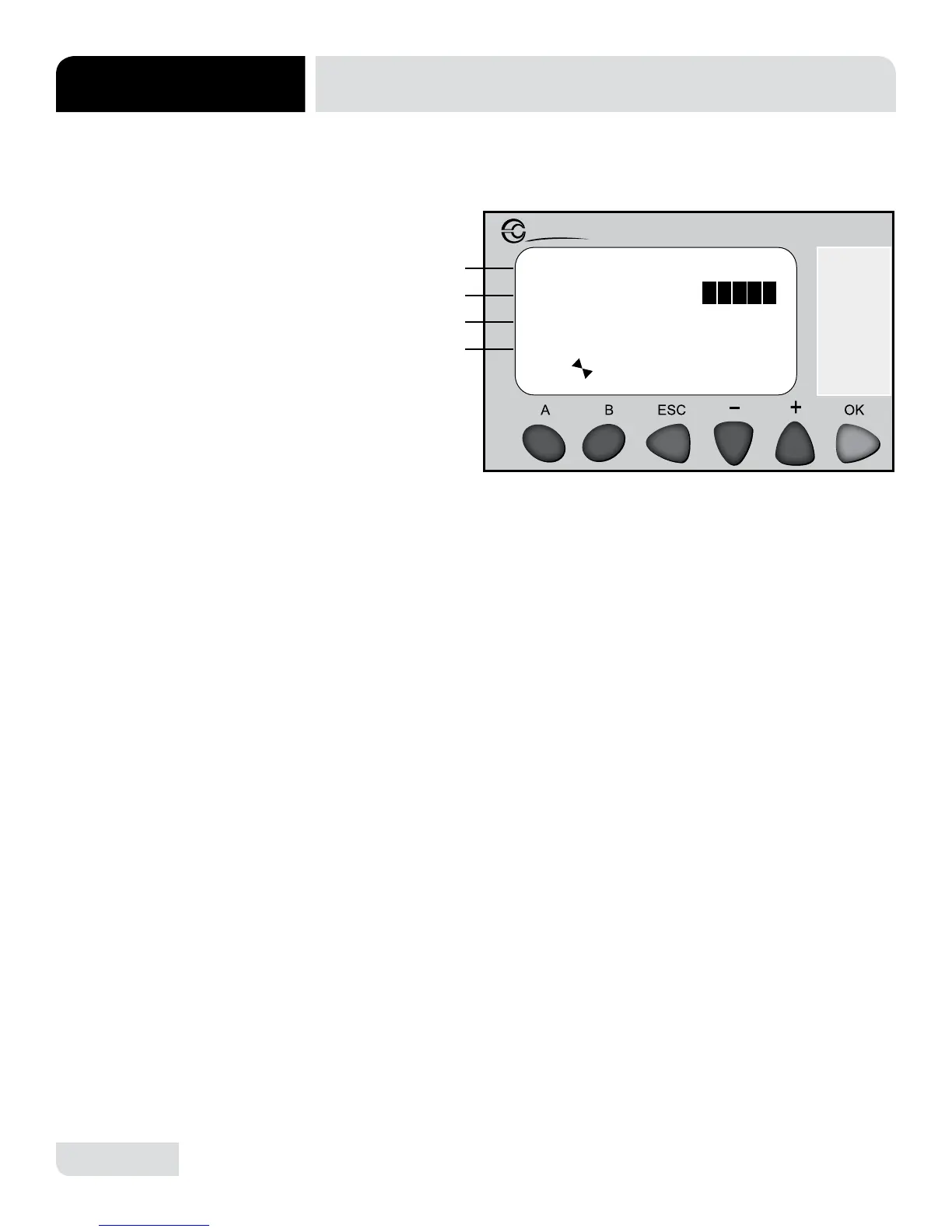
The “Fill Cycle Timers” screen allows the user to edit the ll, detergent and rinse aid
timers for the initial ll cycle.
A
B
C
D
PLC TROUBLESHOOTING
MAINTENANCE
SCREEN 3:
FILL CYCLE TIMERS
1. Line B displays the ll time.
• Press + or - to highlight line B.
• Press OK to enter highlight mode for line B.
• Press + or - to make any adjustments needed.
* Fill Time: 5 to 20 seconds.
• Press OK to conrm adjustments.
2. Line C shows the detergent time.
• Press the + or - to highlight line C.
• Press “OK” to enter highlight mode.
• Press + or - to make any adjustments needed.
* Detergent Time: 5 to 10 seconds.
• Press “OK” to conrm adjustments.
3. Line D displays the rinse aid time.
• Press + or - to highlight line D.
• Press OK to enter highlight mode.
• Press + or - to make any adjustments needed.
* Rinse Aid Time: 0 to 12 seconds.
• Press OK to conrm adjustments.




 To Next Page