5) Leveler
6) HI Lamp (ON) Indicating parameter item is selected when setting buzz
sounds. (See 5. Function Setting, setting buzz sounds)
OK Lamp (ON) -- Indicating parameter item or is selected when setting buzz
sounds.
LOW Lamp (ON)—Indicating parameter item is selected when setting buzz sounds.
7) ―PRESET TARE” Symbol ― ‖ points at “PRESET TARE” when Tare value entered via
numeric keys.
8) ―NET” Net weight--Gross weight minus Tare. Symbol ― ‖ points at “NET” when TARE or
PRESET TARE action is done.
9) ―STABLE” Stable indication, Symbol ― ‖ appears at the top of “STABLE” when scale
is in stable condition.
10) ―ACAI” Symbol ― ‖ points at “ACAI” when the average unit weight is calculated or
recalculated.
11) ―M+” Symbol ― ‖ points at “M+” when scale is in accumulation mode.
12) “UW” Under entering a known unit weight mode, Symbol ― ‖ points at ―UW” when
entered unit weight is lower than 4/5 of scale division. Unit weight is too small for ensuring
accurate quantity calculations.
13) ―SMPL” Under the sample counting mode, Symbol ― ‖ points at “SMPL” when
calculated unit weight is lower than 4/5 of scale division or the quantity of sample is less than
10 pieces.
14) “UNIT WEIGHT” Unit Weight Window --Displays the average unit weight value, or
number of weighments.
15) “TOTAL COUNT” Total count window –Displays the calculated number of pieces on the
weighing pan, or accumulated piece count value.
16) “WEIGHT” Weight Window--Displays weight of object on weighing pan, or accumulated
weight value.
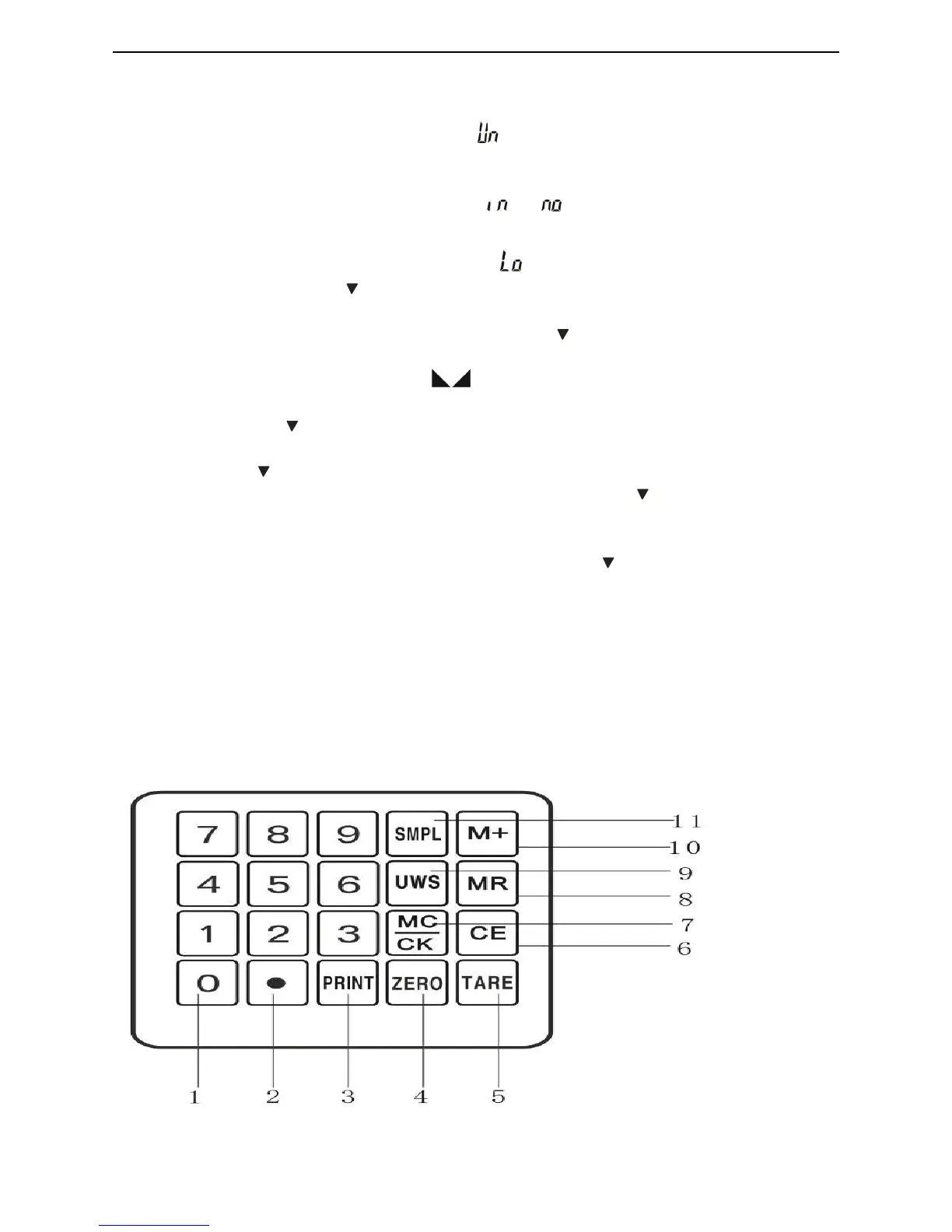
4-2-2 Keyboard
1) 0 ~9 numeric keys Enters specific values for tare, unit weight and other data entries.



 To Next Page