JADEVER JCE/JWE Service Manual - V05
As per the right of proprietary intellectual property, may not be reproduced in any form without written permission.
19
2-4 Offset value and keypad check
Offset value mode is provided for maintenance people to observe the internal offset value
when it is needed. In the offset value mode, to press respectively each key on the keypad
can also perform check of the key’s function. Follow the steps below to enter the offset value
mode.
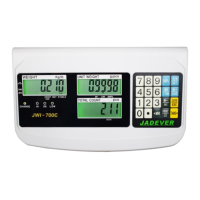
JCE SERIES
1. Switch off the scale.
2. Keep ZERO pressed and switch on the scale, display will show SEt SCALE Func.
Then, press ZERO again, offset value will be shown in WEIGHT and UNIT WEIGHT
displays, and KEy18 will be shown in TOTAL COUNT display. With weighing pan on the
scale, the correct offset values should be under 800000.
3. To press respectively each key on the keypad can perform check of the key’s function.
The correct display in TOTAL COUNT should be the following if the key pressed is normal:
Key pressed Correct display Key pressed Correct display Key pressed Correct display
1
Key 1
7
Key 7
M+
Key 12
2
Key 2
8
Key 8
UWS
Key 13
3
Key 3
9
Key 9
MC
Key 14
4
Key 4
0
Key 0
CE
Key 15
5
Key 5
CK
Key 10
MR
Key 16
6
Key 6
. (decimal pt.)
Key 11
SMPL
Key 17
4. After all required has been done, press ZERO twice to initiate power-on self-test, and the
scale will be ready for use.
JWE SERIES
1. Switch off the scale.
2. Keep pressing
M+
MR
key and switch on the scale. The display will show POS 2.



 To Next Page