Page 14
ENGLISH
Jandy
®
Variable-Speed Pumps, DV/DVS Models
|
Installation & Operation Manual
3.3.3 Pre-2022 AquaLink
®
RS Firmware Rev V
and Earlier
AquaLink RS systems using Firmware Rev V and
earlier, manufactured prior to mid-year 2022, support up
to four (4) variable-speed pumps. Each pump is assigned
an address of 1 through 4 using DIP switches 3-4 on
the pump. Use Table 4 for pump address assignment
settings.
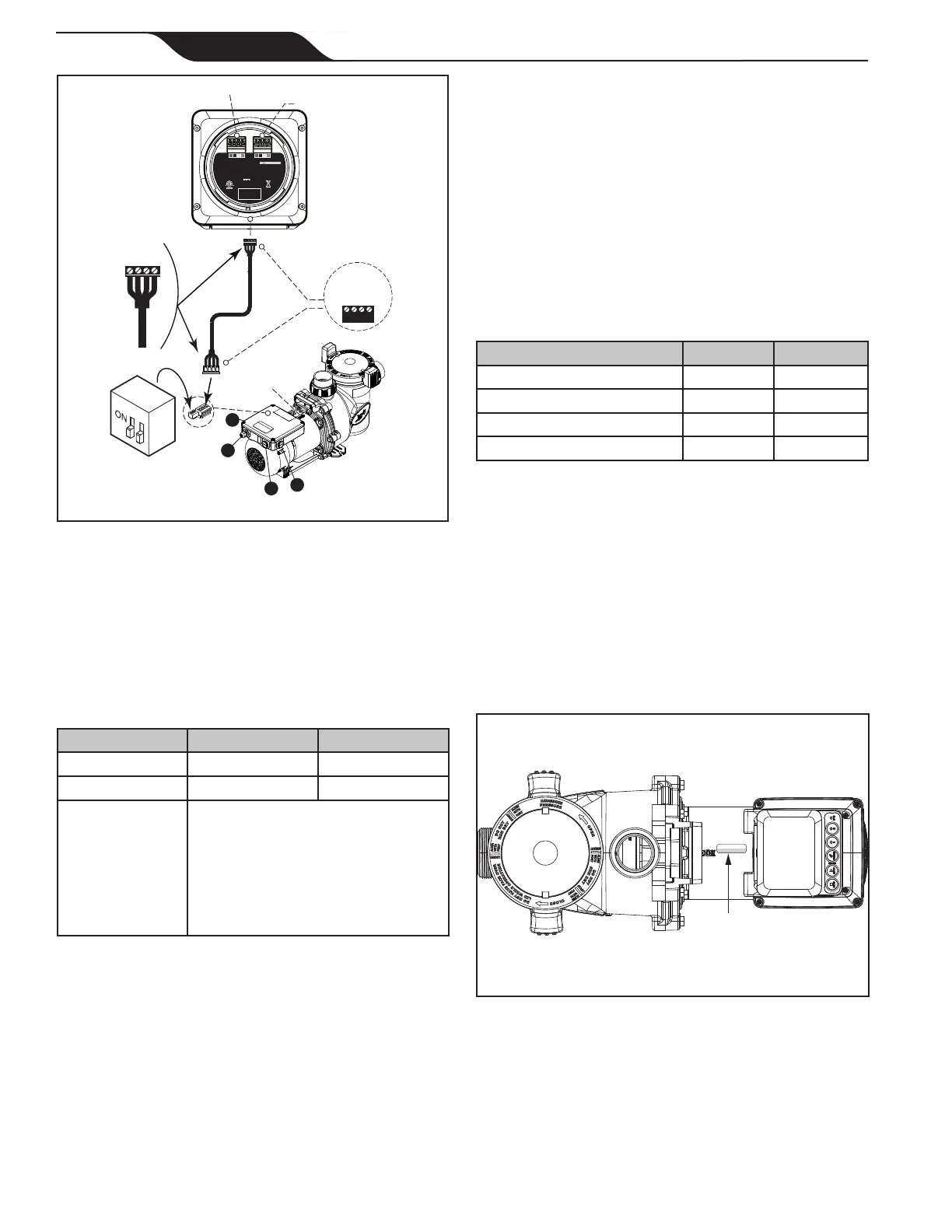
These settings are used when connected to the RS-485
connection on the pump or when connected to the pump
using a SpeedSet
™
controller's automation passthrough
wiring connection on the bottom of the controller.
Address Switch 3 Switch 4
PUMP 1 (Factory Default) OFF OFF
PUMP 2 ON OFF
PUMP 3 OFF ON
PUMP 4 ON ON
Table 5. DIP Switch Settings
3.3.4 2022 AquaLink RS Firmware Rev W and
Later
AquaLink RS systems using Rev W and later,
manufactured after mid-year 2022, support of up to
sixteen (16) variable-speed pumps that utilize a pre-
assigned SERIAL ADDRESS. DIP Switches 3-4 are
not utilized. Pumps in this manual are all assigned a
unique SERIAL ADDRESS at the factory. The SERIAL
ADDRESS label can be found on the pump motor (see
Figure 10).
SERIAL ADDRESS
Serial Address
Label Location
Figure 10. Serial Address Label Location
When setting up pumps using this method, the SE-
RIAL ADDRESS of each pump will initially appear in
the unassigned pumps section of the iAquaLink App or
other automation setup devices. Utilize the App or other
device to complete pump setup.
3
4
RS485
4321
Speedset
Controller
(Bottom View)
BLACK
YELLOW
RED
GREEN
RS-485
Cable (22 AWG)
H0738200_REVB
Conforms to ANSI/UL Std. 1563 Certified to CAN/CSA Std. C22.2 No. 218.1
FOR INDOOR/OUTDOOR USE
POUR USAGE INTÉRIEUR/EXTÉRIEUR
PARA USO INTERIOR/EXTERIOR
10V 200mA
This device complies with part 15 of the FCC Rules. Operation is subject to the following two conditions:
(1) This device may not cause harmful interference, and (2) this device must accept any interference received,
including interference that may cause undesired operation. CAN ICES-003 (B) / NMB-003 (B)
RECOGNIZED
COMPONENT
3032401
Zodiac Pool Systems LLC
Model # SpeedSet
CAUTION/ATTENTION
READ THE INSTRUCTION MANUAL
LIRE LA NOTICE TECHNIQUE
TO AUTOMATION TO PUMP
To Automation
To Pump
1234
BLACK
YELLOW
RED
GREEN
2-Position
DIP Switch
1- 1/2” Threaded
2- 1/2” Threaded
3- 1/2” Threaded
4- 1/2” Threaded
Bonding Lug
1
2
3
4
Figure 9. Wiring to a Controller
3.3 Pump DIP Switch Settings
3.3.1 DIP Switch Settings with Local
Controller
Please refer to the following table for required settings
for DIP switches 3-4 when the pump is connected to a
local controller.
Controller Switch Pump Address
JEP-R OFF OFF
IQPUMP01 OFF OFF
SpeedSet
DIP Switch 3-4 settings should
both be OFF unless connected to
a Jandy automation system using
SpeedSet automation passthrough
wiring connection on the bottom of
the controller. If applicable, please
see the following sections.
Table 4. Local Controller DIP Switch Settings
3.3.2 DIP Switch Settings with Automation
DIP Switches 3-4 setting rules are not common across all
Jandy automation systems. Read the following sections
to understand the required settings.
For Jandy AquaLink RS Automation System users,
a 2022 mid-year update alters the method in which
pumps in this manual interact with Jandy AquaLink RS
systems. Refer to the RS manual for more information.



 To Next Page