8
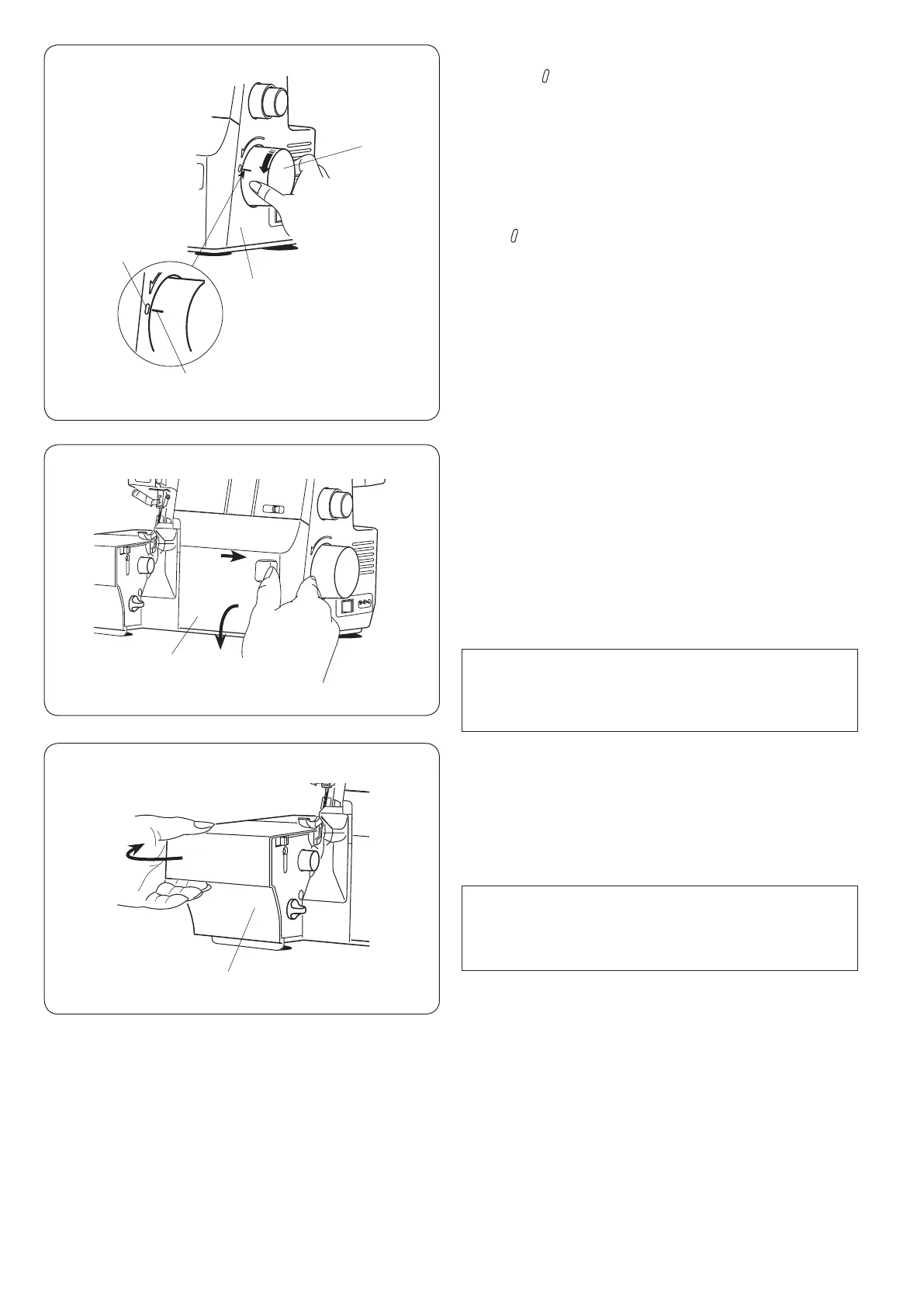
Handwheel
Match the “ ” mark of the belt cover with the “–” mark
of the handwheel when threading needles, adjusting
the chaining nger switch knob or raising/lowering the
spreader.
Always turn the handwheel toward you
(counterclockwise).
q Handwheel
w Belt cover
e “ ” mark
r “–” mark
Looper Cover
To open:
Hold the looper cover as illustrated and slide it to the right
as far as it will go.
Pull the looper cover toward you to open it.
q Looper cover
To close:
Push the looper cover back up. The looper cover snaps
into position automatically.
Side Cover
To open:
Pull the side cover to the left.
q Side cover
To close:
Push the side cover to the right.
q
q
q
w
e
r
NOTE:
Always close the looper cover when the machine is
in use. You cannot run the machine with the looper
cover open.
NOTE:
Always close the side cover when the machine is in
use. You cannot run the machine with the side cover
open.





 To Next Page