25
W: 00
W: 01
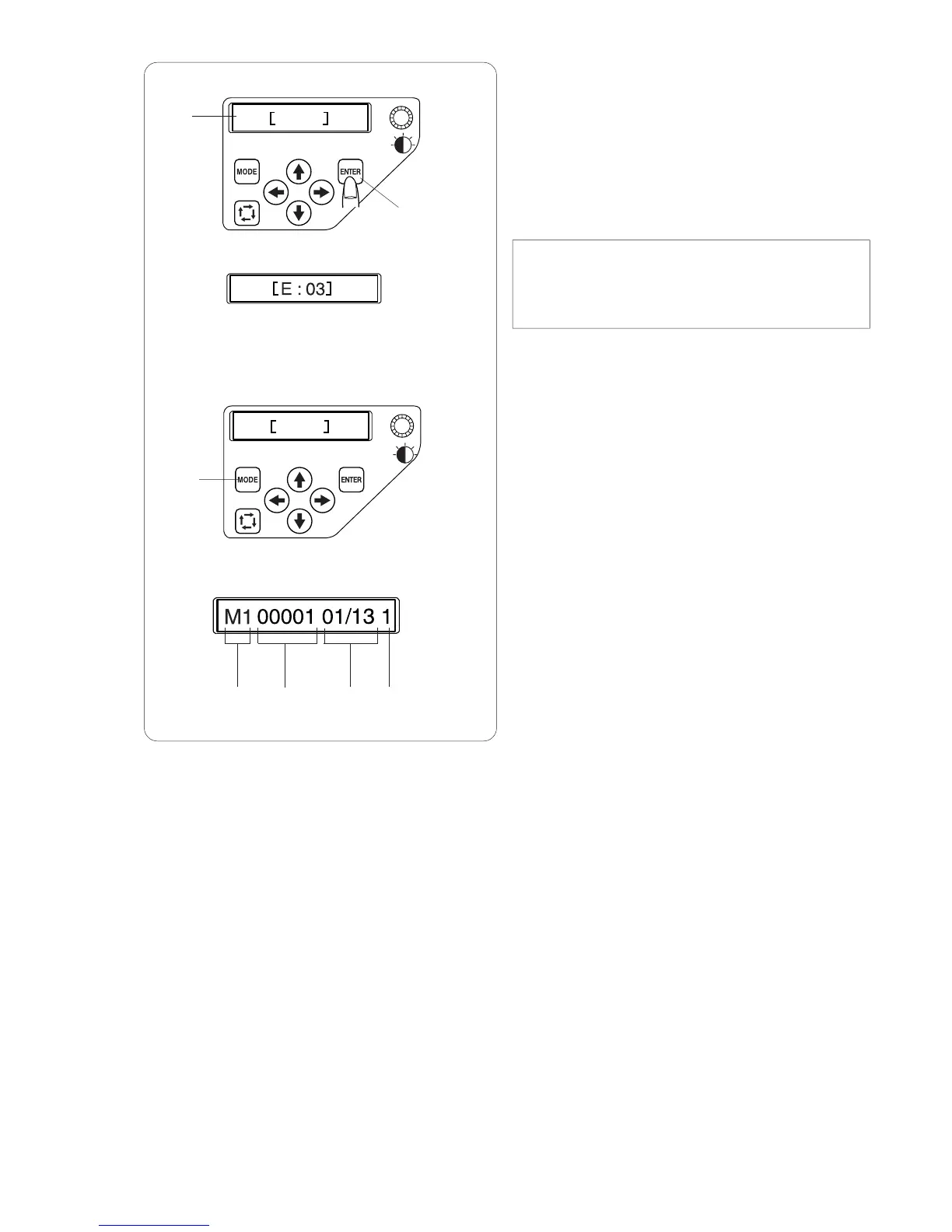
LCD screen
z When turning the power on, the LCD screen will
show [W:00].
Press the ENTER button and the hoop will move
to the home position.
q LCD screen
w ENTER button
NOTE:
If the LCD screen shows [E:03], press the ENTER
button to initialize the needle bar position.
After initializing, the LCD screen will show [W:00].
x The LCD screen will show [W:01].
Press the MODE button to start a new project or
press the ENTER button if you wish to continue
the last job before you turned the power off.
e MODE button
c The LCD screen will show the Ready to Sew
mode display.
In the Ready to Sew mode, the LCD screen
shows the following information.
r Hoop type
M1: MB Hoop 240 x 200
M2: MB Hoop 126 x 110
M3: MB Hoop 50 x 50
t Stitch count
y Color section
13: Total number of colors
01: Order number of the current color
u Needle bar number
yu
q
w
e
rt
z
x
c








 To Next Page