81
Location :
New
Rename
Embf
Location :
0.1/3MB
1
5
9
6
10
7
11
8
12
234
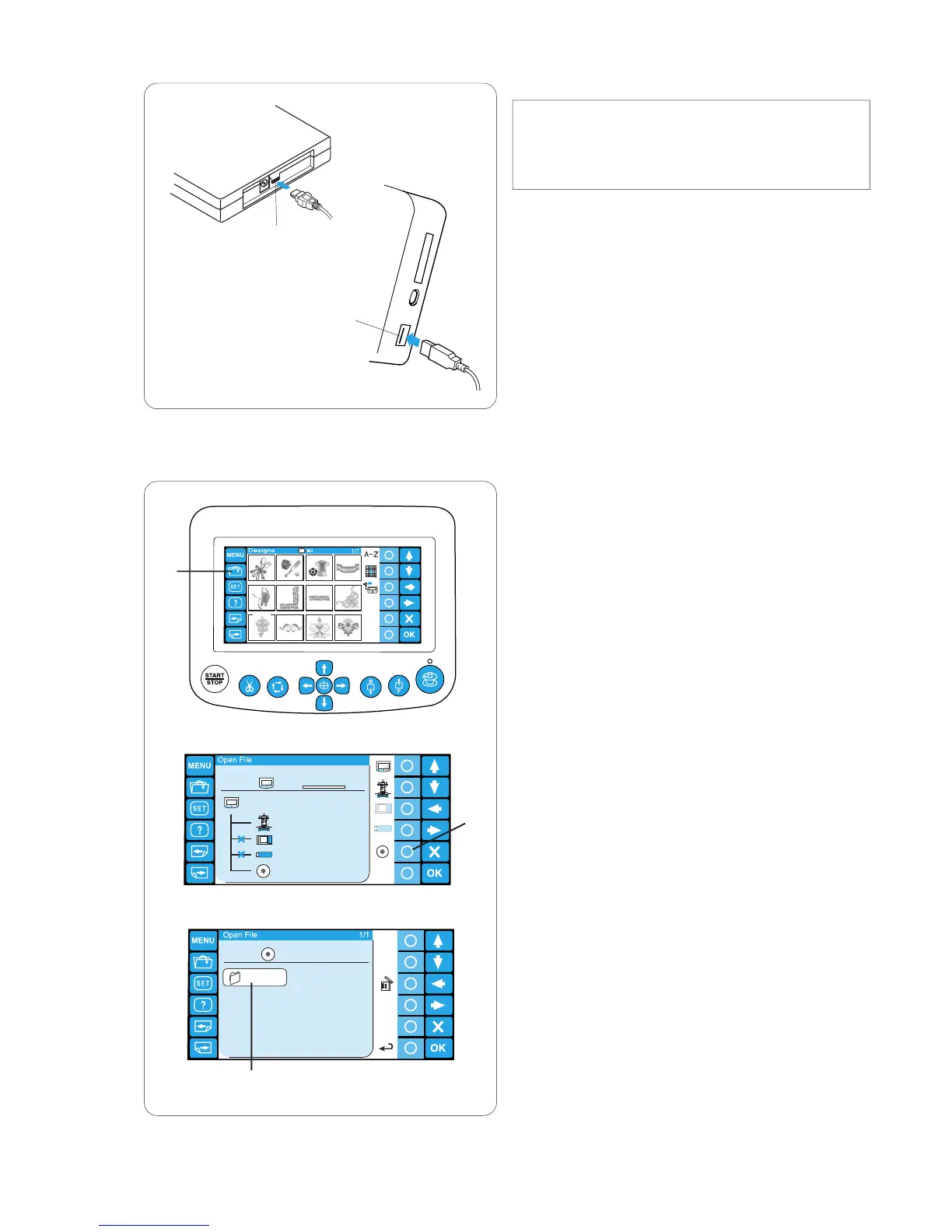
CD-ROM Drive
NOTE:
Do not use any other CD-ROM drive than the
exclusive CD-ROM drive, which is available from
authorized dealers.
Insert the mini USB connector into the USB port on
the back of the CD-ROM drive.
q Mini USB port on the CD-ROM drive
Insert the USB connector into the USB port on the
RCS unit. The CD-ROM drive does not need external
power source since it is supplied from the RCS unit
via the USB cable.
w USB port on the RCS unit
Opening the embroidery pattern from
the CD-ROM
z Press the open file key.
q Open file key
x Press the circle key next to the CD-ROM icon.
w Circle key (CD-ROM)
c The folder list window will open. Press the Embf
folder icon to open.
e Folder icon
The file list window will open.
Press the desired file icon to open.
q
w
q
w
e
z
x
c








 To Next Page