Part No. 960-000187R_Rev. A © 2016 JCM American Corporation
DBV-500 Banknote Validator JCM® Training Overview November, 2016
SENSOR AND ROLLER CLEANING PROCEDURE
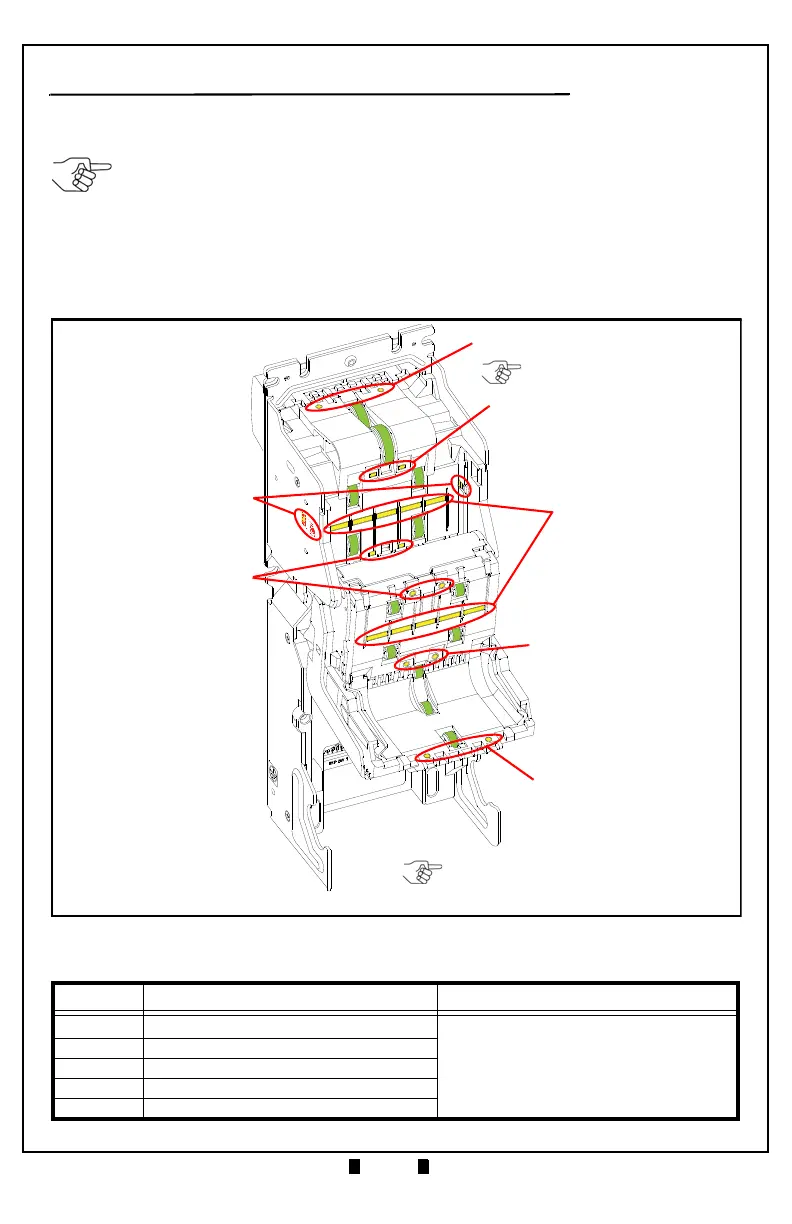
To clean the DBV-500 Unit, gently wipe the Sensors and Rollers using a clean
(slightly damp) lint-free Microfiber cloth.
1. Turn the DBV-500 Unit Power OFF.
2. Open the Validation Guide.
3. Clean the Lens of each Sensor (yellow) and the Rollers (green). (See Figure 3
for Locations and Table 5 for Cleaning Methods.)
4. Calibrate the DBV-500 Unit after cleaning.
Table 5 DBV-500 Sensor and Roller Cleaning Methods
Label Sensor Description Cleaning Method
a
Entrance Sensor
b Centering Start Sensor
c Side Sensor
d COB Sensor
e Exit Sensor
NOTE: DO NOT use Alcohol, solvents, citrus-based products or scouring agents.
These items may cause damage to the Validation Section Sensors and Rollers.
e
g
a
a
b
e
d
a
b
e
c
b
a
NOTE: Clean the surface of each Roller
(green) using a clean (slightly damp)
lint-free Microfiber cloth.
NOTE: Always calibrate the
DBV-500 Unit after cleaning!
Figure 3 DBV-500 Sensor and Roller Locations
Wipe Sensors (yellow areas) clean using a
clean (slightly damp) lint-free Micro-fiber cloth.
Wipe Rollers (green areas) clean using a
clean (slightly damp) lint-free Microfiber cloth.



 To Next Page