30
SPX532 – QUICKSTART GUIDE
13. MACHINE STABILITY (NO FUNCTIONS AVAILABLE)
Rotate the Working mode selector in position and the
screen beside will be displayed.
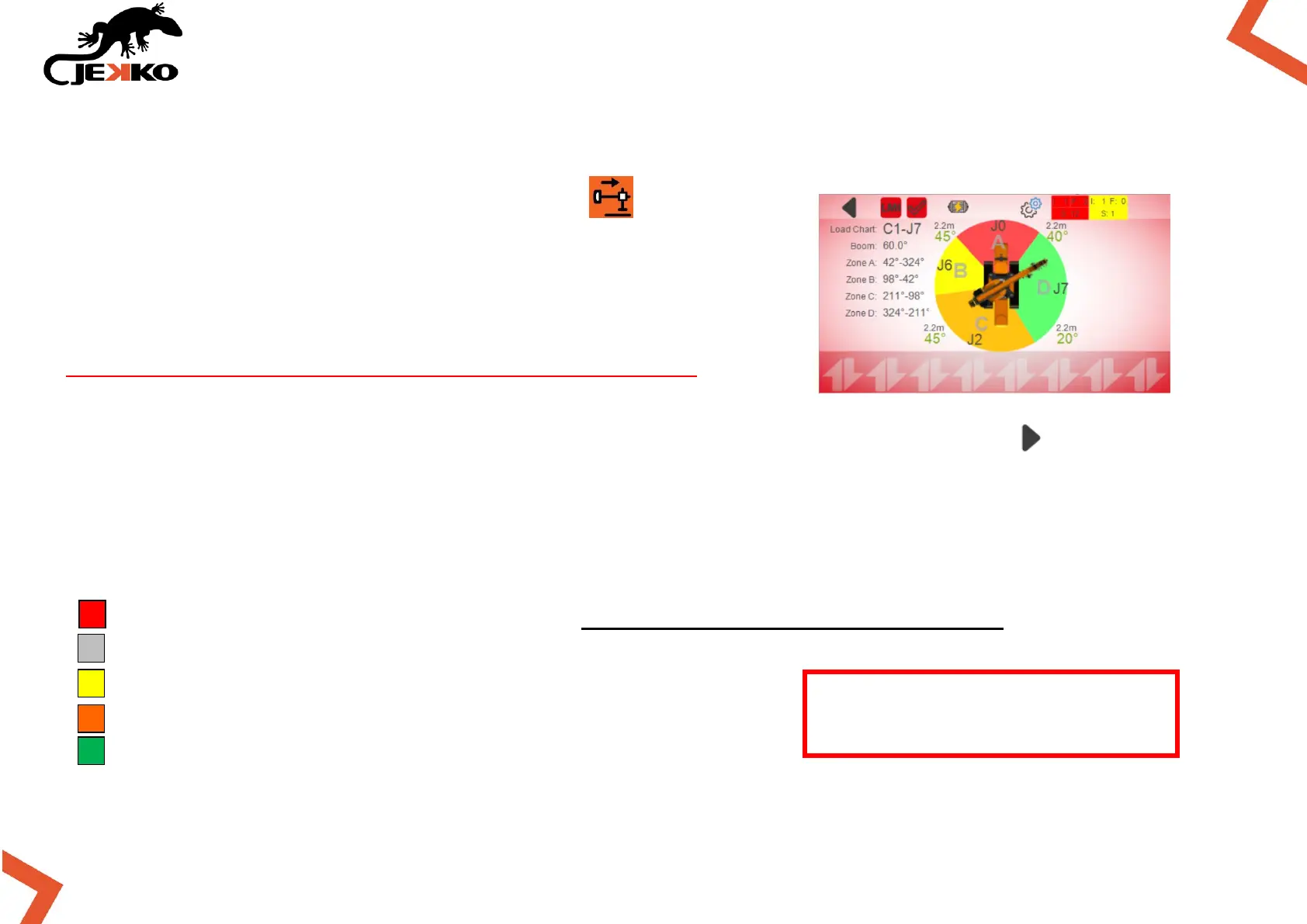
In this page the operator can check the machine stability
(extension and swing rotation angles of outriggers).
There are no functions associated to this working mode, for this
reason there are no functions associated to the levers.
This page can be displayed even by scrolling the pages with the Arrow right button ( ).
13.1. WORKING ZONES AND LIFTING CAPACITY
From Stability page the operator can check the lifting capacity of each sector and also the turret
rotation angles that limit each working zone (see the picture above).
J0 (RED SECTOR) = NO WORKING ZONE (accessible only for parking the crane)
J1 (GREY SECTOR) = PICK & CARRY CHART
J5 (YELLOW SECTOR) = 50% APPROX. LIFTING CAPACITY
J6 (ORANGE SECTOR) = 75% APPROX. LIFTING CAPACITY
J7 (GREEN SECTOR) = 100% LIFTING CAPACITY
The load charts J2, J3 and J4
are not used.


 To Next Page