9
®
CM715K
SEL
SEL
SEL
SEL
SEL
VOL
VOL
4
5
VOL
VOL
6
CH
I
0
+
+
II
LOC
SCN RPT
MTL
AMS PGM RDM
LOUD
T-IN
CH
I
0
+
+
II
LOC
SCN RPT
MTL
AMS PGM RDM
LOUD
T-IN
CH
I
0
+
+
II
LOC
SCN RPT
MTL
AMS PGM RDM
LOUD
T-IN
SEL
SEL
SEL
SEL
VOL
VOL
1
2
VOL
VOL
3
CH
I
0
+
+
II
LOC
SCN RPT
MTL
AMS PGM RDM
LOUD
T-IN
CH
I
0
+
+
II
LOC
SCN RPT
MTL
AMS PGM RDM
LOUD
T-IN
CH
I
0
+
+
II
LOC
SCN RPT
MTL
AMS PGM RDM
LOUD
T-IN
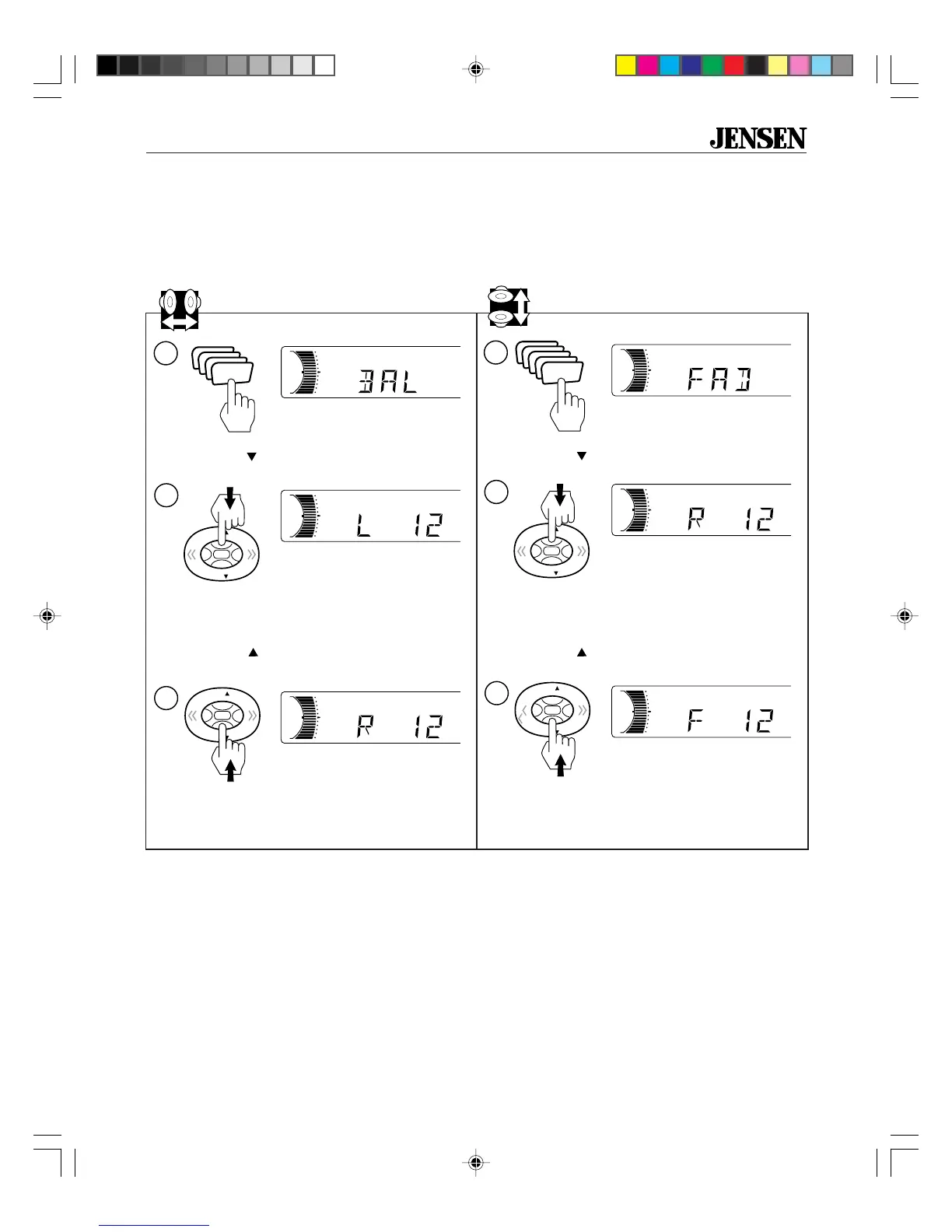
Test Speaker Connections
These tests make sure the speakers are connected right. If speakers don’t play at all, both wires
may not be connected. If the wrong speaker plays (you hear front speakers when you expect rear
speakers) make sure you connected the wires right.
Balance
Fader
1. Press SEL four times.
BAL appears in the display.
3. Hold
VOL
on the control button until the
display shows R 12.
2. Hold
VOL
on the control button until the
display shows L 12.
Only the right speakers should be playing.
If not, check the wiring. Make sure you con-
nected the wires just like the chart on page 6.
4. Press SEL five times.
FAD appears in the display.
6. Hold
VOL
on the control button until the
display shows F 12.
5. Hold
VOL
on the control button until the
display shows R 12.
Only the front speakers should be playing.
If not, check the wiring. Make sure you con-
nected the wires just like the chart on page 6.
Only the rear speakers should be playing.
If not, check the wiring. Make sure you con-
nected the wires just like the chart on page 6.
Only the left speakers should be playing.
If not, check the wiring. Make sure you con-
nected the wires just like the chart on page 6.
Untitled-3 4/10/99, 7:38 PM9



 To Next Page