28
VX4010
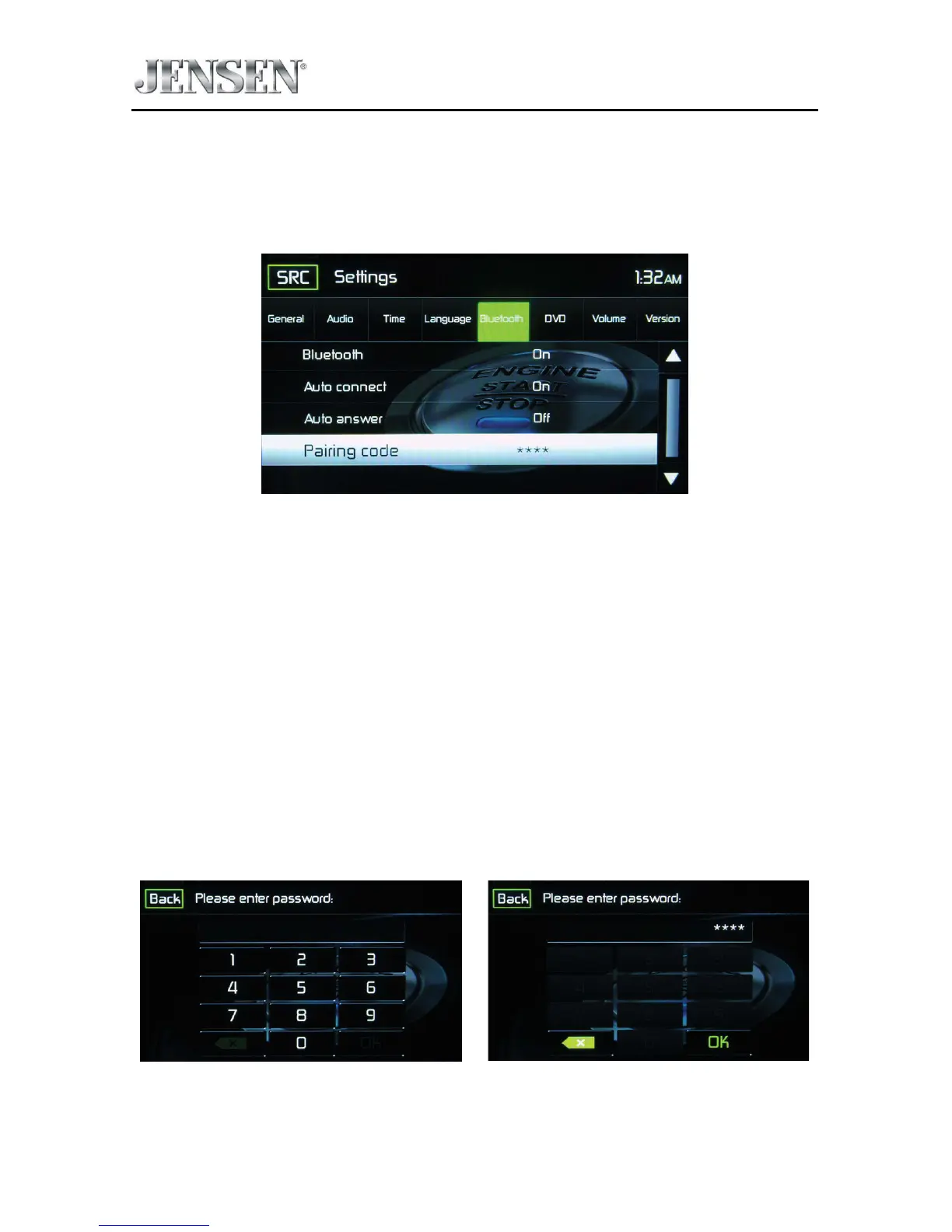
Bluetooth Sub-menu Features
The Bluetooth audio capabilities can be used for wireless phones hands free
applications. Before attempting to use the Bluetooth functions on this unit, please
make sure the wireless phone to be connected supports Bluetooth functions.
Bluetooth Pairing Code Screen 2
Bluetooth - Touch ON or OFF to turn the Bluetooth function ON or OFF.
Auto-Connect - Touch ON or OFF to turn the Bluetooth Auto-Connect function
ON or OFF.
Auto-Answer - Touch ON or OFF to turn the Bluetooth Auto-Answer function ON
or OFF.
Pairing - This feature allows the user to create a unique 4 digit code for pairing
Bluetooth devices to the unit. The factory default pairing code is “0000”.
1. Touch the Paring Code icon and the Pairing Code entry screen will appear.
2. Use the keyboard to enter a unique 4-digit Pairing Code.
NOTE: If a wrong digit is entered touching the arrow will remove the number.
3. Touch OK to conrm 4 digit pairing code.
Pairing Code Entry Screen Pairing Code Conrmation Screen
Pairing Code Screens



 To Next Page