49
VX4010
USB AND SDHC OPERATION
The unit will read the audio/video les on USB devices/microSD cards
automatically.
NOTE: The USB/SD ports will recognize most USB/SD ash memory devices and
portable hard drives. The unit supports up to 32GB SD cards however SD
cards larger than 32GB may not be recognized. Portable hard drives (hard
drives must be formatted to FAT32 and NTFS is not supported).
Inserting/Removing a USB Device or microSD Card
To insert a USB device or microSD card:
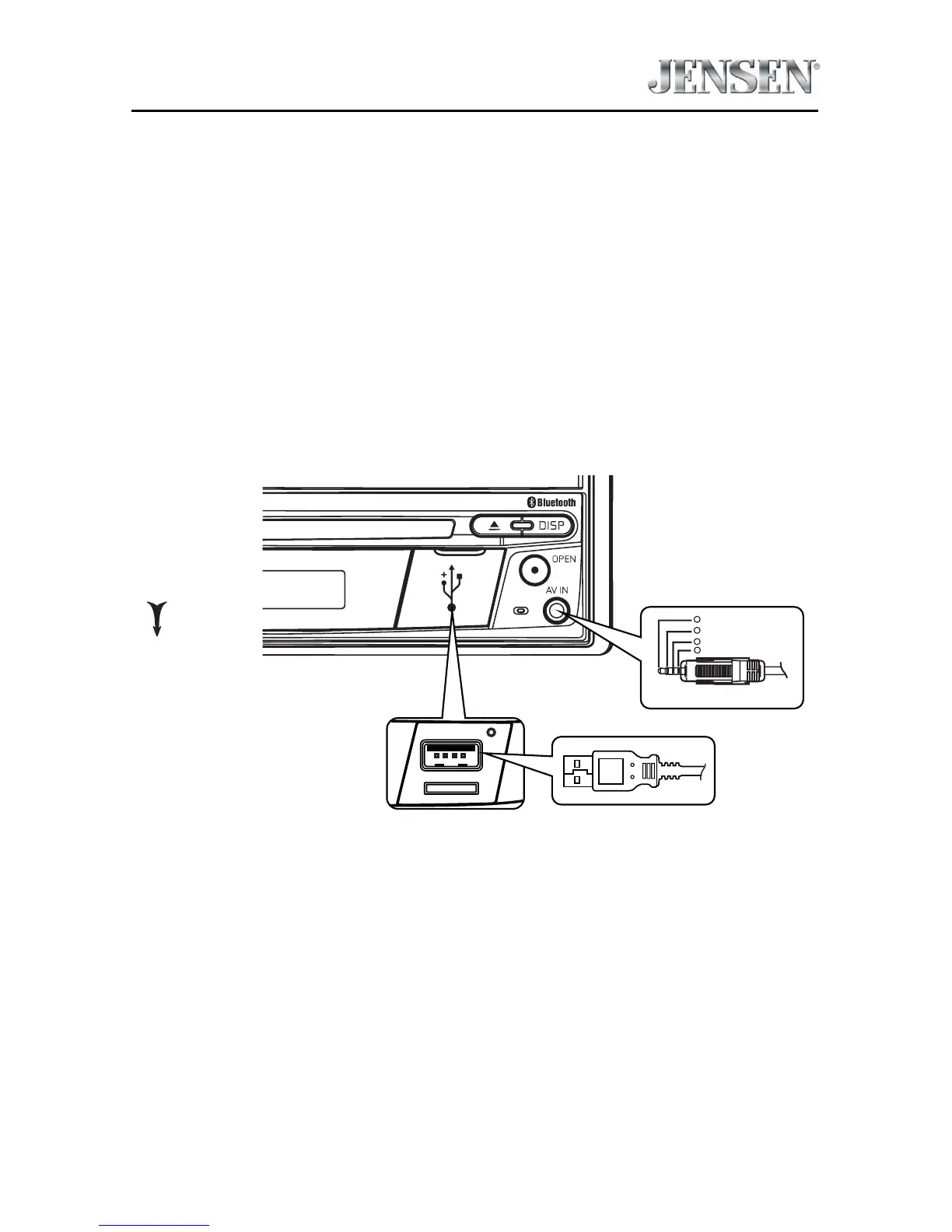
1.
L
ocate the Interface Cover on the front of the radio.
3.5mmA/V Cable (not included)
Video
Left Audio
Right Audio
Ground
1
2
3
4
OPEN
USB Cable (not included)
USB Slot and microSD Card Slot Location
2. Lift the protective cover to reveal the USB slot and microSD card slots.
3. Insert the USB device/microSD card into the USB/microSD card connectors.
NOTE: microSD cards are inserted into the microSD card slot until a click is
heard. The click will ensure that the card is securely inserted to the unit.
To remove the USB device or microSD card:
1. Touch the SRC icon on the main menu or press the SRC button on the front
panel to switch to another mode.
2. Remove the USB device or microSD card from the connector.



 To Next Page