74
Operation Manual
Changing PTO Oil
1. Place a container below the PTO large
enough to capture the oil in the PTO case
(26 oz) (0.77 L).
2. Remove the drain plug (Figure 135) and
allow the oil to fully drain from the case.
3. When the oil has drained, install the drain
plug.
4. Remove the breather and ll with 10W40
synthetic oil until it begins to show in
the site gauge. Continue adding oil slowly
once visible in the site gauge so as not
to overll. The oil is slow to drain into the
reservoir.
5. Install the ll plug.
Checking Belt Tension
1. Disengage the clutch and stop the engine.
2. Open the access cover on the belt guard.
3. Locate the decal on the cover to nd the
correct belt tension specication.
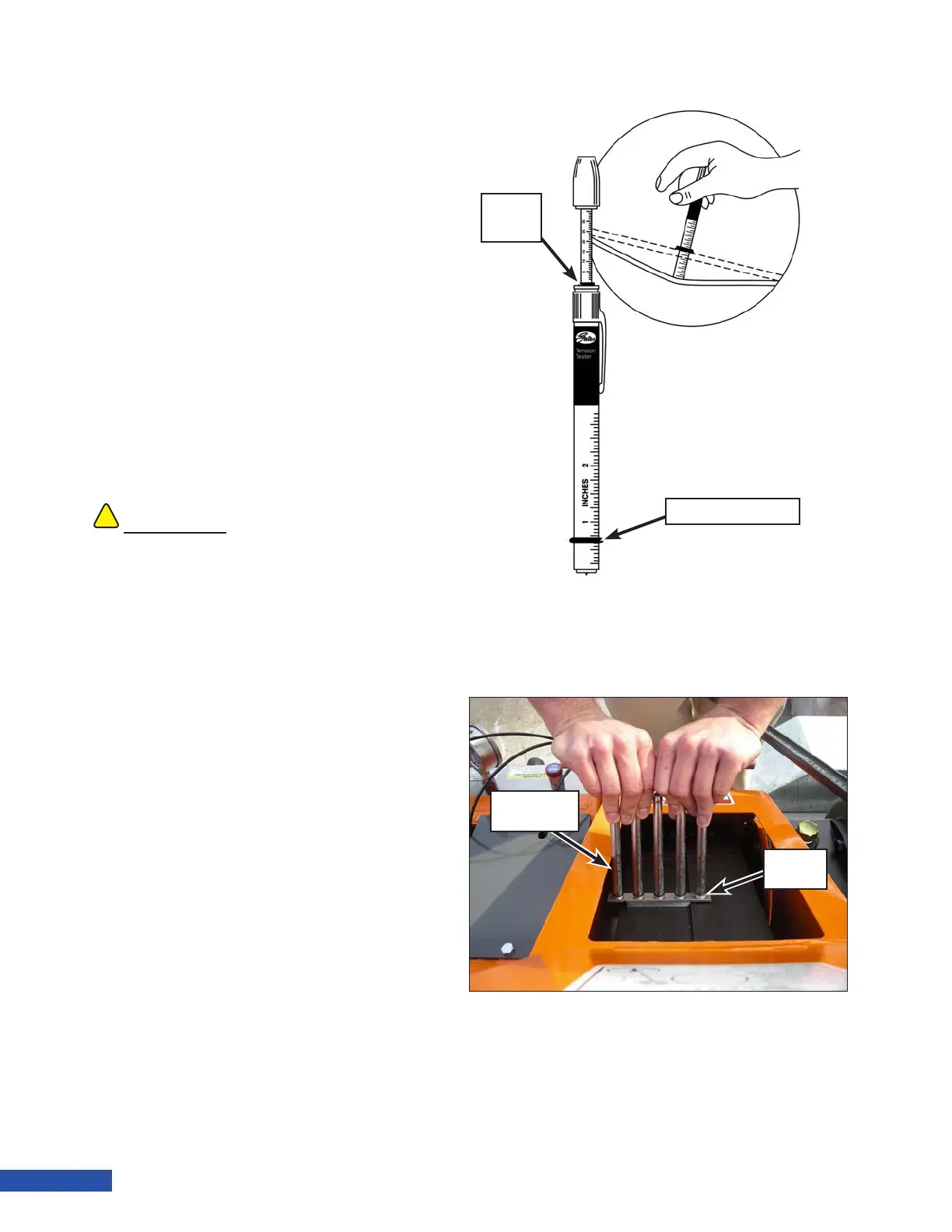
4. Adjust the deection O-ring (Figure
137) on a belt tension tool for the proper
deection as specied on the decal.
Slide the force O-ring to the bottom of
the scale. Use a ve barrel tension tool if
power bands are used on your unit (Figure
138).
5. Position the tension tool in the middle
of one of the belts mid-way between belt
pulleys. Press on the tool until the deec-
tion O-ring is even with the adjacent belt.
On ve barrel tensioners, press until the
gauge plate (Figure 138) touches the adja-
cent belt.
Note: Power bands are ve times the
single belt force.
6. Release pressure and inspect the reading
at the bottom edge of the force O-ring(s)
(Figure 137) on the tension tool. Adjust the
!!
CAUTION
Belts must be adjusted properly. Improper
adjustment can lead to belt slippage and failure,
or PTO bearing damage caused by excessive belt
tension.
Figure 137: Single Belt Tension Tester.
Deflection O-Ring
Force
O-Ring
Figure 138: Power Band Tensioning
Gauge
Plate
Five Barrel
Tensioner


 To Next Page