Page 33
John Bean BFH 1000 Operators Manual
9.0 USER CALIBRATION
The BFH 1000 Balancer features a user calibration program
which requires only a few minutes to complete. Perform this
procedure when the balancer has been moved, disturbed, or
whenever accuracy is questioned. Occasional field calibration
will ensure years of reliable service.
Follow these 3 simple steps for shaft calibration:
1. Press and release the “Function” key (F1) from the “Wel-
come or Main Screen”.
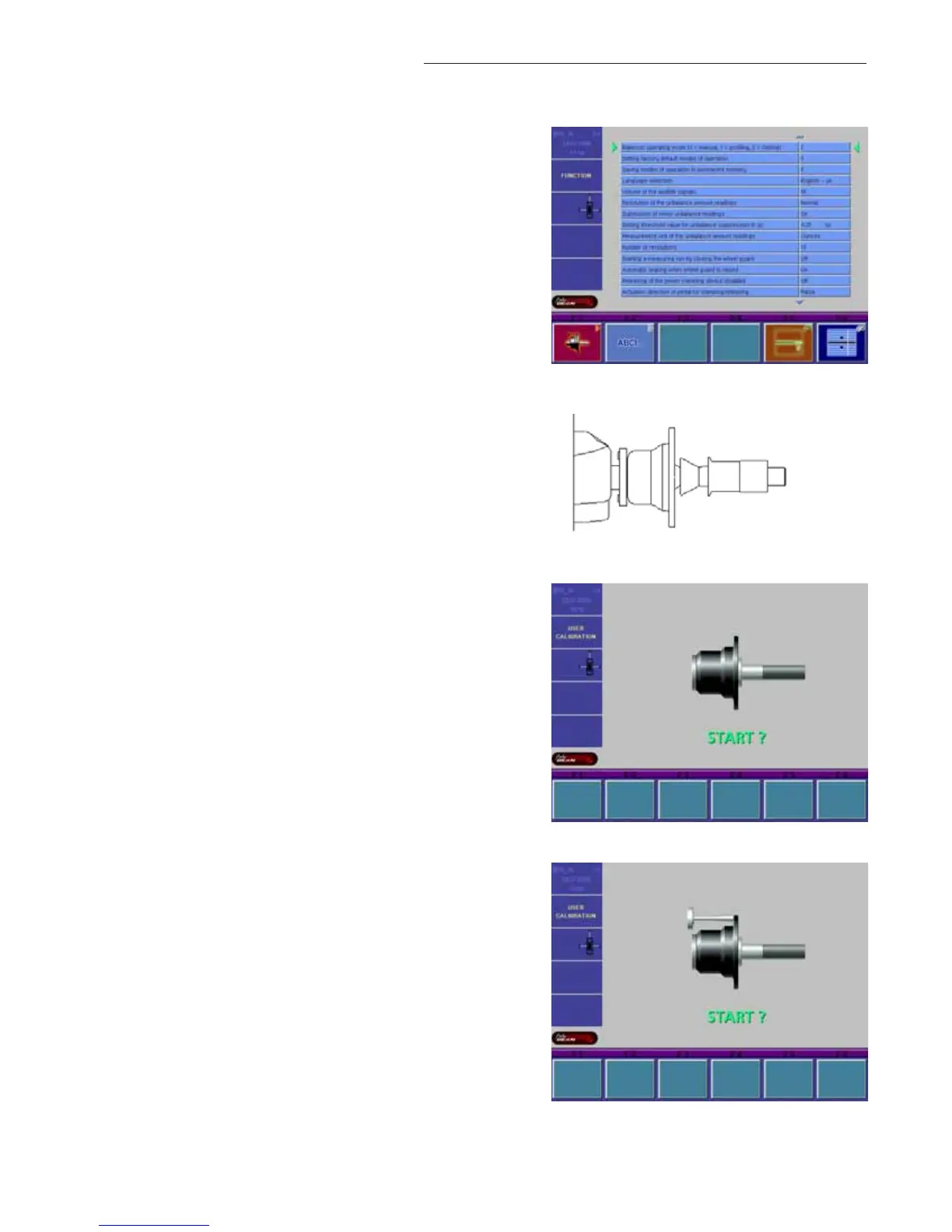
2. Press and release the “Calibration” key (F1). Fig 53.
3. Place 2 cones followed by the clamping nut (no retainer)
onto the shaft. Lift the pedal to clamp. See Figure 54.
4. Lower the wheel guard and press the “SPIN” key. The bal-
ancer should spin and come to a complete stop. See Fig-
ure 55.
4. After the balancer comes to a stop raise the wheel guard
and screw the calibration slug into left side of the flange
plate. Lower the wheel guard and press the “SPIN” key.
The balancer should spin and come to a complete stop.
Once the shaft stops the display should display “OK” and
the speaker sounds the Snap-on “TüDüLü”.See Figure 56.
SHAFT CALIBRATION IS COMPLETE
Figure 53
Figure 54 - 2 cones & clamping nut only
Figure 55
Figure 56


 To Next Page