Page 3
John Bean BFH 1000 Series Operators Manual
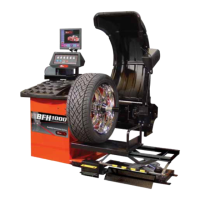
1.4 FEATURES
• Self test check with every power up cycle.
• Selectable car/light truck limit values
• Advanced Spoke count capability
• Rim-only diagnostics
• Rim cleaning brake control
• Flat spot detection
• On-board diagnostics for easy service issues
• Selectable default weight placement mode
• Advanced Help screens with illustrations
• Pre-programmed Error Codes indicate procedural errors or safety concerns.
• Fully Automatic All-Parameter Data Entry.
• Fully Automatic Rim/Tire Profiling.
• Fully Automatic Spoke/Split Weight Function for Hidden Weight Placement.
• Fully Automatic Left and Right Radial & Lateral Runout Measurements.
• Bare Rim Radial and Lateral Runout Measurement
• Tire Tread Depth Measurement.
• Hands-Free Power Clamping for Precise Wheel Placement.
• Fast Tire/Wheel Diagnostic System Time, Floor-to-Floor.
• Captured back spring eliminates having to handle the backing spring.
• Automatic recalculation if weight positions are changed. No need for re-spinning the wheel.
• Common 40 mm diameter mounting shaft.
• Easy-to-Read LCD Data Display Monitor.
• Dynamic and single weight Static capability.
• Stop-at-Top features simplifies weight imbalance location
• Automatic Weight Type Selection Based on Rim Profile, Indicated by Color Coded Icons
• Optima Balance feature for reducing weight required.
• Built-in spin counter for monitoring balancer productivity.
• Service code access to all Balancer electronic functions for fast, easy diagnosis.
• Operator selectable round-off mode.
• Wheel pull index, option (standard on BFH 1000 Super)
• Wheel runout in multiple positions, optional feature (standard on BFH 1000 Super)
• Premium 7 cone set with storage tray option (standard on BFH 1000 Super)


 To Next Page