Network Room Module Technical Bulletin 10
• Three speed
If you set the property to Three speed fan, pressing the fan push
button cycles the fan status: AUTO, OFF, low, medium, and high
speed.
Occupancy Mode
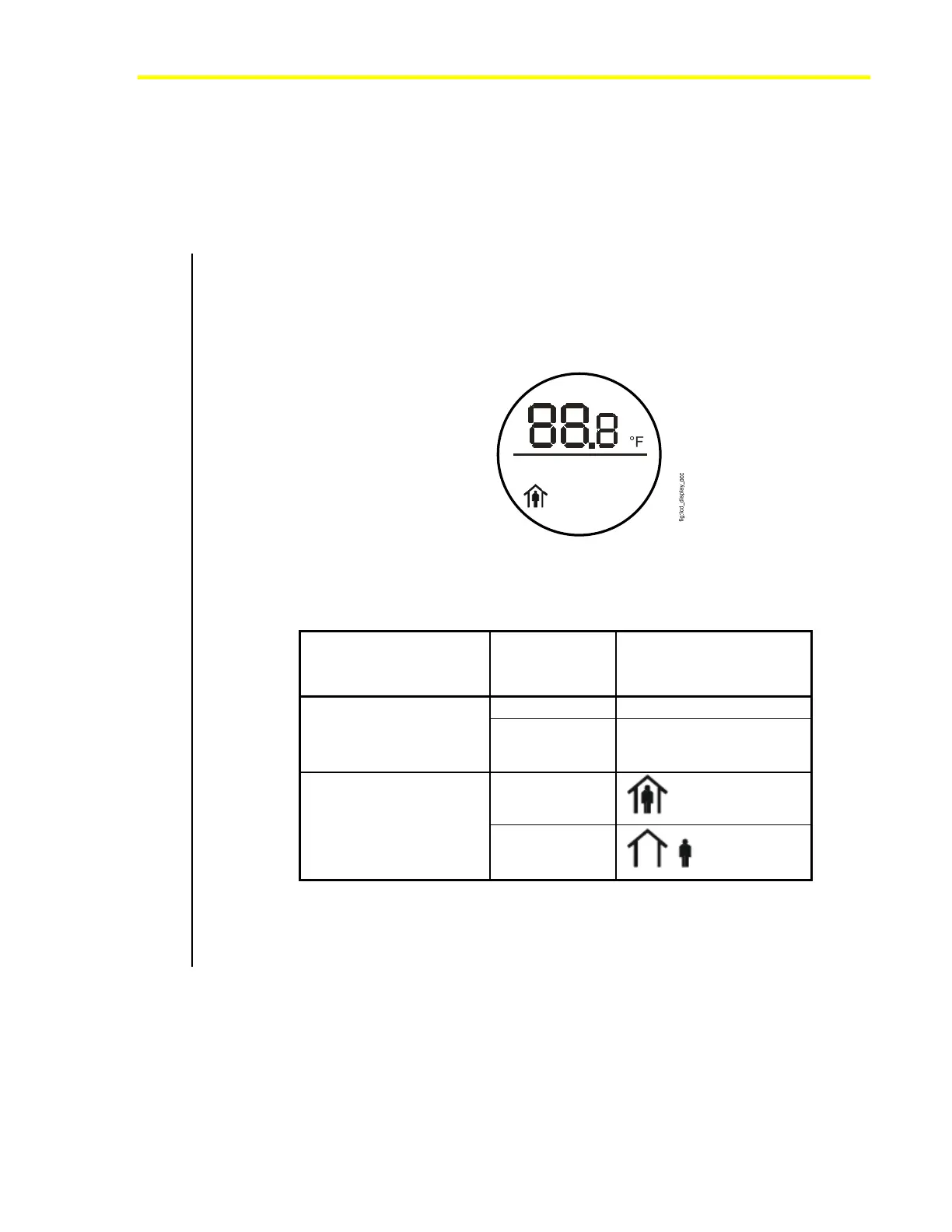
The LED display indicates the Effective Occupancy Status when the
Enable Unoccupied State Blink configuration property is set to enabled
(ON) and the network variable input Effective Occupancy Status value
shows that the occupancy mode is UNOCCUPIED or STANDBY. See
Figure 8 and Table 4.
Figure 8: Occupancy Mode Icon for
LP-NRM5xx-000C and LP-NRM6xx-000C Series NRMs
Table 4: Effective Occupancy Status
NRM Series Effective
Occupancy
Status
Icon/Description
Occupied The display remains on.
LP-NRM0xx-000C Series
Unoccupied or
Standby
The display blinks off/on
approximately every
3 seconds.
Occupied
LP-NRM5xx-000C and
LP-NRM6xx-000C Series
Unoccupied or
Standby
This feature indicates to the unexpected occupant (or an occupant present
during nonstandard hours) that the controller is not in the OCCUPIED
mode. You can disable this feature by setting the Enable Unoccupied
State Blink configuration property to disabled (OFF).













 To Next Page