
 Need help?
Do you have a question about the Johnson Controls IQ Lock-PowerG and is the answer not in the manual?
Key safety warnings for using the IQ Lock-PG, including user codes and physical keys.
Instructions on how to clean the IQ Lock-PG using a soft damp cloth.
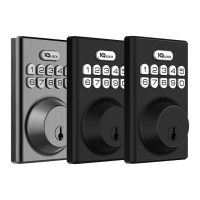
Overview of the IQ Lock-PG as a battery-operated smart lock communicating with an IQ Panel.
Guidance on selecting the appropriate faceplate for the IQ Lock-PG installation.
Procedure to verify if the rectangular faceplate is suitable for the door hole.
Steps to attach the round drive-in collar if the rectangular faceplate is not suitable.
Configuration of sound notifications for the IQ Lock-PG, including low battery alerts.
Handling incorrect user code attempts, temporary lockout, and unlock methods.
Statement regarding user modifications and their impact on device operation authority.
Compliance statement regarding device interference according to FCC rules.
FCC and IC radiation exposure limits and antenna installation guidelines.
Canadian compliance statement for license-exempt transmitters and RF exposure.
 General
| Connectivity | PowerG |
|---|---|
| Power Source | Battery |
| Battery Life | Up to 1 year |
| Operating Temperature | -4°F to 140°F (-20°C to 60°C) |
| Security Features | Encrypted communication |
| Door Thickness | 1-3/8 to 2 inches |
| Backset | Adjustable 2-3/8 or 2-3/4 inches |
| Battery Type | 4 AA Alkaline Batteries |
| Finish | Satin Nickel |
| Compatibility | Compatible with PowerG enabled alarm systems |

 To Next Page