2.9 Icons on the display
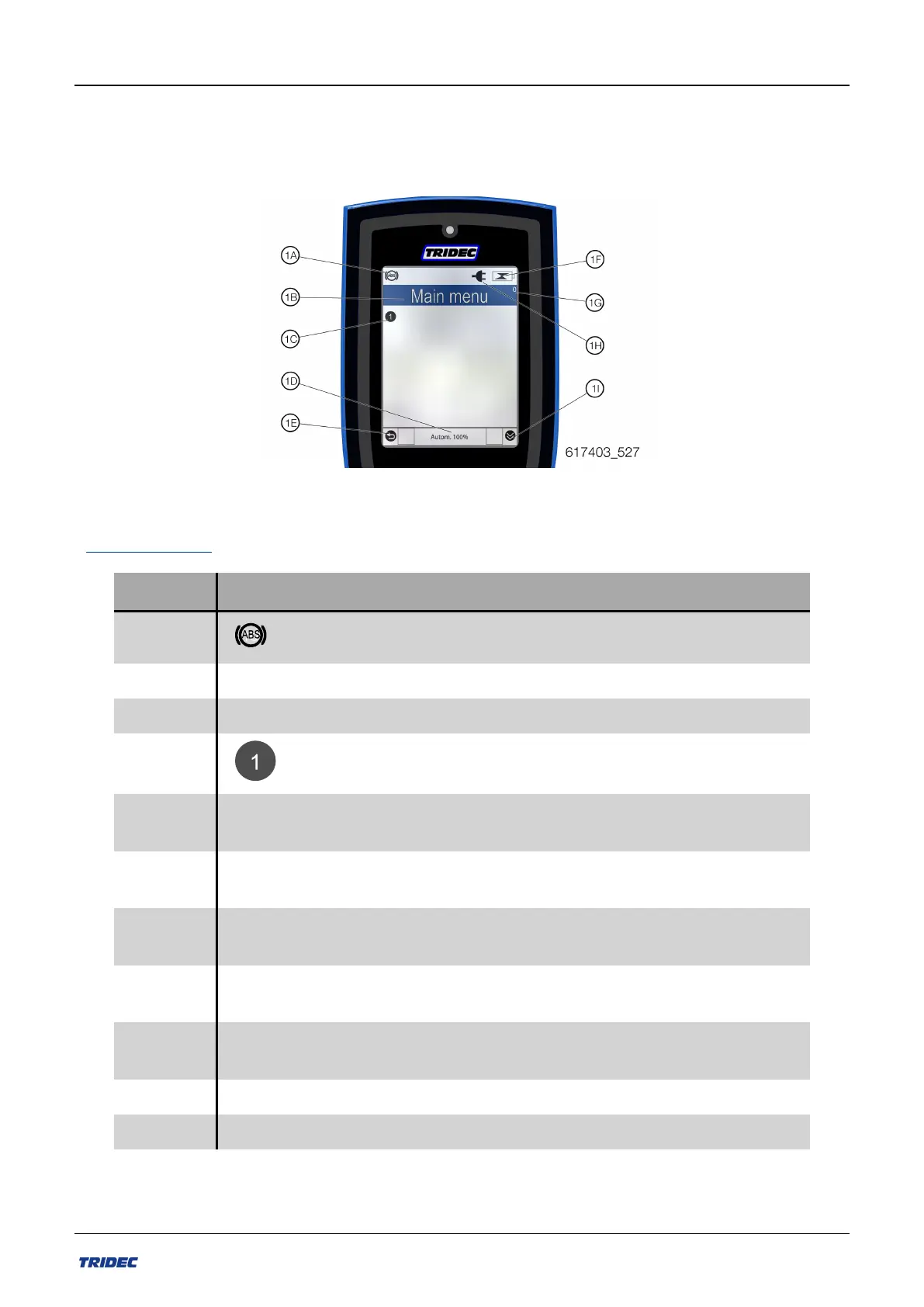
Specific information is displayed on the screen by icons. The meaning of each of these icons
is described in the table.
Afb.2-9
Icons and texts
Positie Icoon Beschrijving
1A ABS/EBS signal is active.
1A - No ABS/EBS
1B Main menu Text line where active menu is visible
1C Numbering of options / buttons to be pressed
1D Autom.
The wheels of the steered axles turn through an angle that
depends on the towing angle.
1D Axle rigid
The wheels of the semi-trailer / trailer are in the straight-
ahead position.
1D Calibrate
The trailer / semi-trailer wheels turn to the straight ahead
position and the kingpin sensor value is set to 0.
1D Crab steer
Crab steering makes all the wheels turn to one direction, so
you can drive diagonally.l
1D Manual
Manual steering of the semi-trailer / trailer wheels up to a
speed of 15 km / h.
1D Pressure relief System pressure is released
1D Pressurize System is pressurized
Part no.: 162014 EN-1
31
Release 07/2020
User manual 2300 EF-S system



 To Next Page