15
L1
L2
L3
L4 L5
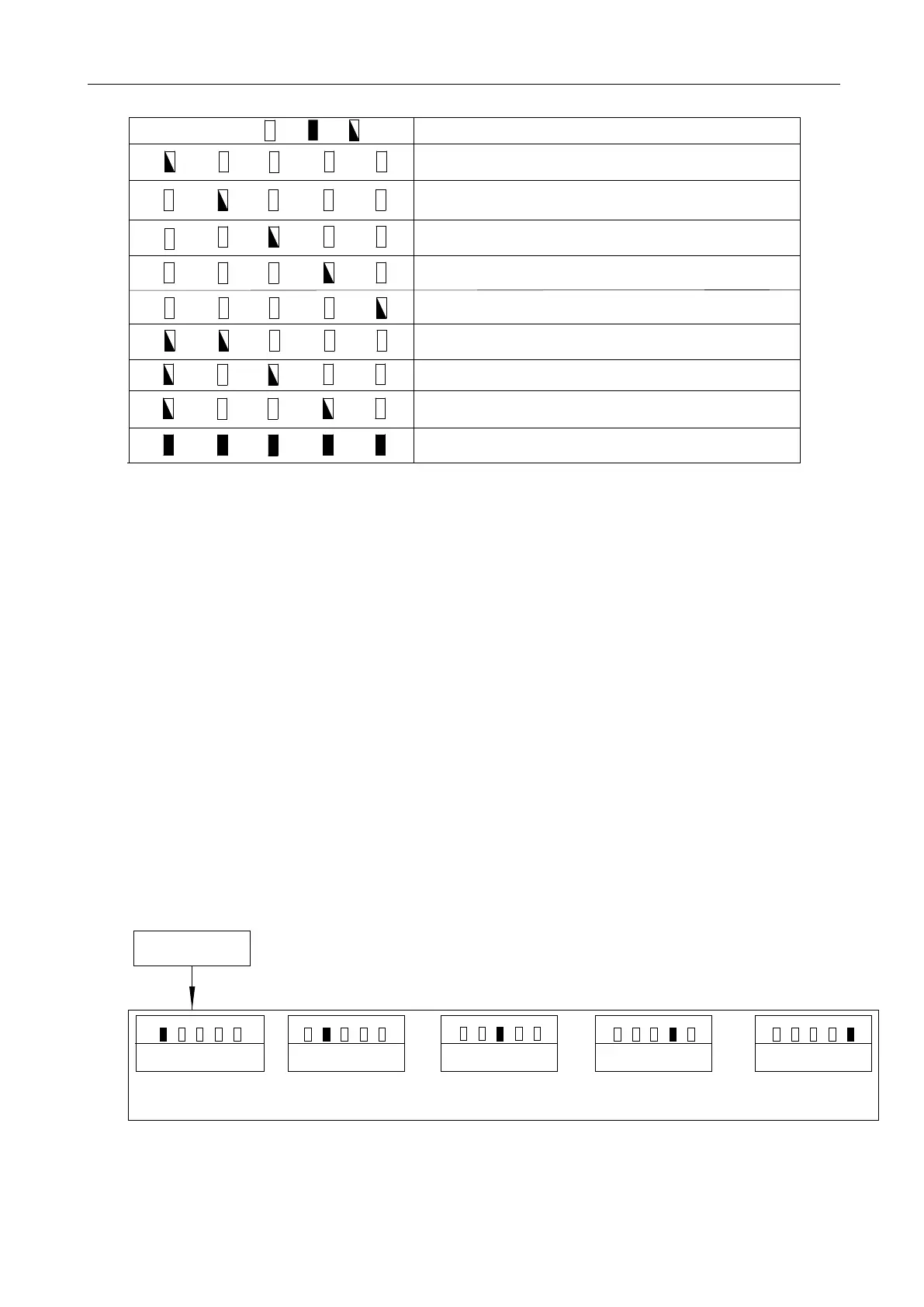
Indicator light status:
L1
L2
L3
L4 L5
L1
L2
L3
L4 L5
L1
L2
L3
L4 L5
L1
L2
L3
L4 L5
L1
L2
L3
L4 L5
Off
On
Flicker
Status Instruction
Travel for closing is too long(≥12m)
Travel for closing is too short(≤0.5m)
Travel for opening is too long(≥12m)
Travel for opening is too short(≤0.5m)
Magnet is not detected
L1
L2
L3
L4 L5
L1
L2
L3
L4 L5
STOP button is pressed, travel setting is interrupted
Hall sensor signal is not detected
Press “PROG” to exit the travel setting
L1
L2
L3
L4 L5
Travel limit position setting successfully,all on for 1 sec, then off
Table 1 Travel Setting Tips
Note:
1. If there is no operation under the limit switch position setting status, system will automatically exit
after 20 sec.
2. If need to exit in the process of travel limit position setting, please press “PROG” once to directly
exit.
5.4 Remote Control Management
Operation Instruction:
1. Press “+” button for 3 sec. to enter into the first function of remote control management under the
control board standby mode.
2. Different functions can be selected through “+” and “-” buttons.
3. Press “SET” button to enter into the corresponding selection to set the parameters.
Running Speed Setting
L1
L2
L3
L4
L5
Slow Stop Speed Setting
L1
L2
L3
L4
L5
Auto-reverse When Meeting
L1
L2
L3 L4 L5
Slow Stop Distance Setting
L1
L2
L3 L4 L5
Standby Mode
Press and hold “+” button for 3 sec.
Basic Menu Setting
Auto-close Function Setting
L1
L2
L3 L4 L5
Obstacles Setting
Figure 15



 To Next Page