15
Function Select
The function select feature allows you to program the five
available digital trims, the two available switches and the
thumb-operated button to one of the following functions:
In System Mode, access the Fuction Select function by
moving the cursor to FUNC. SEL and pressing the MODE
LIST key.
Note: Each function can only be programmed to one
switch or digital trimmer. If the function you wish
to select is already programmed to another switch
or trimmer, it must first be removed from that
switch or trimmer before it can be reprogrammed
to another.
[Func. SEL]
£D.T. ST.TRIM
TH.TRIM AUX=3ch
‘
DR.MODE IDLE UP
Timer
TH.BRKE
ST.D/R
[FUNC. SEL]
£DIRECT MODE
[CUSTOM(-)] key
TIMER
Func.
Digital Trims:
• Throttle trim (coast brake)
• Steering trim
• Throttle brake (panic brake)
• Steering rate
• ABS swing (see ABS braking page 33)
• ABS point (see ABS braking page 33)
• Aux. 3 channel Inhibit (turned off)
Buttons:
• Timer
• Throttle hold
• Inhibit
Switches :
• Drive mode
• Idle up
• Inhibit (turned off)
Press the PAGE key to access the Function Select Direct
Mode, which allows you to program a direct access function
on the CLR key. Use the + or – keys to select the desired
function.
Direct access
function selected
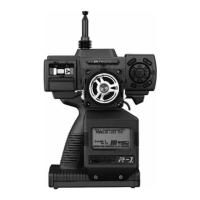
Note: The trimmer switch or button
flashes when selected
Press the SEL key to
select the desired
trimmer, switch or
button
Press the UP key to go to
Reverse Switch
Press the PAGE key to
access the Direct Mode
custom key
Press the CLR key to
inhibit the selected
trimmer, switch or button
Press the DOWN key to
go to Trim Rate
Press the + or – keys to
change the selected
trimmer, switch or button
to the desired function


 To Next Page
 Loading...