– 23 –
4-3. How to select a sewing pattern
*2. For the sewing speed, the maximum sewing speed is limited by the set values of the stitch length and cloth
pulling amount. The set value of sewing speed before the limit is applied is displayed on the operation panel.
In the case the set value of stitch length is 3.1 mm or more: Maximum sewing speed 5000 sti/min
In the case the set value of cloth pulling amount is 4.6 mm or more: Maximum sewing speed 4000 sti/min
*3. Input the stitch length using the memory switch S003 according to the feed amount of the sewing machine. (If
this value is changed, the feed amount of the sewing machine itself will not change.)
→ Referto"4-4. How to change the sewing data" p. 24.
<
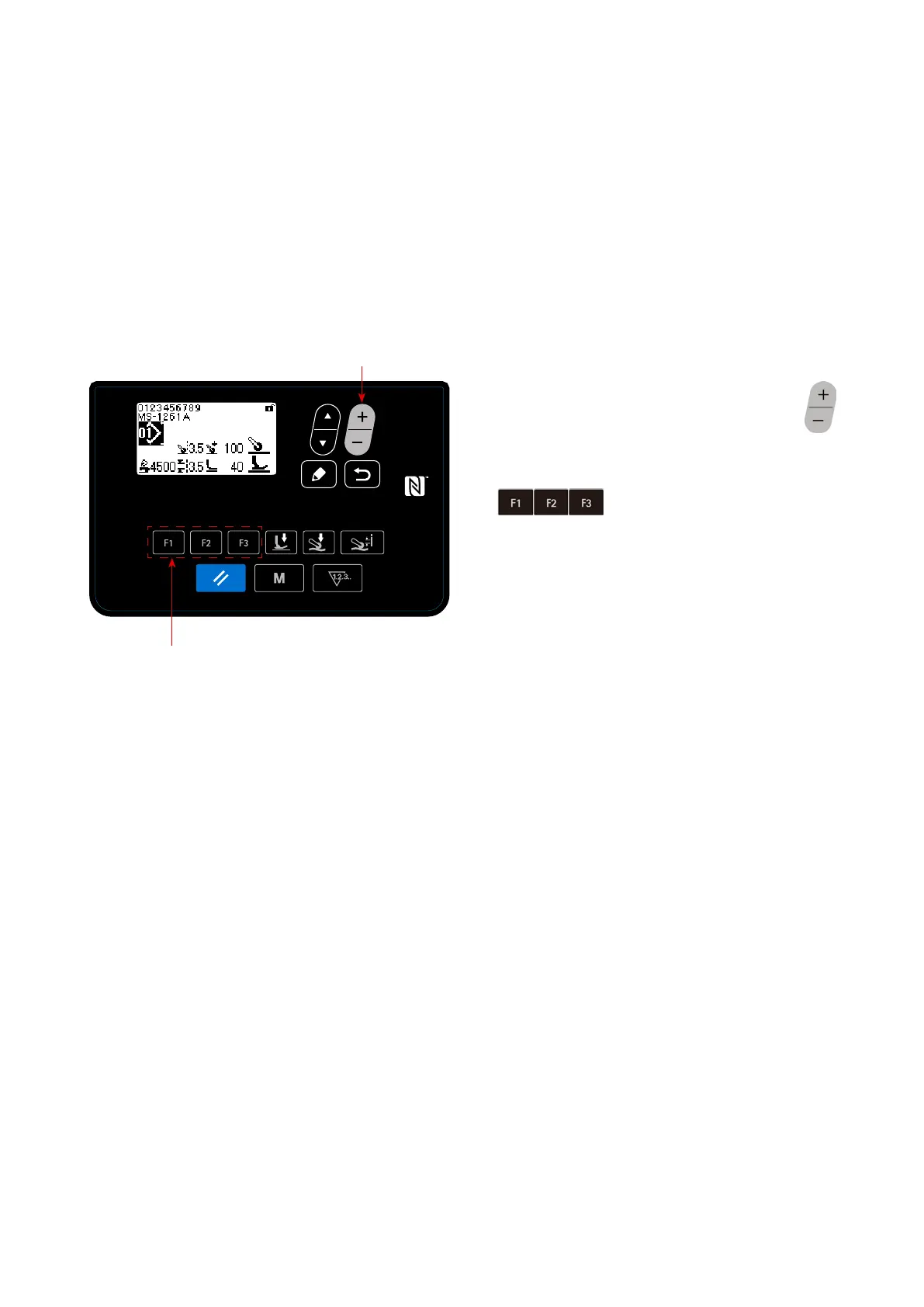
Sewing screen
>
❻
❾
The sewing pattern can be selected by pressing
❻
on the sewing screen.
The sewing pattern can also be changed by press-
ing
❾
to which a sewing pattern has
been registered.
→
Refer to "4-5-5. How to use the F key" p. 59.


 To Next Page
 Loading...