– 58 –
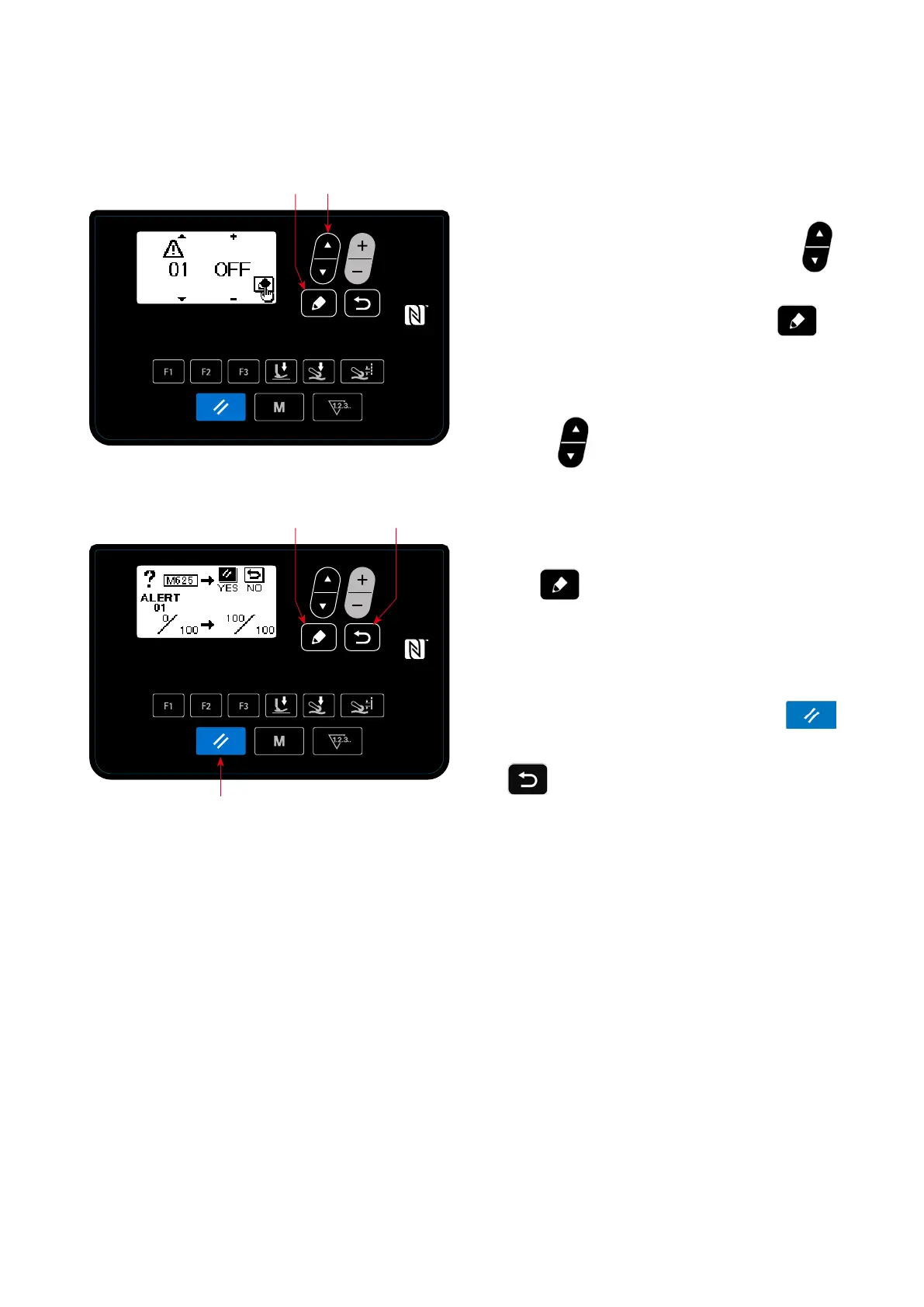
<Warning counter clearing screen>
<Warning number selection screen>
(3) Resetting the warning when no warning is generated
In order to reset the warning in the case that no warning is generated, return the numerator of the counter to
the same value with the dominator of the counter on the warning counter details setting screen, or carry out
the following steps of procedure.
①
Selecting the warning number
Select "04 Maintenance setting" by pressing
❺
on the mode screen. Then, display the warn-
ing number selection screen by pressing
❼
.
After the warning number selection screen is dis-
played, the warning number can be selected by
pressing
❺
.
②
Setting details of the warning
When
❼
is pressed on the warning num-
ber selection screen, the warning counter clearing
screen is displayed.
After the warning counter clearing screen is dis-
played, reset the warning counter and return the
screen to the previous screen by pressing
❷
.
If
❽
is pressed, the screen will return to
the previous screen without resetting the warning
counter.
❺
❼
❼
❽
❷


 To Next Page
 Loading...