SL
47
Delete
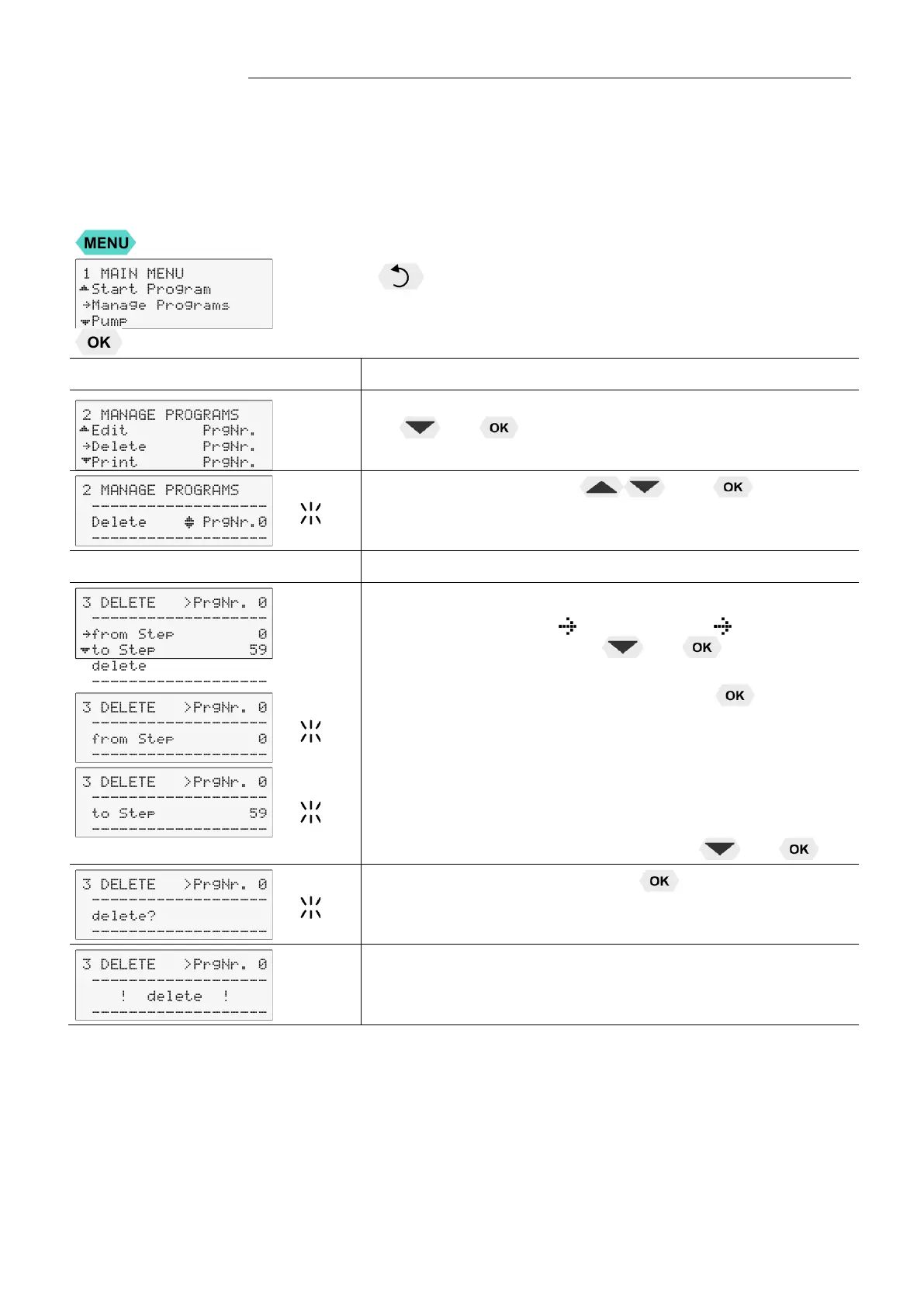
It is possible to delete an entire program or consecutive sections
Delete PrgNr: Set the program you wish to delete
0 ... 5
Delete from Step X to Step X - (0 … 59)
Press the key if a parameter is to be retained. (prior to OK)
Level 2
Submenu >Delete<
• Set menu item >Delete PrgNr.< by pressing
and .
• Set desired PrgNr with and .
Example: PrgNr. 0
Level 3
Input window: delete sections.
• Select menu items >
from Step< and >
to Step< one
after the other by pressing and .
• Select the desired section for every menu item by using the
numeric keypad and confirm by pressing .
Example: >from 0< >to 59<
• Select menu item >delete< by pressing and
• Confirm >Delete?< by pressing
.
The delete procedure is confirm by indication of the
message >delete< on the LCD display.


 To Next Page