Firmware update
Care and maintenance
During care and maintenance activities, always disconnect the HeliaLux SmartControl from the power supply.
If necessary, we recommend cleaning with a soft cloth and mild detergent.
We recommend that you regularly check for firmware updates to ensure optimum
control of your HeliaLux SmartControl. Firmware updates improve performance and may
provide additional features.
1. Establish a connection through your home network to the HeliaLux SmartControl's user
interface. Please refer to '
Connecting the HeliaLux SmartControl to home networks
'.
Notice
Please ensure that your home network has access to the Internet.
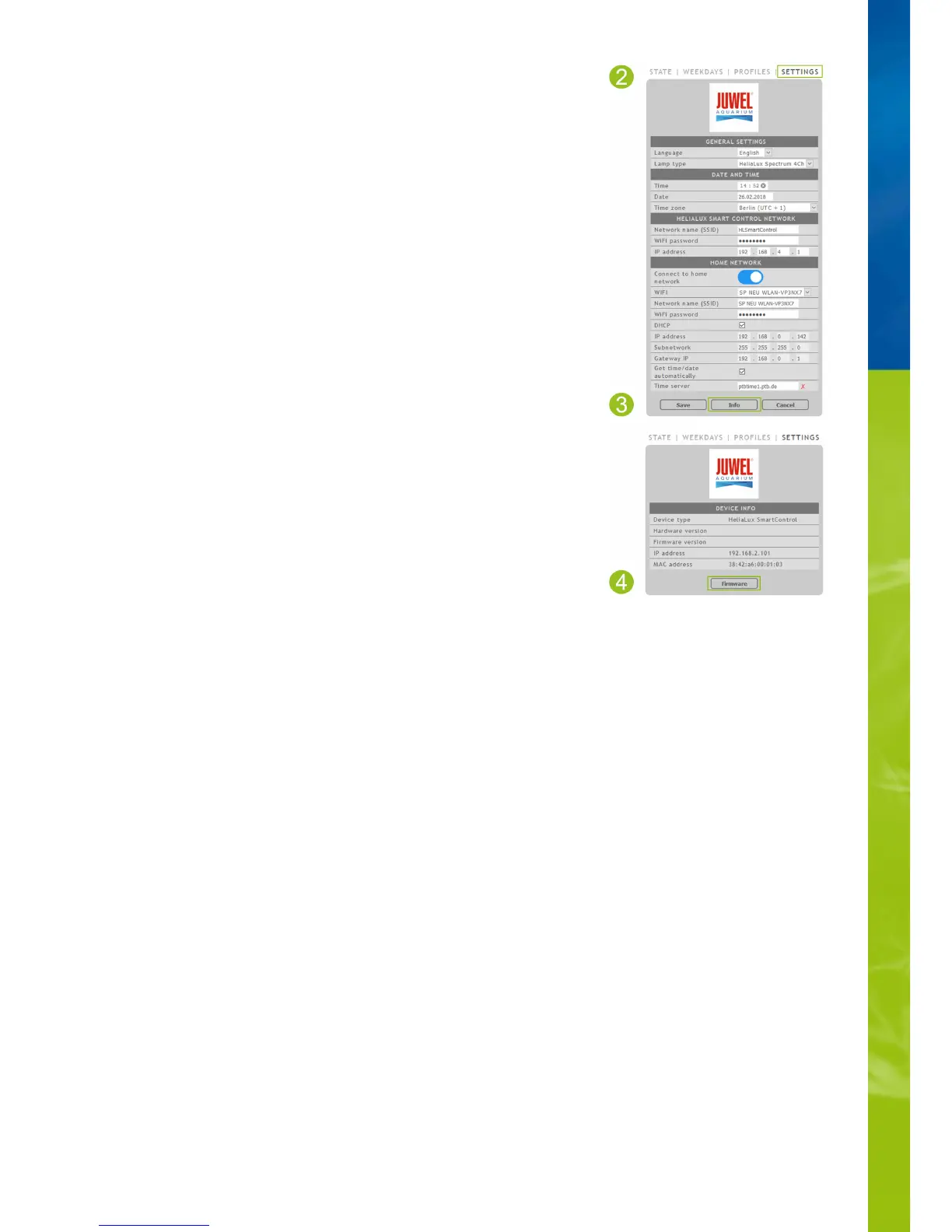
2. Select the main '
Settings
' menu item.
3. Navigate to the '
Info
' button and press it.
4. Press the '
Firmware
' button on the page that is now being displayed. The system will
check for new firmware.
5. Press the '
Update
' button if new firmware is available.
6. The system will automatically install the new firmware and will reboot once
installation has been concluded.
Notice
Do not disconnect the HeliaLux SmartControl from the power during a
firmware update. The resulting loss of data could cause your device to stop
working.


 To Next Page