Introduction
19
Listening to Ra dio Broadcasts
Listening to Radio Broadcasts
This product can receive FM and AM radio
broadcasts.
CAUTION
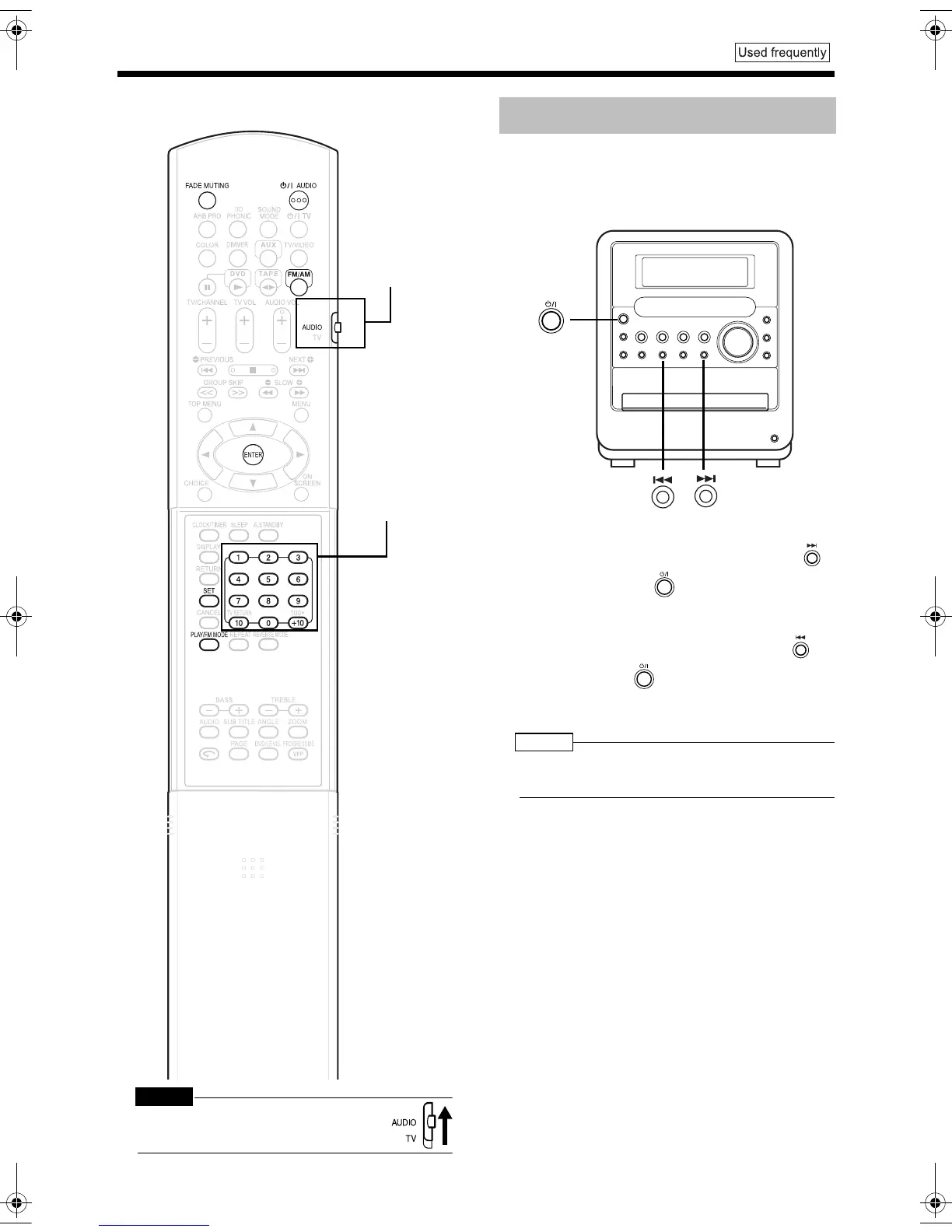
• Set the remote control mode selector to
AUDIO before using the number buttons.
Some countries space AM stations 9 kHz apart,
and other countries use 10 kHz spacing.
On the main unit ONLY:
■When the main unit is turned off
To select 10 kHz spacing, while holding down
on the main unit, press on the main unit to turn
on the power. "AM 10 kHz" appears in the display
window.
To select 9 kHz spacing, while holding down on
the main unit, press on the main unit to turn on
the power. "AM 9 kHz" appears in the display
window.
NOTE
• If the spacing is switched, the memory in which the
radio stations were stored will be erased.
Number buttons
Remote control
mode selector
Setting the AM Tuner Spacing
UX-QD9[A]-03.fm 19 ページ 2004年9月22日 水曜日 午前11時12分


 To Next Page