36
Listening to Discs English
Playing Back MP3/WMA and JPEG Discs
NOTE
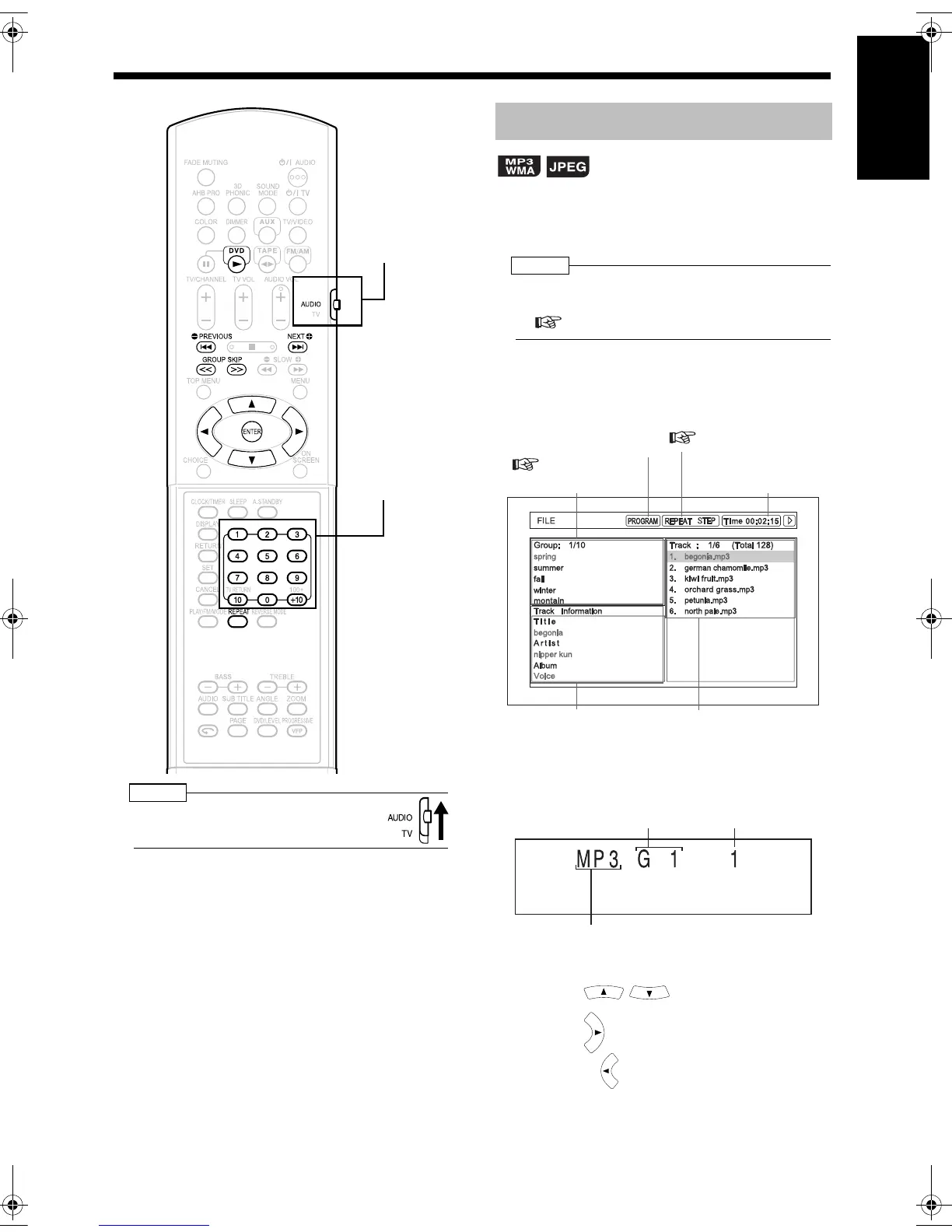
• Set the remote control mode selector to
AUDIO before using the number buttons.
Display of an MP3/WMA disc is described here as
an example.
For a JPEG disc, read "track" as "file".
NOTE
• When playing back a disc containing both MP3/
WMA and JPEG files, set one of them to be played
( page 38).
1 Insert a disc.
Example: TV screen
Example: Display window
2 Press to select a group.
3 Press to move to the track list.
• Pressing returns to the group list.
(Continued on next page)
Number buttons
Remote control
mode selector
Playback
Elapsed playing time of
the selected track
(only for MP3/WMA).
Tag information of the
selected track
(only for MP3s/WMAs)
Group list
Track list (Tracks con-
tained in the selected
group)
This indicator lights up
during program playback
(
page 31).
This indicator lights up
during repeat playback
(
page 37).
Group number Track number
"WMA" is displayed when a WMA disc
is loaded, and "JPG" is displayed when
a JPEG disc is loaded.
UX-QD9[US].book 36 ページ 2004年10月8日 金曜日 午前10時27分


 To Next Page