46
Recording Sound/Convenient Functions
Recording Sound/Convenie nt Functions
Using the Timers
NOTE
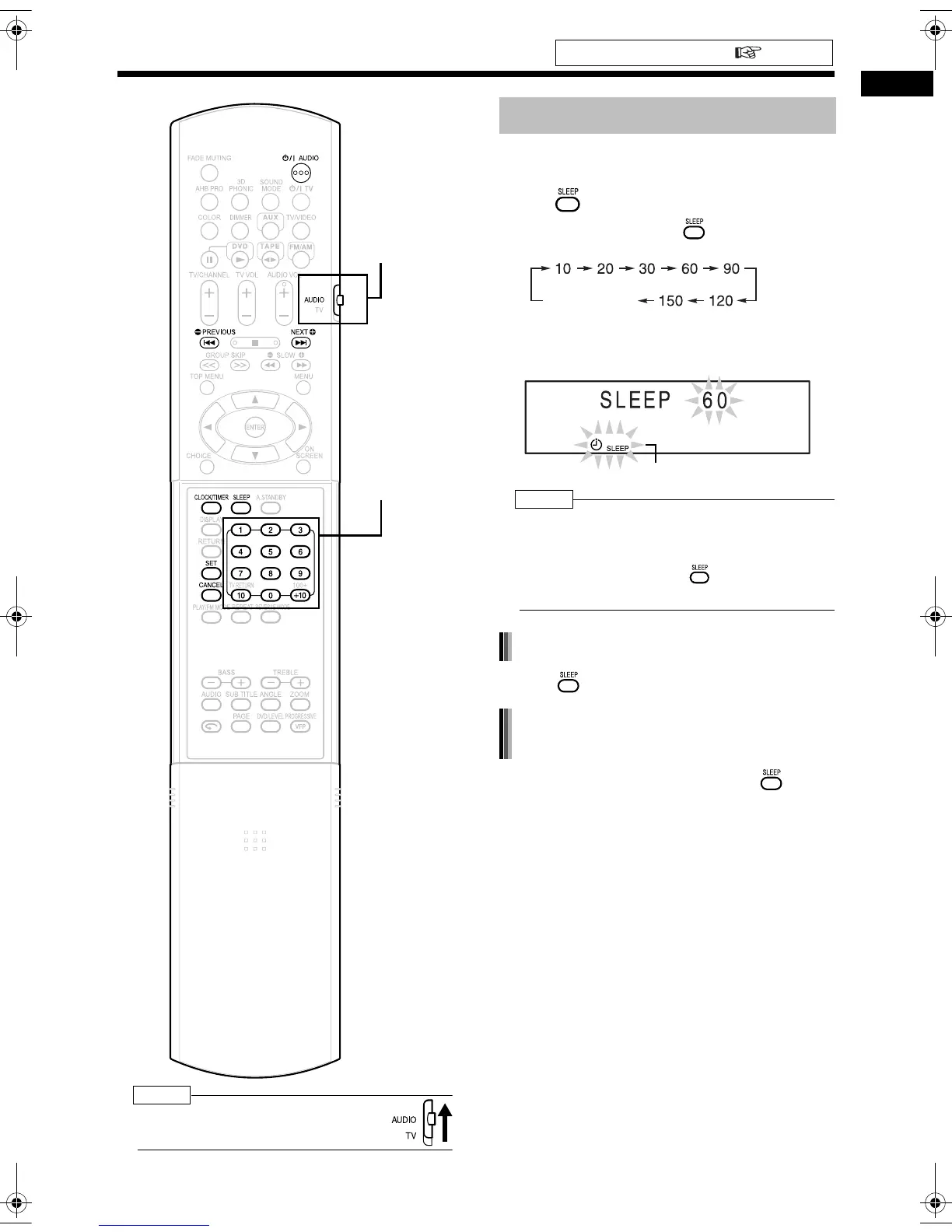
• Set the remote control mode selector to
AUDIO before using the number buttons.
When the specified time passes, the main unit
automatically turns off.
Press .
• Each time you press , the time display
(in minutes) toggles as follows.
Example: Display while the sleep timer is set to
60 minutes
NOTE
• When you set the sleep timer, the display window
automatically dims.
• Before the clock has been set (While "0:00" is
flashing), when you press , "CLOCK
ADJUST!" appears.
• Press repeatedly to select the time again.
• With the sleep timer activated, press once.
Set the clock beforehand ( page 16).
Number buttons
Remote control
mode selector
Sleep Timer
Cancel (Sleep
indicator disappears.)
Sleep indicator
Changing the sleep timer setting
Confirming the sleep timer setting
(remaining time)
UX-QD9[A]-05.fm 46 ページ 2004年9月7日 火曜日 午前11時35分


 To Next Page