Introduction
25
(Continued)
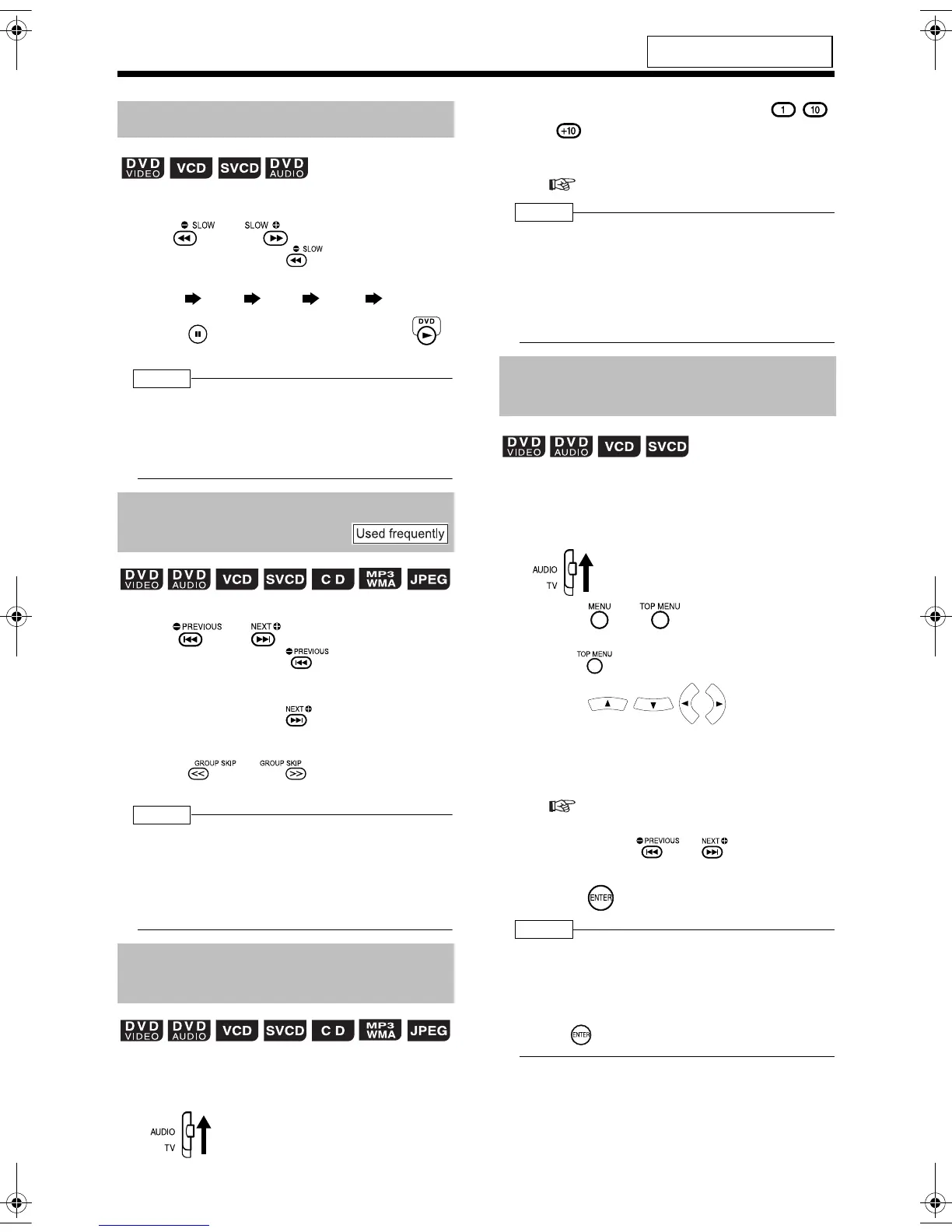
Basic Operations of the DVD Player
■ While a disc is paused
Press or .
• Each time you press , the speed
increases as shown below.
• Press
to pause playback, and press
to resume normal playback.
NOTE
• No sound will be produced.
• The picture motion in the reverse direction may
not be smooth.
• For a VCD or SVCD, slow motion playback can
be carried out in the forward direction only.
■ While a disc is being played back*
Press or .
• Each time you press , the current
chapter/track/file skips to the beginning of the
previous chapter/track/file.
• Each time you press , the current chapter/
track/file skips to the beginning of the next
chapter/track/file.
•Press or to select a title or
group.
NOTE
* For a VCD or SVCD, this operation can be carried
out only during playback without the PBC function.
• Except for a DVD VIDEO, this operation can also
be carried out while the disc is stopped.
• This operation may not be carried out for some
discs.
■ While a disc is being played back
1 Set the remote control mode
selector to AUDIO.
2 Press the number buttons ( -
or ) to select the track/chapter
you want to listen to.
• Refer to "Using the number buttons"
( page 16).
NOTE
• You can operate a VCD or SVCD while the disc is
stopped or played back with PBC off.
• You can operate a DVD AUDIO, CD, MP3, WMA,
or JPEG while the disc is either played back or
stopped.
• This operation may not be carried out for some
discs.
■While a disc is stopped or being played
back*
1 Set the remote control mode
selector to AUDIO.
2 Press or .
• A menu screen of the disc appears.
• Only can be used for DVD AUDIOs.
3 Press (only for a
DVD VIDEO or a DVD AUDIO) or
the number buttons to select a
track you want to listen to.
• Refer to "Using the number buttons"
( page 16).
• If there are two or more pages of menu
screen, press or to change the
pages (only for a VCD or SVCD).
4 Press .
NOTE
* You can operate a VCD or SVCD while PBC is set
to off.
• You cannot perform this function with discs to
which a menu screen is not recorded.
• Some disc may start playback even if you do not
press .
For the locations of remote control
buttons, refer to page 21.
Slow Motion Playback
Skipping to the Beginning of a
Track
Skipping to the Beginning of a
Track with the Number Buttons
(only for moving image)
32
/
1
16
/
1
8
/
1
4
/
1
2
/
1
Selecting a Track from the
Menu Screen
UX-QD9[A]-03.fm 25 ページ 2004年9月22日 水曜日 午前11時15分


 To Next Page