42
Listening to Discs/Listening to Cassette Tapes
Listening to Di scs/Listening to C assette Tapes
Listening to Cassette Tapes
1 Insert a cassette tape.
CAUTION
• Before using a cassette tape, wind up any slack in
the cassette tape. ( page 52)
• Do not use long cassette tapes such as C-120 or
C-150. Long cassette tapes are thin and stretch
easily, and may become tangled in the inner part
of the main unit.
• This product is compatible with playback of
TYPE I cassette tapes. Playback of TYPE II or
TYPE IV cassette tapes is not recommended,
because this product does not meet the specifi-
cations for these tapes. The main unit does not
produce the proper sound from these cassette
tape types.
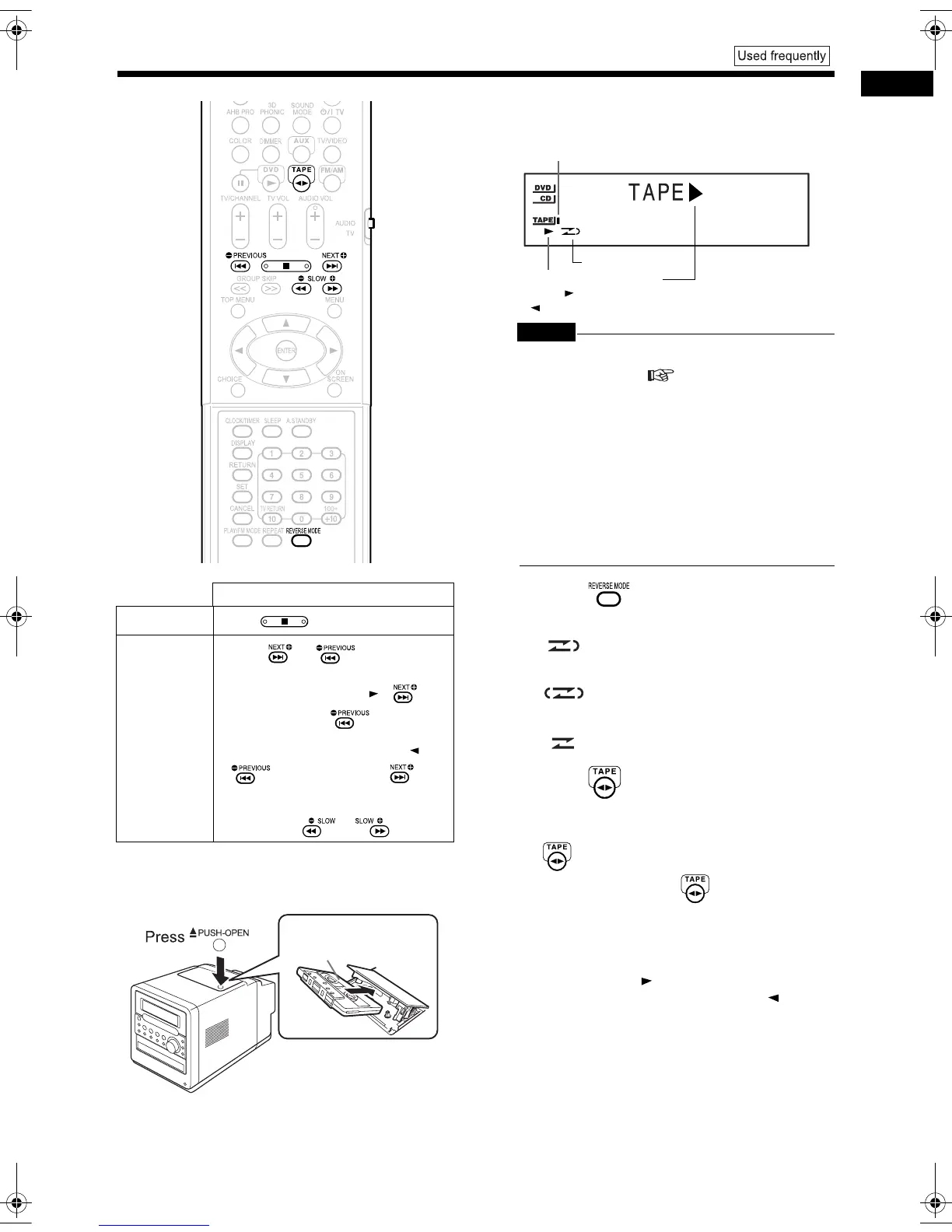
2 Press repeatedly to select
the reverse mode.
3 Press .
• Playback starts.
• When the main unit is turned off, pressing
automatically turns on the main unit.
• Each time you press , the cassette tape
playback direction changes. The initial play-
back direction after you have inserted a cas-
sette tape is always the normal direction.
• The cassette tape playback direction indica-
tor facing right is displayed during normal
playback. The indicator facing left is dis-
played during reverse playback.
Operation
Stop
Press .
Fast forward/
Rewind
Press or .
• When a cassette tape is played back
in the normal direction ( ), is
fast forward and is rewind.
• When the cassette tape is played
back in the opposite direction ( ),
is fast forward and is
rewind.
• You can perform the same operation
by pressing or .
Insert a cassette tape
with the side you want to
listen to facing up.
Cassette tape indicator
(The cassette tape indicator lights up while the cas-
sette tape is stopped. The cassette tape indicator
flashes while the cassette tape is being played back.)
Reverse mode
Cassette tape playback
direction ( : normal direc-
tion/ : opposite direction)
: For one return playback of both
sides.
: For repeated playback of both sides
(Playback continues until playback is
stopped.)
: For one-way playback of either side.
UX-QD9[A]-04.fm 42 ページ 2004年9月27日 月曜日 午後2時1分


 To Next Page