Introduction
31
(Continued)
Convenient Functions of the DVD Player
You can program a maximum of 99 chapters or
tracks. You can program the same chapter or track
more than once.
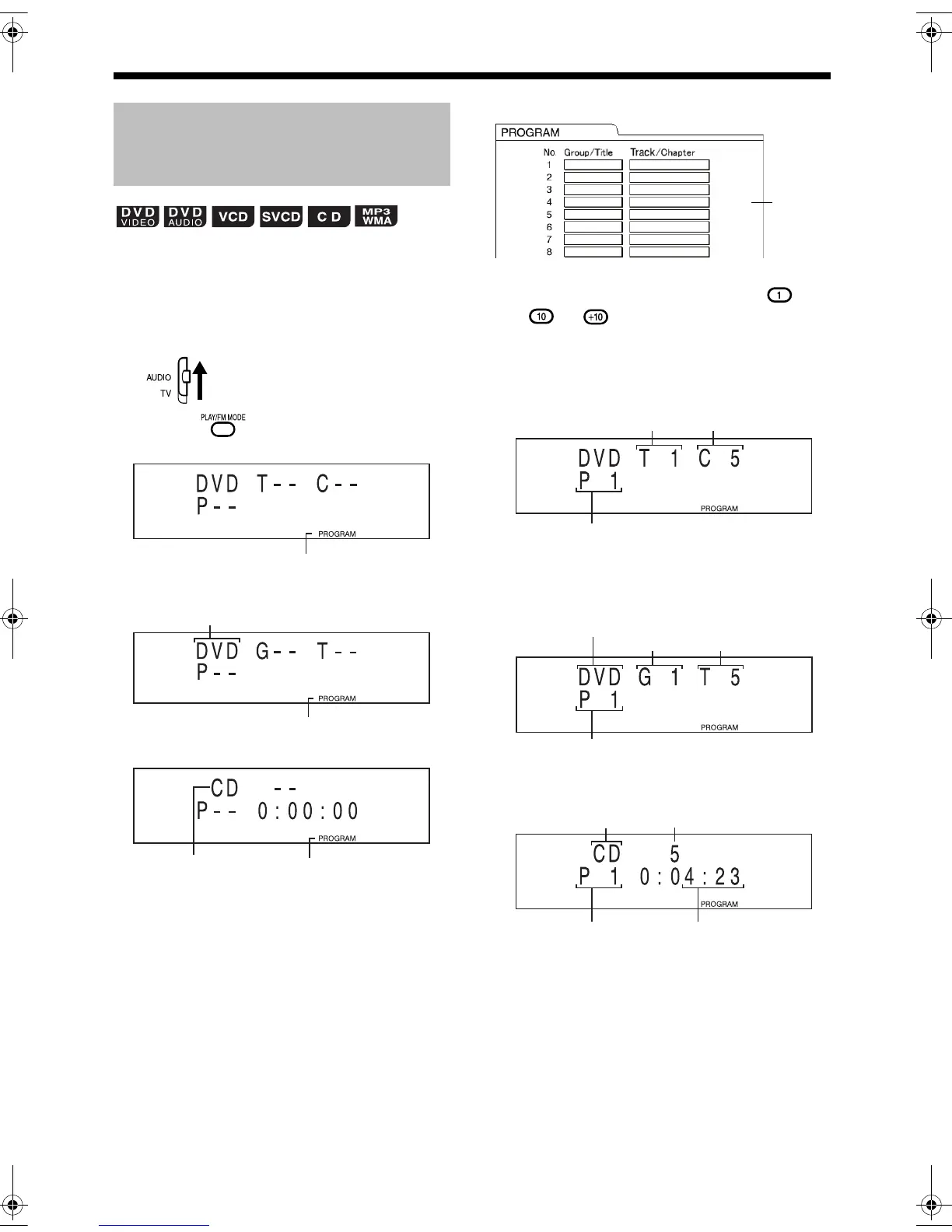
■ While a disc is stopped
1 Set the remote control mode
selector to AUDIO.
2 Press to select "PROGRAM".
■ Display for DVD VIDEO
■ Display for DVD AUDIO/MP3/WMA
■ Display for CD/VCD/SVCD
Example: For DVD VIDEO
3 Press the number buttons ( -
or ) to program chapters/
tracks.
■Display for DVD VIDEO
• Select a title number, and then select a
chapter number.
■Display for DVD AUDIO/MP3/WMA
• Select a group number, and then select a
track number.
■Display for CD/VCD/SVCD
• Select a track number.
Playing Back the Disc in the
Desired Order (Program
Playback)
Program indicator
Program indicator
DVD, MP3 or WMA
Program indicator"VCD" is displayed while
VCD/SVCD is selected.
TV screen
Program
screen
Program number
Title number Chapter number
Group number
Track number
Program number
DVD, MP3 or WMA
Program number Total time for
program playback
Track number
CD or VCD
UX-QD9[US].book 31 ページ 2004年10月8日 金曜日 午前10時27分


 To Next Page