Introduction
27
(Continued)
Convenient Functions of the DVD Player
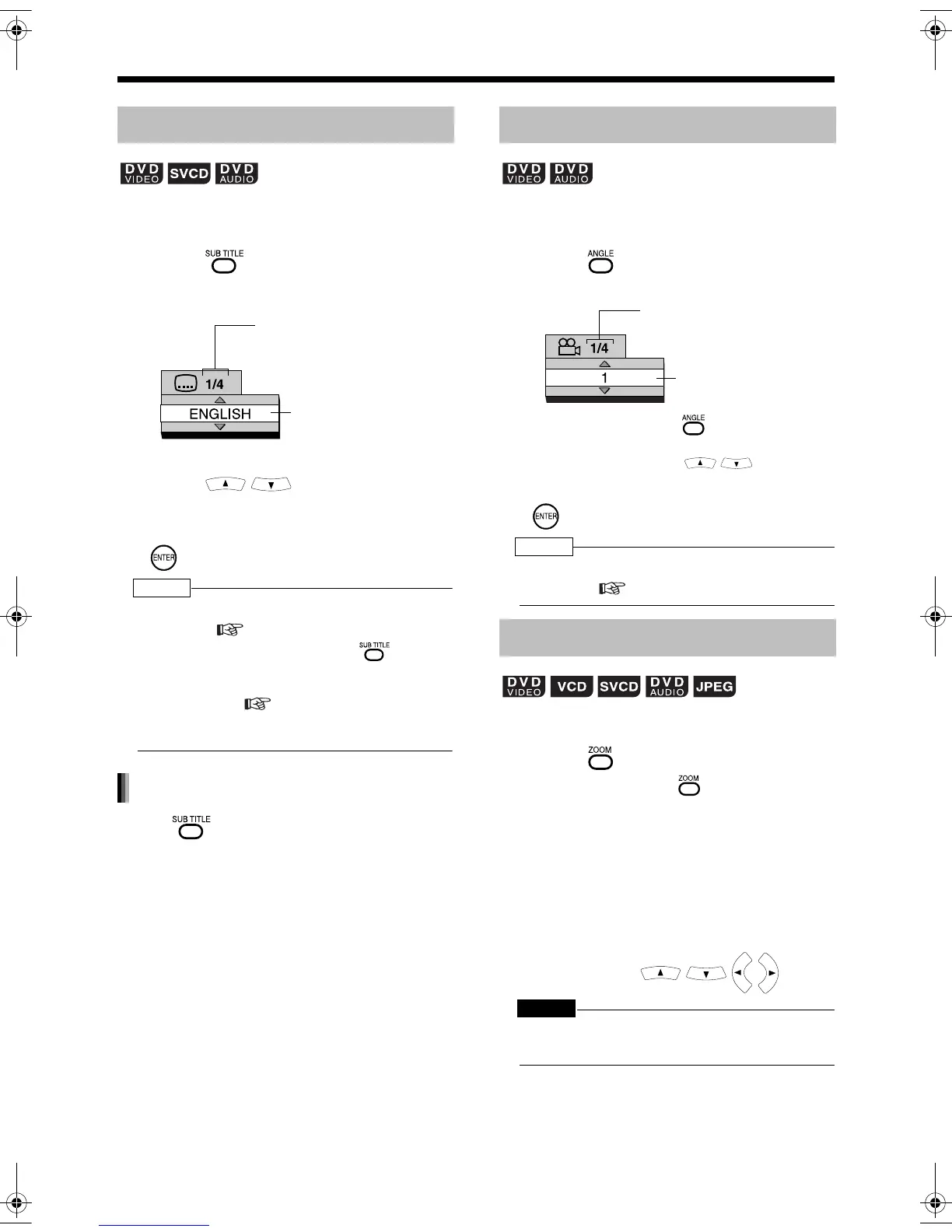
■ While a disc containing two or more subti-
tles is being played back
1 Press .
Example: TV screen
2 Press to select a
subtitle.
3 Wait for a few seconds or press
.
NOTE
• You can also operate this function by using the
menu bar ( page 34).
• For an SVCD, each time you press in step
1, the subtitle type and ON/OFF will be changed.
• For a language code such as "AA", refer to "Lan-
guage Codes" ( page 41).
• The manner of displaying subtitles may be differ-
ent depending on the disc.
Press to select "OFF".
■While a disc containing two or more view
angles is being played back
1 Press .
Example: TV screen
• Each time you press , the angle will
be changed. The angle can also be
changed by pressing .
2 Wait for a few seconds or press
.
NOTE
• You can also operate this function by using the
menu bar ( page 34).
■While a disc is played back or paused
1 Press .
• Each time you press , the picture
magnification will be changed (OFF,
ZOOM1 - 6).
• When a JPEG disc is used, the picture
magnification changes through "ZOOM
1", "ZOOM 2" to "OFF". You cannot
change the picture magnification during
slide-show playback.
2 Select the portion you want to see
by pressing .
CAUTION
• When you magnify a picture, image quality may be
deteriorated or image may be distorted.
Selecting the Subtitle
(only for moving image)
Selected subtitle/Total
number of subtitles
(When no subtitle is
set in the disc, "--"
appears.)
Selected subtitle
(When no
subtitle is set in
the disc, "OFF"
appears.)
Canceling the subtitle
Selecting a View Angle
Magnifying the Picture (ZOOM)
(only for moving image)
Selected view angle/
Total number of view
angles
Selected
view angle
(only for moving image)
UX-QD9[A].book 27 ページ 2004年9月6日 月曜日 午後3時21分


 To Next Page