26
Listening to Discs English
Listening to Di scs
Convenient Functions of the DVD Player
NOTE
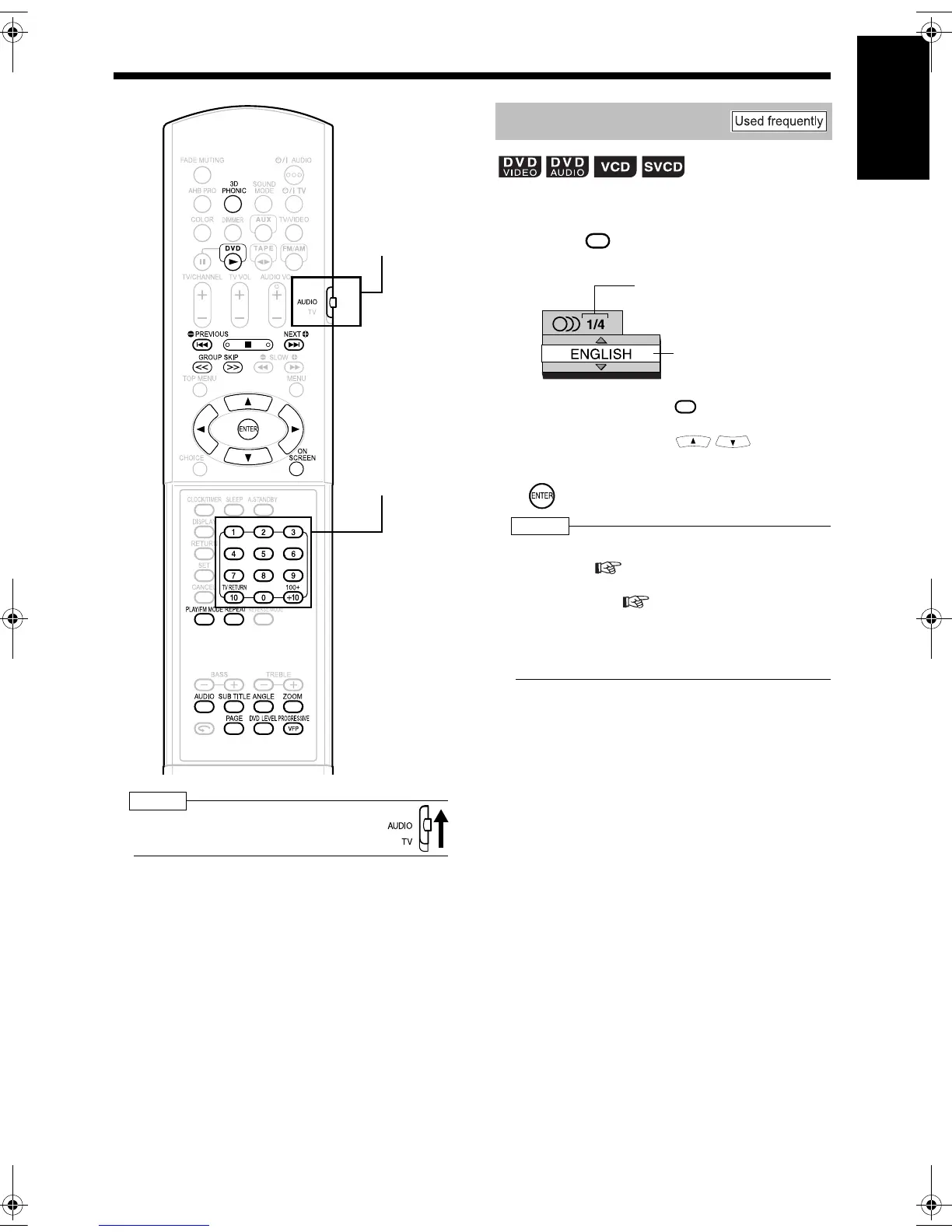
• Set the remote control mode selector to
AUDIO before using the number buttons.
■While a disc containing two or more audio
is being played back
1 Press .
Example: TV screen
• Each time you press , the audio will
be changed. The audio can also be
changed by pressing .
2 Wait for a few seconds or press
.
NOTE
• You can also operate this function by using the
menu bar ( page 34).
• For a language code such as "AA", refer to "Lan-
guage Codes" ( page 41).
• When 2 channel sounds are recorded in 1/2 and
multi channel sounds with down-mix prohibited
are recorded in 2/2 in a DVD AUDIO, you can
select 1/2 only.
Remote control
mode selector
Number buttons
Selecting the Audio
AUDIO
Selected audio/Total
number of audio
Selected audio
AUDIO
UX-QD9[US].book 26 ページ 2004年10月8日 金曜日 午前10時27分


 To Next Page