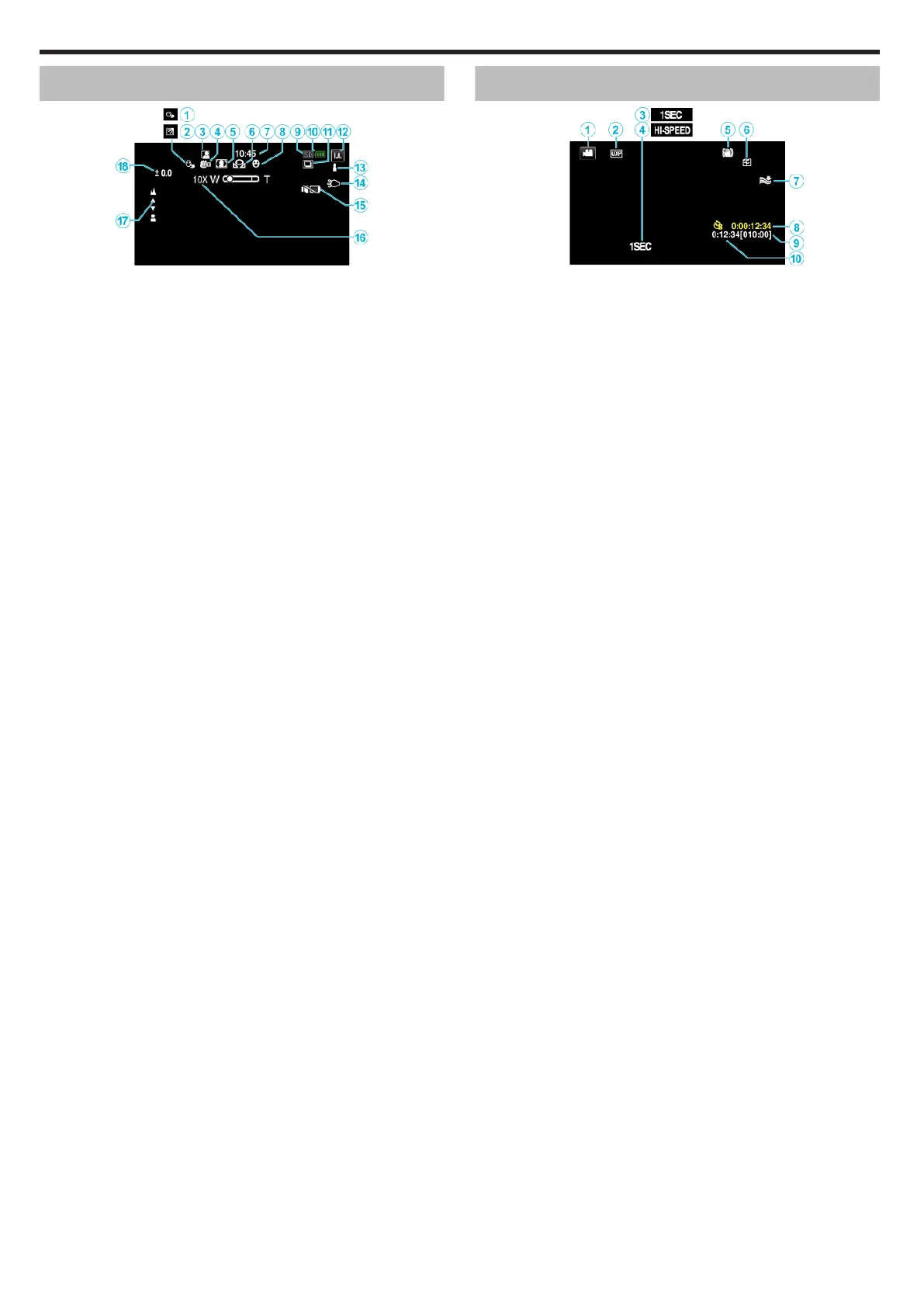
Common Recording Indications
.
A TOUCH PRIORITY AE/AF
“Capturing Subjects Clearly (TOUCH PRIORITY AE/AF)” (A p. 46)
B Backlight Compensation
“Setting Backlight Compensation” (A p. 37)
C Auto REC
“Recording Automatically by Sensing Movements (AUTO REC)” (A p. 59)
D Tele Macro
“Taking Close-up Shots” (A p. 39)
E Scene Select
“Shooting According to Scene (Subject)” (A p. 34)
F
WHITE BALANCE
“Setting White Balance” (A p. 38)
G
Time
“Clock Setting” (A p. 21)
H
SMILE SHOT
“Capturing Smiles Automatically (SMILE SHOT)” (A p. 47)
I
Recording media
“REC MEDIA FOR VIDEO(GZ-EX575/GZ-EX555/GZ-E565)” (A p. 245)
“REC MEDIA FOR IMAGE(GZ-EX575/GZ-EX555/GZ-E565)” (A p. 245)
J Battery Indicator
K CONTINUOUS SHOOTING
“SHUTTER MODE (Video)” (A p. 231)
“SHUTTER MODE (Still Image)” (A p. 236)
L Recording Mode
“Taking Videos in Auto Mode” (A p. 26)
“Manual Recording” (A p. 32)
M Setting Scenes of Intelligent Auto
0
Displays scenes detected automatically in the Intelligent Auto function.
Multiple scenes may be detected.
“Scenes of Intelligent Auto” (A p. 27)
N Light
“ LIGHT ” (A p. 230)
O SILENT MODE
“Using the Silent Mode” (A p. 28)
P
Zoom
“ ZOOM ” (A p. 232)
Q
Focus
“Adjusting Focus Manually” (A p. 35)
R
Brightness
“Adjusting Brightness” (A p. 36)
Video Recording
.
A Video Mode
0
Switches between video and still image modes.
B Video Quality
“ VIDEO QUALITY ” (A p. 232)
C TIME-LAPSE RECORDING(1SEC)
“Recording at Intervals (TIME-LAPSE RECORDING)” (A p. 56)
D HIGH SPEED RECORDING
“Slow-motion (High-speed) Recording” (A p. 55)
E Image Stabilizer
“Reducing Camera Shake” (A p. 54)
F
Seamless Recording
F Wind Cut
“ WIND CUT ” (A p. 231)
G Time-Lapse Recording Counter
“Recording at Intervals (TIME-LAPSE RECORDING)” (A p. 56)
H Remaining Recording Time
“Checking the Remaining Recording Time” (A p. 63)
I Scene Counter
Indications on the LCD monitor
250


 To Next Page