Deleting Playlists
Delete the playlists that you have created.
0
*The following is a screen of the model with the built-in memory.
1
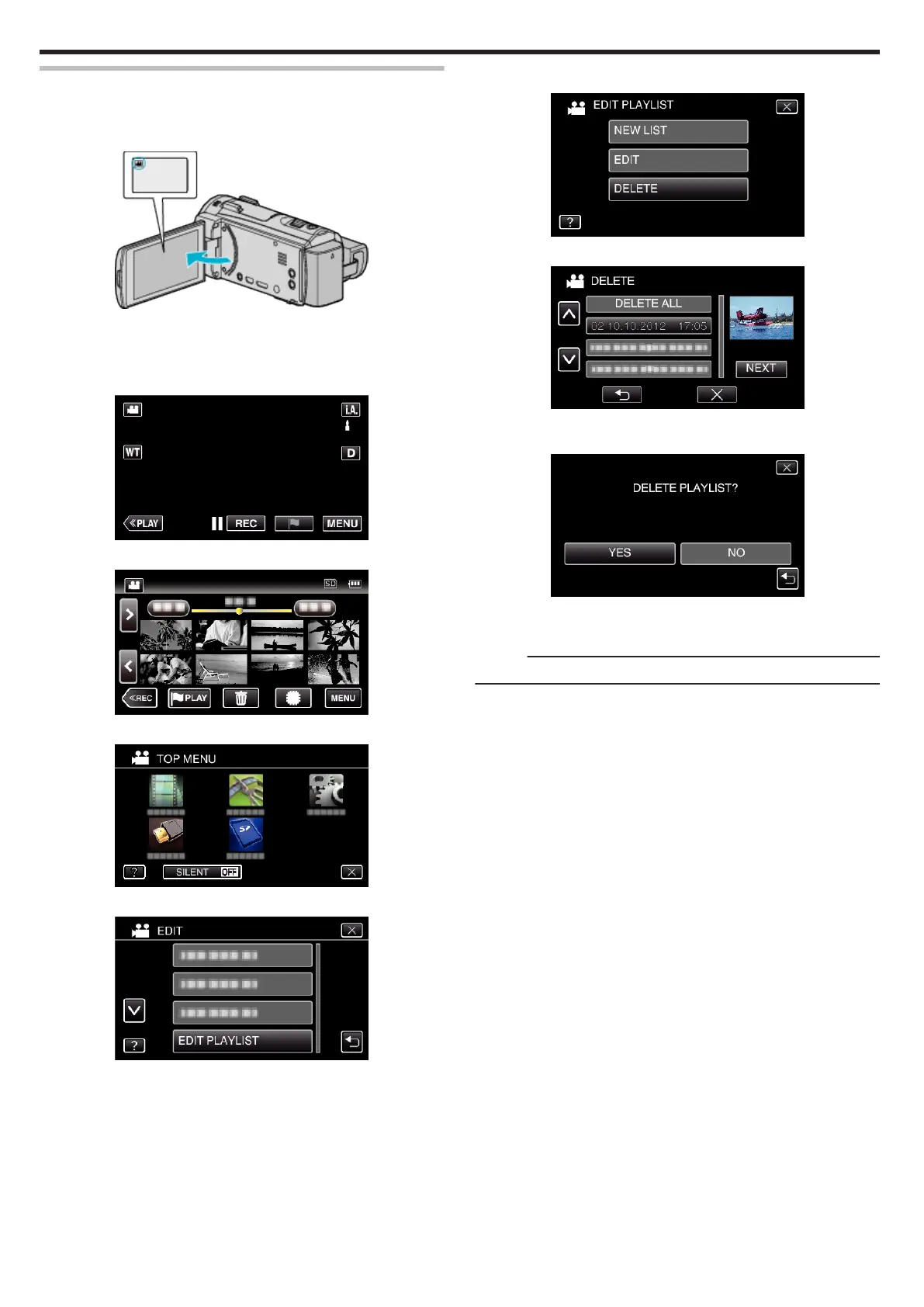
Open the LCD monitor.
.
0
Check if the recording mode is A.
0
If the mode is B still image, tap B on the recording screen to display
the mode switching screen.
Tap A to switch the mode to video.
2
Tap “<<PLAY” to select the playback mode.
.
3
Tap “MENU”.
.
4
Tap “EDIT”.
.
5
Tap “EDIT PLAYLIST”.
.
6
Tap “DELETE”.
.
7
Tap on the playlist to delete, and tap “NEXT”.
.
0
All created playlists will be deleted when “DELETE ALL” is selected.
8
Tap “YES” to confirm the deletion.
.
0
After deleting, tap “OK”.
0
After deleting is complete, the screen returns to the delete playlist
selection screen.
Memo :
0
Tap L on each screen to exit the menu.
Editing
94


 To Next Page