Recording Automatically by Sensing
Movements (AUTO REC)
This function enables the unit to record automatically by sensing the changes
in subject’s movement (brightness) within the red frame displayed on the
LCD monitor.
It can be set for both video and still image modes.
*The following is a screen of the model with Wi-Fi functions.
1
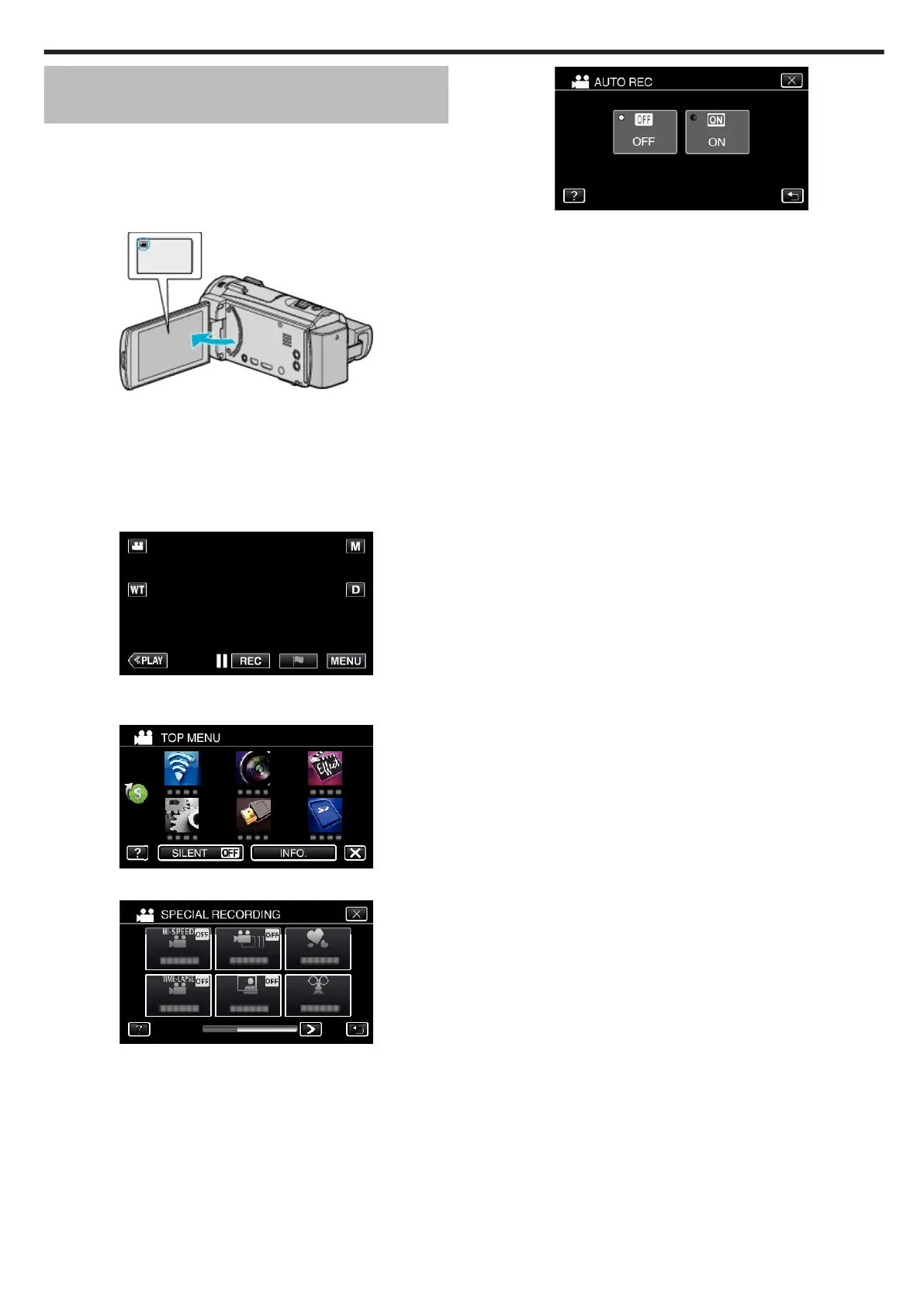
Open the LCD monitor.
.
0
Set the recording mode to either A video or B still image.
0
To switch the mode between video and still image, tap
A
or
B
on the
recording screen to display the mode switching screen.
Tap
A
or
B
to switch the mode to video or still image respectively.
2
Compose the picture according to the subject.
0
Adjust the angle of view with the zoom, etc.
3
Tap “MENU”.
.
0
The top menu appears.
4
Tap “SPECIAL RECORDING”.
.
5
Tap “AUTO REC”.
.
0
Tap L to exit the menu.
0
Tap J to return to the previous screen.
6
Tap “ON”.
.
Recording
59


 To Next Page