0
To check the created disc, refer to ““Playing Back with a BD Writer
(External Blu-ray Drive)” (A p. 102) ”.
“Playing Back with a BD Writer (External Blu-ray Drive)” (A p. 102)
Copying Selected Playlists
Arrange and copy the created playlists in the order you like.
0
*The following is a screen of the model with the built-in memory.
1
Select video mode.
2
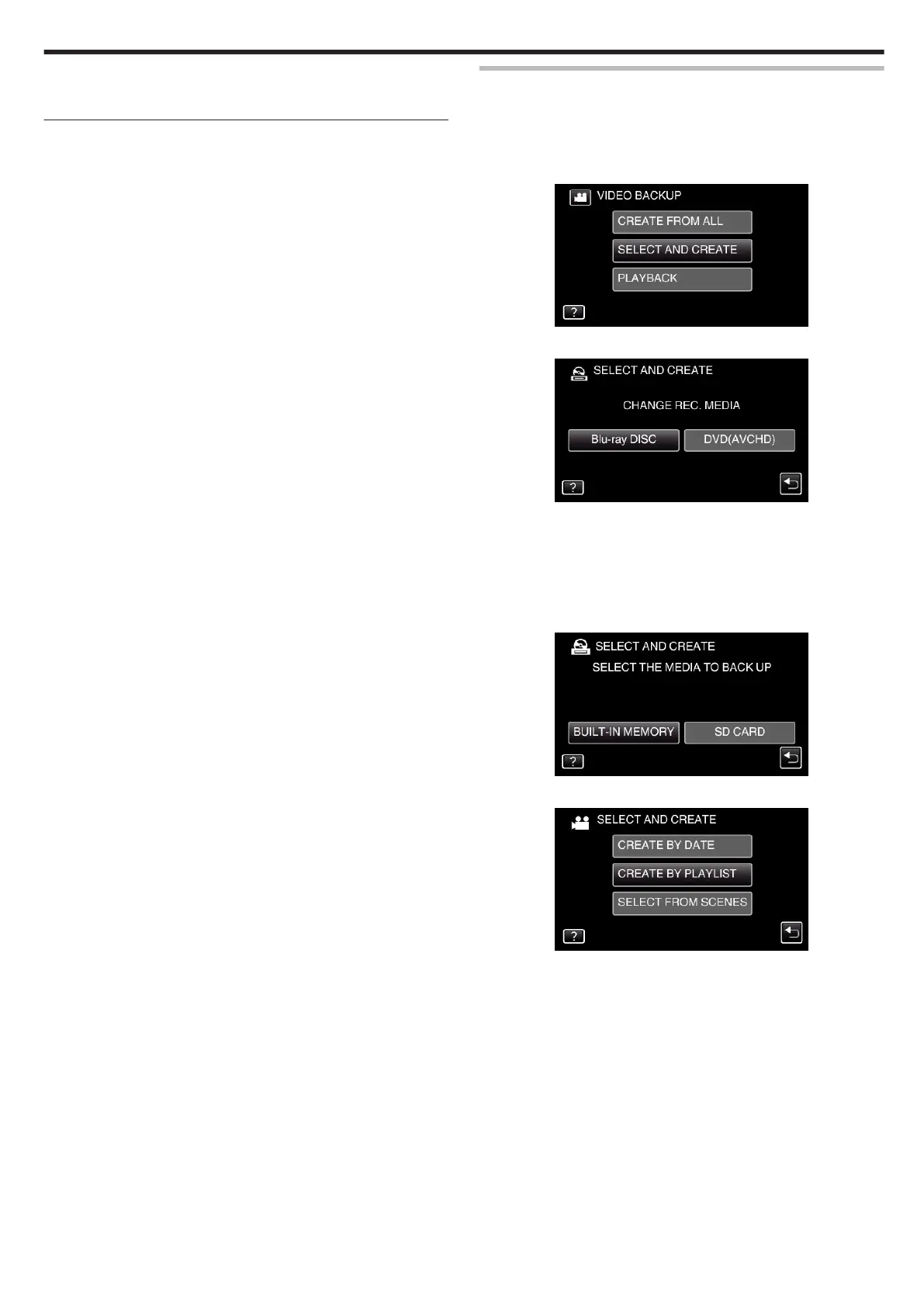
Tap “SELECT AND CREATE”.
.
3
Tap “Blu-ray DISC” or “DVD(AVCHD)”.
.
0
The media changes to the tapped item. Select the appropriate setting
according to the disc.
0
Selecting “Blu-ray DISC” enables you to save videos in a Blu-ray disc
in the high definition quality.
0
Selecting “DVD(AVCHD)” enables you to save videos in a DVD in the
high definition quality.
4
Tap the media you would like to make a backup.
.
5
Tap “CREATE BY PLAYLIST”.
.
Copying
99


 To Next Page