ENGLISH
18
: Stop play
: Pause (Frame-by-frame playback if
pressed during pause.)
: Start play
: Reverse/forward track search *
6
: Press: Select track
Hold: Reverse/fast-forward track
search *
7
: Select folder
: • Return/advance the scenes
by about 5 minutes (see right
column).
• DivX: Select chapter.
: DivX: Select subtitle language
: DivX: Select audio language
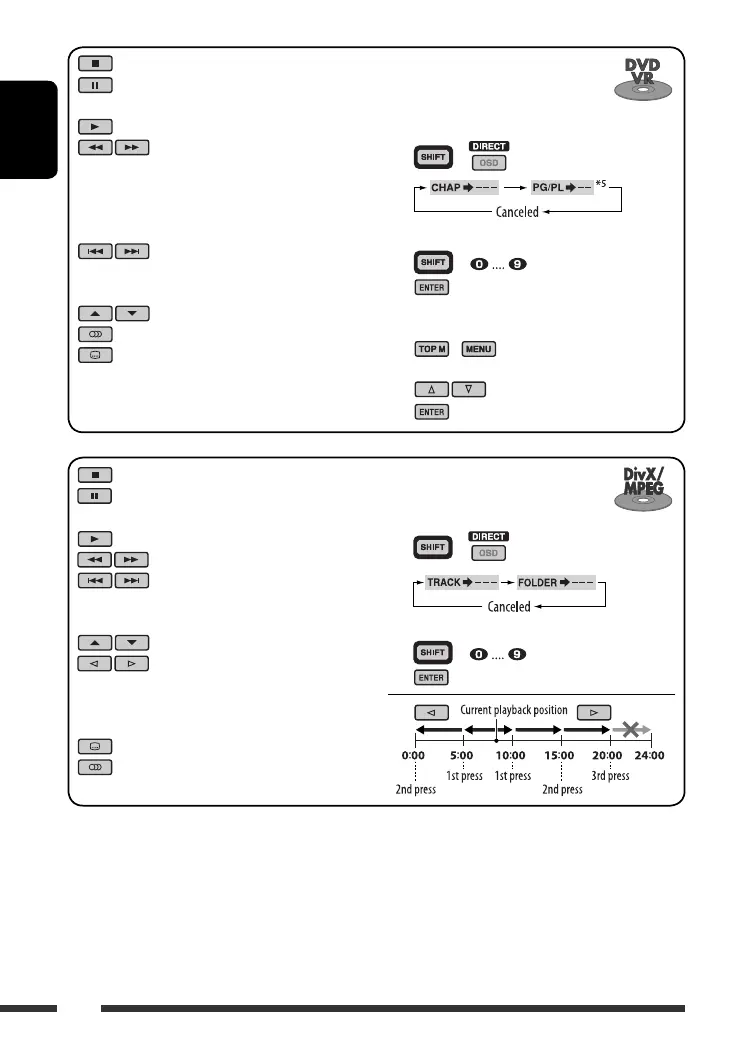
To search for track (within the same
folder)/folder directly
1 Select track/folder search.
+
2 Enter the desired number.
+
3
To search for chapter/program/
playlist directly
1 Select chapter/program/playlist
search.
+
2 Enter the desired number.
+
3
Using menu driven features...
1 /
2 Select an item you want to start play.
3
: Stop play
: Pause (Frame-by-frame playback if
pressed during pause.)
: Start play
: Reverse/forward chapter search *
1
• Forward slow motion *
2
during
pause. No sound can be heard.
(Reverse slow motion does not
work.)
: Press: Select chapter *
3
Hold: Reverse/fast-forward chapter
search *
4
: Select program/playlist
: Select audio channel
: Select subtitle language
*
1
Search speed changes to × 2 ] × 5 ] × 10 ] × 20 ] × 60 on the monitor if pressed repeatedly.
*
2
Slow motion speed changes to 1/32 ] 1/16 ] 1/8 ] 1/4 ] 1/2 on the monitor if pressed repeatedly.
*
3
During play or pause
*
4
Search speed changes to × 2 ] × 10 on the monitor.
*
5
During Original program playback (PG)/Playlist playback (PL)
*
6
Search speed changes 1 ] 2 ] 3 on the monitor if pressed repeatedly.
*
7
Search speed changes 1 ] 2 on the monitor.
EN16-23_DV8306_001A_f.indd 18EN16-23_DV8306_001A_f.indd 18 4/24/07 12:53:48 PM4/24/07 12:53:48 PM



 To Next Page