ENGLISH
17OPERATIONS
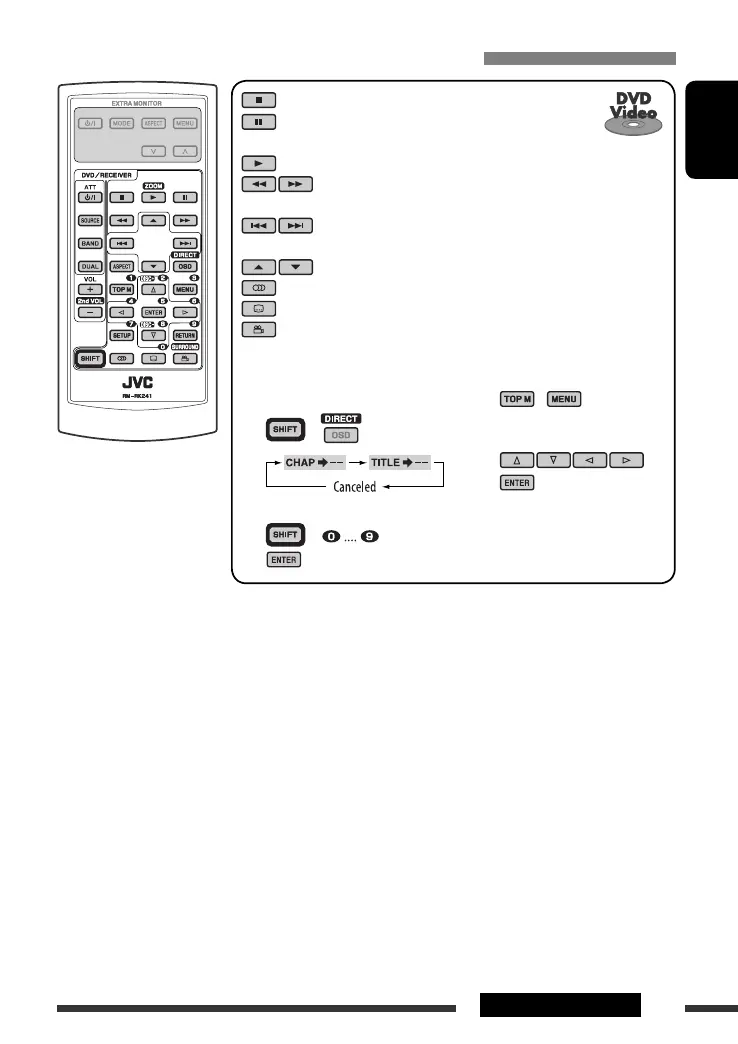
To search for chapter/title directly
1 Select chapter/title search.
+
2 Enter the desired number.
+
3
Operations using the remote controller—RM-RK241
: Stop play
: Pause (Frame-by-frame playback if pressed during
pause.)
: Start play
: Reverse/forward chapter search *
1
• Slow motion *
2
during pause. No sound can be heard.
: Press: Select chapter *
3
Hold: Reverse/fast-forward chapter search *
4
: Select title *
3
: Select audio language
: Select subtitle language
: Select view angle
Using menu driven features...
1 /
2 Select the item you want to
start playing.
3
*
1
Search speed changes to × 2 ] × 5 ] × 10 ] × 20 ] × 60 on the monitor if pressed repeatedly.
*
2
Slow motion speed changes to 1/32 ] 1/16 ] 1/8 ] 1/4 ] 1/2 on the monitor if pressed repeatedly.
*
3
During play or pause
*
4
Search speed changes to × 2 ] × 10 on the monitor.
Continued on the next page
EN16-23_DV8306_001A_2.indd 17EN16-23_DV8306_001A_2.indd 17 4/10/07 2:23:42 PM4/10/07 2:23:42 PM



 To Next Page