ENGLISH
25
1
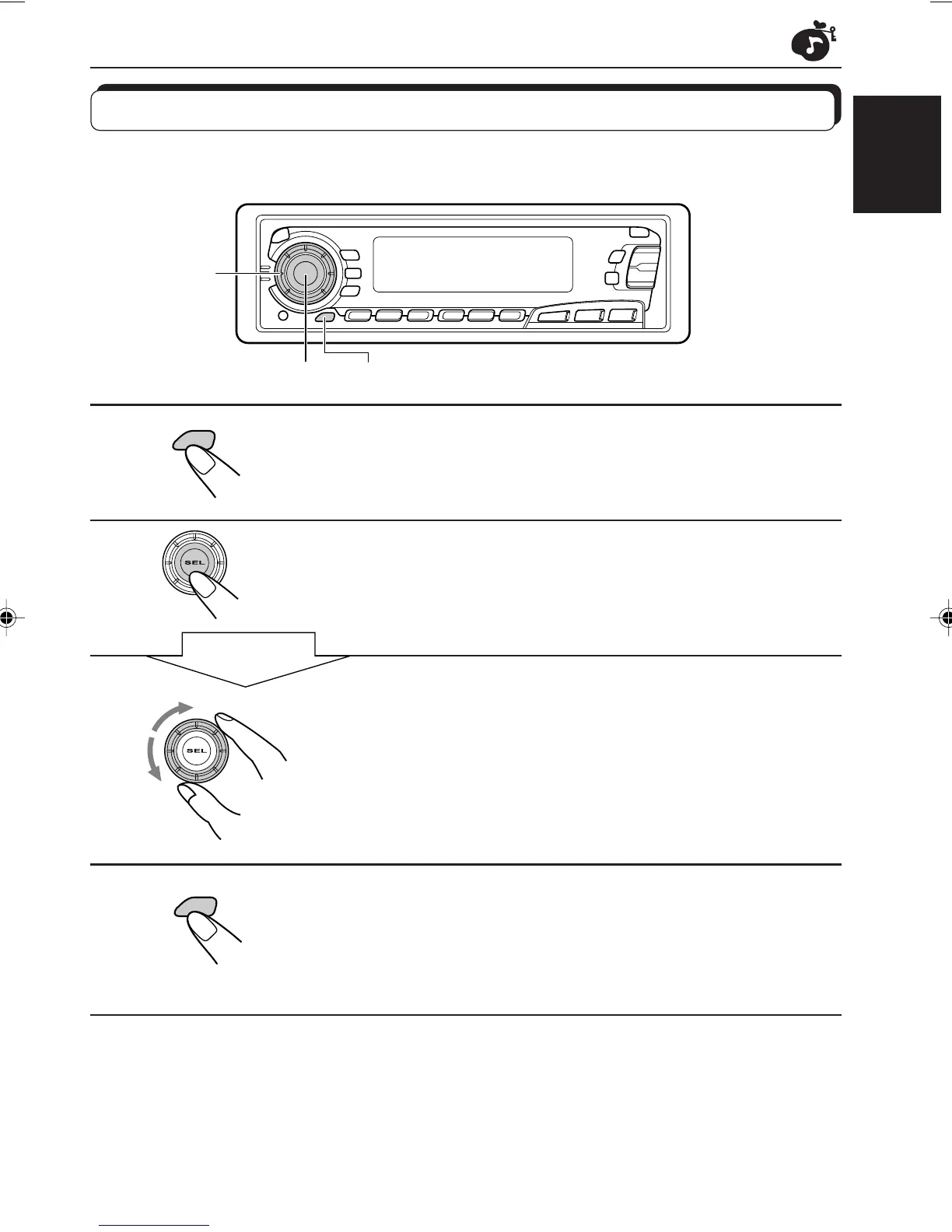
Call up the sound mode you want to adjust.
See page 23 for details.
2
Select “BAS (Bass),” “TRE (Treble)” or “LOUD
(Loudness).”
3
Adjust the bass or treble level or turn the
loudness function ON/OFF.
See page 22 for details.
4
Press and hold SCM (Sound Control Memory)
until the sound mode you have selected in step
1 flashes on the display.
Your setting is stored in memory.
5
Repeat the same procedure to store other settings.
To reset to the factory settings
Repeat the same procedure and reassign the preset values listed in the table on page 23.
Storing your own sound adjustments
You can adjust the sound modes (BEAT, SOFT, POP: see page 23) to your preference and
store your own adjustments in memory.
2 1,4
3
CD
CD-CH
FM/AM
SCM
SCM
Within
5 seconds
EN22-25.KD-SX979R[E]/f 00.1.20, 1:40 PM25


 To Next Page
 Loading...