15English
English
Connecting via a wireless LAN
router
New AirPlay/DLNA devices can be added to
the System's Wi-Fi network.
1
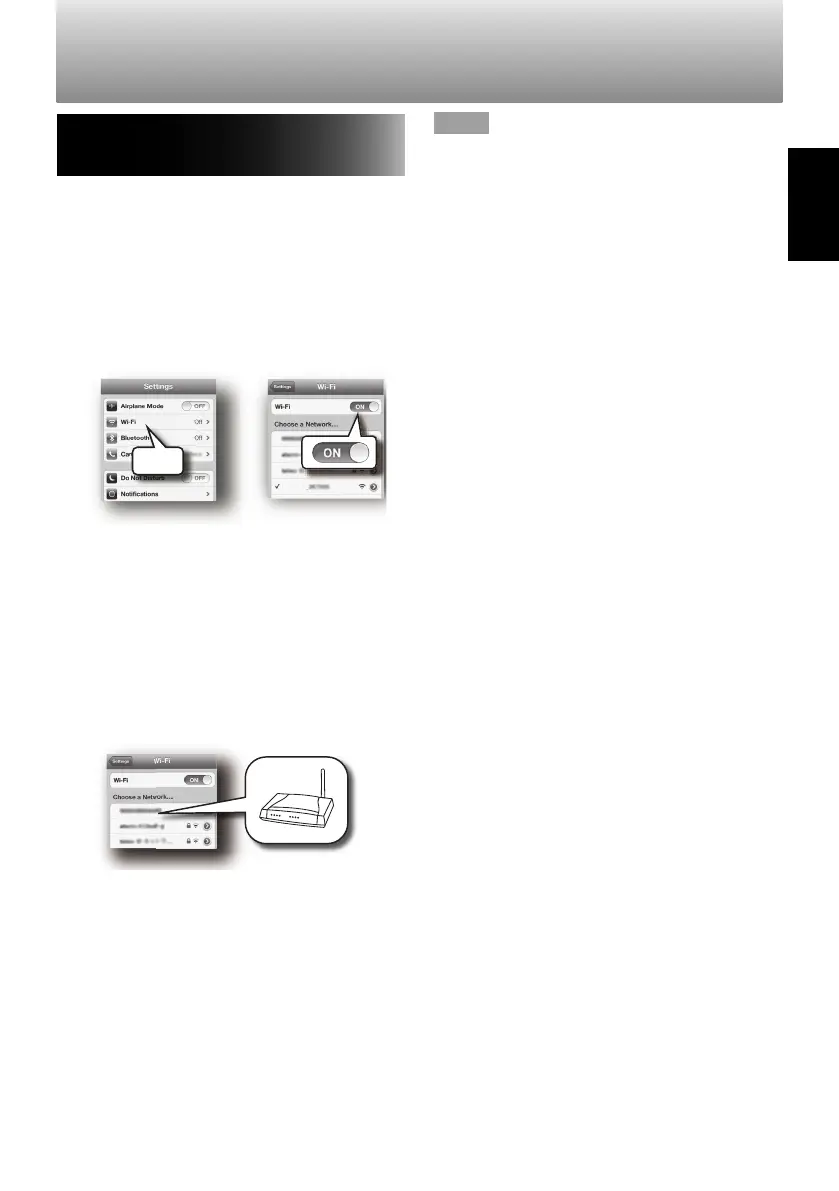
Turn on the Wi-Fi on your device.
– iPod/iPhone/iPad
– Android devices
– PCs
• For iPod/iPhone/iPad select "Wi-Fi" from
the "Settings" menu, and turn it ON.
SP-AP1
P-AP1
Wi-Fi
• For Android devices, select "Wireless &
networks" from the "Settings" menu, and
then select "Wi-Fi settings".
• For computers, open the wireless LAN
network settings window.
• See the instruction manual for your
device for more details.
2
Select the SSID to be used from the
networks displayed on the screen.
• Wait until a connection has been
established between the router and the
added AirPlay/DLNA device.
NOTE
If the network function does not operate
properly, try the following.
• Restart the wireless LAN router.
• Turn the Wi-Fi setting on your mobile device
OFF and then ON again.
• Restart your mobile device.
• Unplug the System and plug it in again.
SP-AP1[E]04.indd15SP-AP1[E]04.indd15 2013/10/1614:192013/10/1614:19
Downloaded from www.vandenborre.be


 To Next Page