21English
English
Changing the sound field
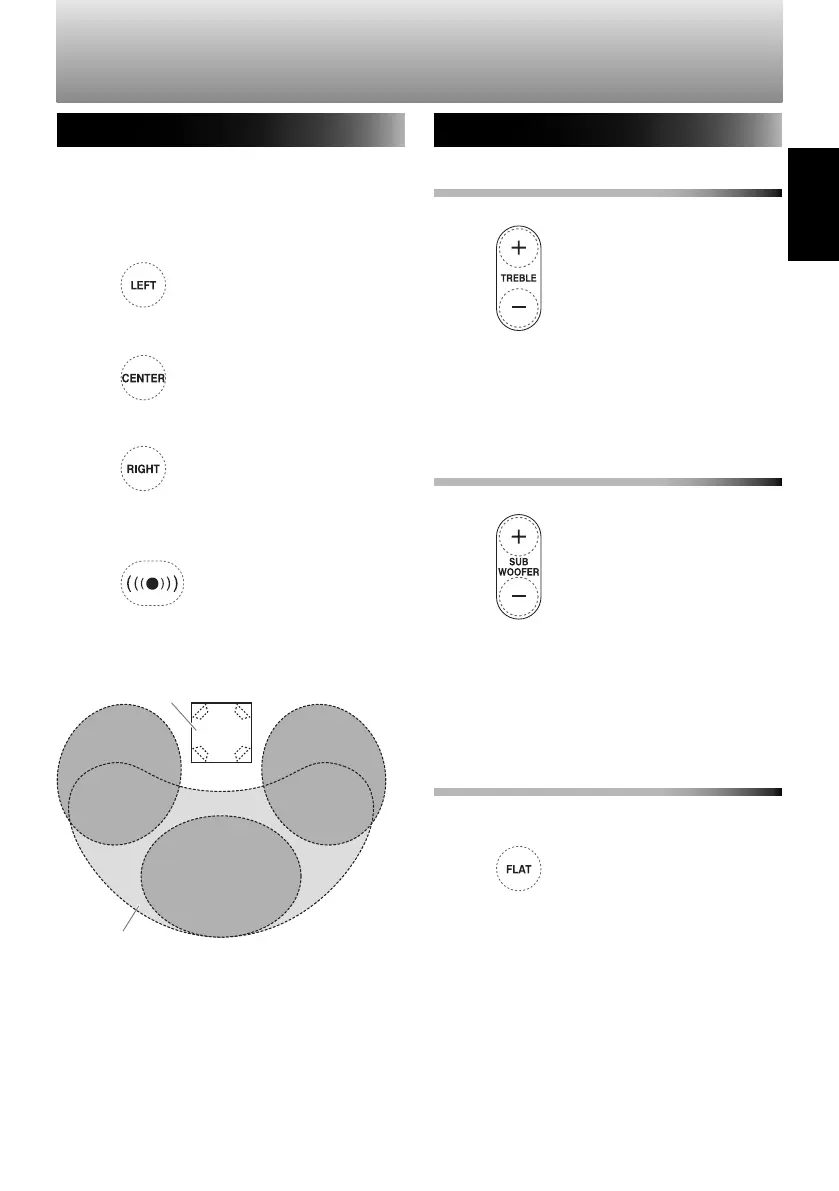
The sound field can be changed to suit your
listening position.
[LEFT]: When listening to the left of the
System.
[CENTER]: When listening in the area in front
of the System.
[RIGHT]: When listening to the right of the
System.
[WIDE]: Creates a wider sound field, suitable
for listening in a wider area in front of the
system.
Listening position diagram
Adjusting the treble/subwoofer
To adjust the treble
Adjust the treble volume.
(press repeatedly)
Adjustable range:
−
5 to 5
• When the volume is set to the minimum
or maximum value, the front indicator
lamp lights for an extended period.
To adjust the subwoofer
Adjust the subwoofer volume.
(press repeatedly)
Adjustable range:
−
5 to 5
• When the volume is set to the minimum
or maximum value, the front indicator
lamp lights for an extended period.
Return the treble/subwoofer to the default
settings
The volume of the treble and subwoofer
returns to "0".
WIDE
SP-AP1
(the System)
Front
RIGHTLEFT
CENTER
Other operations
SP-AP1[E]04.indd21SP-AP1[E]04.indd21 2013/10/1614:192013/10/1614:19
Downloaded from www.vandenborre.be


 To Next Page