6 English
English
1
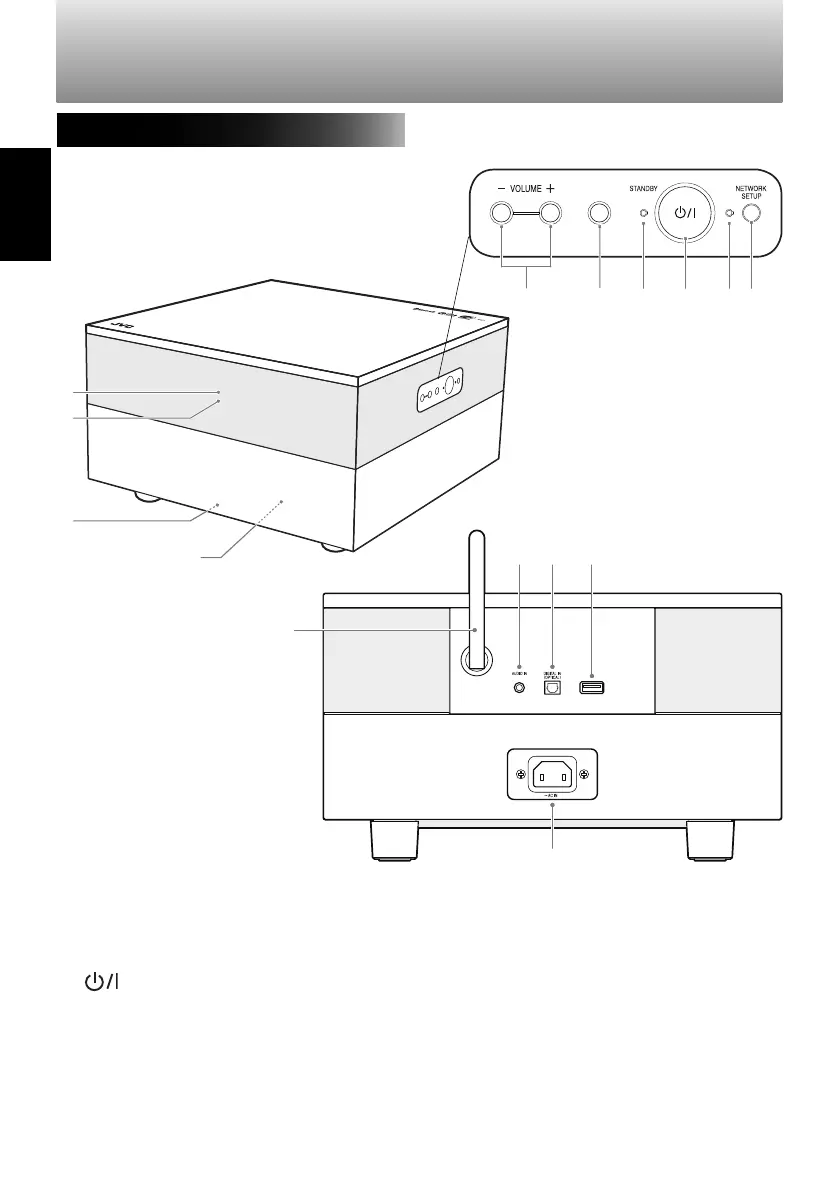
VOLUME +/− buttons (page 9)
2
INPUT button (page 8)
3
STANDBY indicator
4
(standby/on) button (page 8)
5
NETWORK indicator
6
NETWORK SETUP button (page 10)
7
Remote sensor
8
Front indicator lamp (page 8)
9
Illumination
0
Subwoofer (page 21)
-
Wi-Fi antenna
=
AUDIO IN terminal (page 20)
~
DIGITAL IN terminal (page 20)
!
iPod/iPhone/iPad USB terminal (page 18)
@
AC IN terminal (page 5)
Part names
System front/side/back
=
-
~ !
@
7
8
9
0
INPUT
SP-AP1[E]04.indd6SP-AP1[E]04.indd6 2013/10/1614:192013/10/1614:19
Downloaded from www.vandenborre.be


 To Next Page