20 English
English
Connecting external devices
Audio from external devices, such as
televisions and digital players, can be played
through the System.
• See the manual for your external device.
1
Turn the System volume down to the
minimum volume.
2
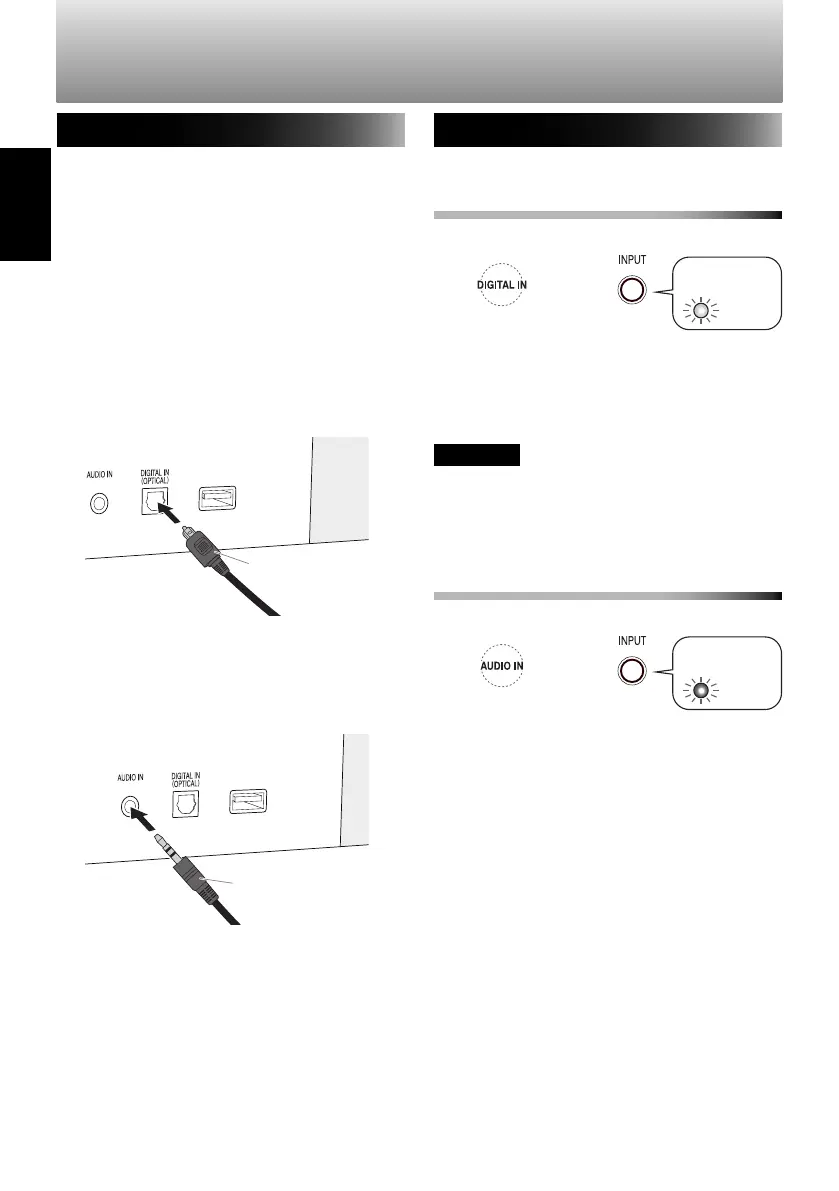
Connect the external device to the
DIGITAL IN or AUDIO IN terminal.
• Make sure that the power is turned off
when connecting.
DIGITAL IN terminal
AUDIO IN terminal
Playing audio
To play audio from a digital device
(DIGITAL IN)
1
Select "DIGITAL IN".
Remote control System
(press repeatedly)
2
Start playback on the external device.
3
Adjust the volume on the external device
and the System.
CAUTION
• When connecting a Blu-ray recorder or
t
elevision, set the ext
ernal device digital
audio output to "PCM".
To play audio from an analog device
(AUDIO IN)
1
Select "AUDIO IN".
Remote control System
(press repeatedly)
2
Start playback on the external device.
3
Adjust the volume on the external device
and the System.
Audio cable with a stereo
mini plug (commercially
available)
Optical cable
(commercially
available)
Television audio output
terminal, digital player
headphone terminal, etc.
Television audio output
terminal, Blu-ray
recorder, etc.
Listening to external devices
Lights in
red
Lights in
yellow
Front indicator
lamp
Front indicator
lamp
SP-AP1[E]04.indd20SP-AP1[E]04.indd20 2013/10/1614:192013/10/1614:19
Downloaded from www.vandenborre.be


 To Next Page